HEATING SYSTEM CONTROL
72 4 213 563 / 03
5.13 Further settings
5.13.1 Set/change WiFi password
If there is a change of provider (Internet service provider), the WiFi pass-
word must be re-entered so that the system will connect to the Internet
again. The WiFi logon can be carried out on any operating module.
You will nd a video tutorial under the following online link, which exp-
lains how to enter a new password.
- Alternatively, you can also scan the QR code to access the video!
https://youtu.be/sATBGdIpnSw
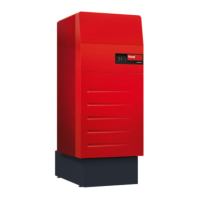
5.13.2 Setting the language
The language of the control can be changed at Start screen > Main
menu ( ) > Presentation > Language (5.12.12 page 69, no. 1).
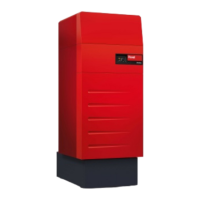
5.13.3 Adapt start screen individually
The elements of the start screen can be individually adapted at Start
screen > Main menu ( ) > Presentation > Start screen (5.12.12 page
69, no. 5).
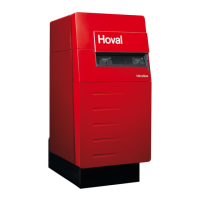
5.13.4 Rename heating circuit
You can give a name to your heating circuit at Start screen > Main
menu > Service > TTE-WEZ > Heating circ. > Select heating circuit
> Function name ( ) > Select function name > Select heating cir-
cuit > Keyboard inputs. Bear in mind that your system can include one
or more heating circuits.




 To Next Page