a semicolon. You must always end a program message with one of
the three program message terminators shown in Figure
l-29.
Use
<new line>,
C-END>,
or <new line>
<-END>
as the program message
terminator. The word
<-END>>
means that EOI is asserted on the
HP-IB interface at the same time the preceding data byte is sent.
Most programming languages send these terminators automatically.
For example, if you use the HP BASIC OUTPUT statement,
<new
line> is automatically sent after your last data byte. If you are
using a PC, you can usually configure the system to send whatever
terminator you specify.
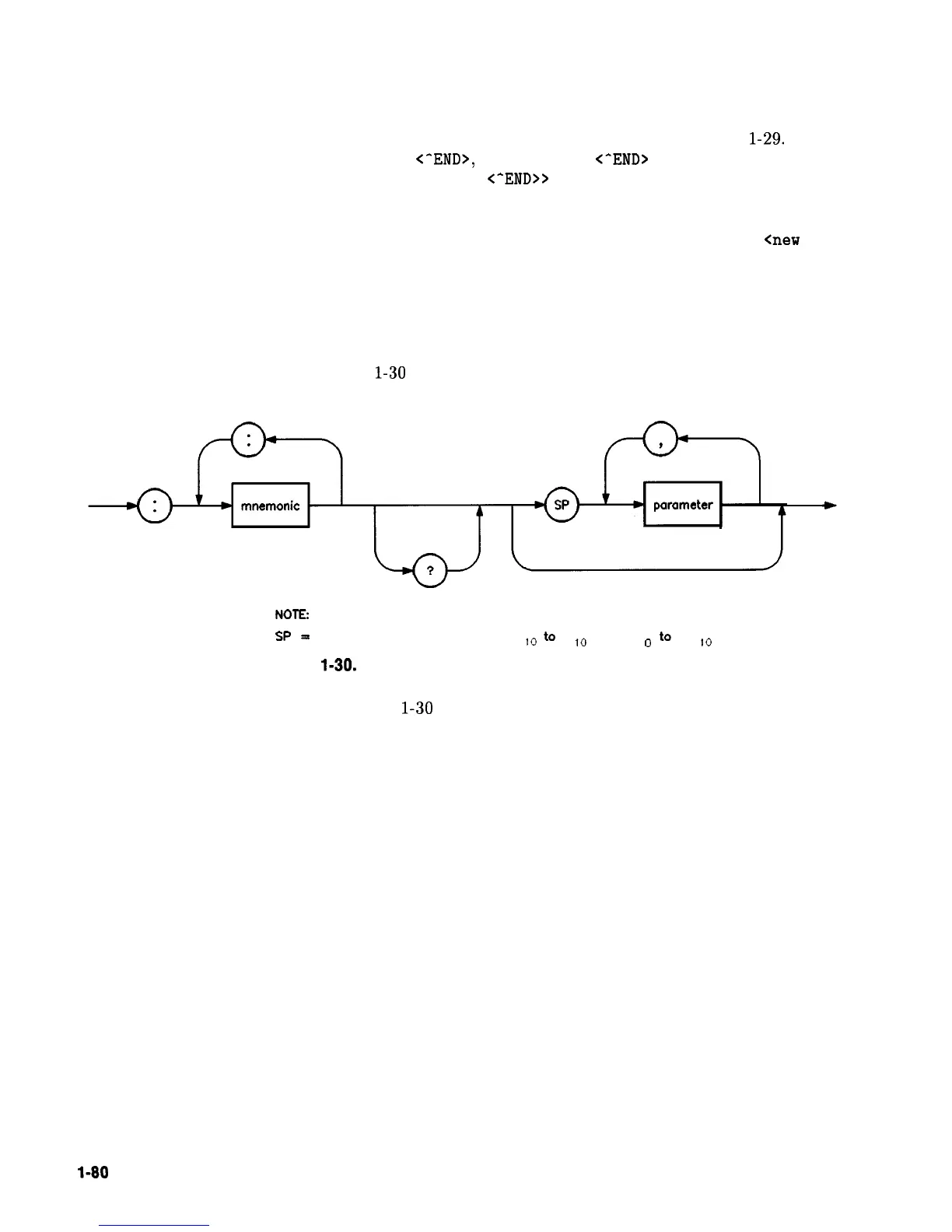
Subsystem Command Syntax
Figure
l-30
describes the basic syntax of SCPI subsystem commands.
NOTE:
SP
=I
white
space,
ASCII
characters
0 ,,,
to
9
,.
and
11,
o
to
32
,.
Figure
l-30.
Simplified Subsystem Command Syntax
As Figure
l-30
shows, there must be a <space> between the
last command mnemonic and the first parameter in a subsystem
command. This is one of the few places in SCPI where <space>
is required. Note that if you send more than one parameter with
a single command, you must separate adjacent parameters with a
comma. Parameter types are explained later in this subsection.
Common Command Syntax
Figure 1-31 describes the syntax of common commands.
l-80
Getting Started Programming



 To Next Page