Use of the Command Tables
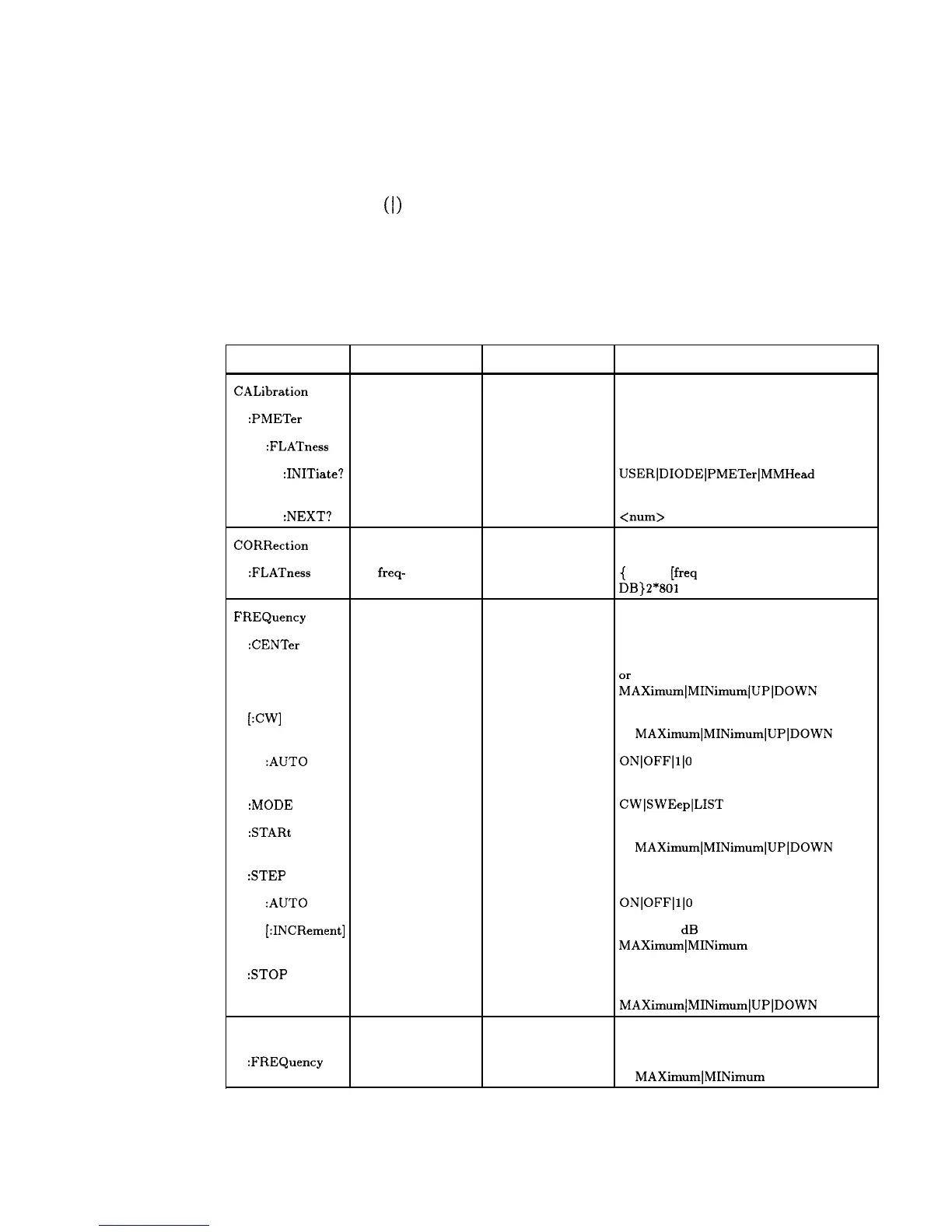
In Table 1-4, notice that a new column titled “Allowed Values” has
been added to the command table. This column lists the specific
values or range of values allowed for each parameter. A vertical
bar
(I) separates values in a list from which you must choose one
value. The commands listed in the table are only part of all the
available SCPI commands of the synthesizer. For a complete listing
of the programming codes see “SCPI Command Summary” in the
Operating and Programming Reference chapter that follows.
Table 1-4. Sample Synthesizer Commands
Command
:CALibration
Parameters Parameter Type
Allowed Values
:PMETer
:FLATness
:INITiate? flatness array
to cal
discrete
USER]DIODE]PMETer]MMHead
:NEXT?
CORRection
measured power extended numeric
<num>
[lvl suffix]
:FLATness
FREQuency
801
freq-
correction pairs
extended numeric
{
<num>
[freq
suffix],
DB}2*801
:CENTer
[:CW]
:AUTO
center freq
CW freq
coupled to
center freq
extended numeric
extended numeric
Boolean
specified freq
range
~AXimum]MINimum/UP]DOWN
specified freq range
or
MAXimum]MINimum]UP]DOWN
ON]OFF]l]O
:MODE
:STARt
:STEP
free mode
start freq
discrete
extended numeric
CW]SWEep]LIST
specified freq range
or
MAXimum]MINimum]UP]DOWN
:AUTO
auto freq step
Boolean
[:INCRement] freq step
extended numeric
ON]OFF]l]O
20 to 0.01 dB or
MAXimumlMINimum
:STOP
stop freq extended numeric
specified freq range
or
MAXimum]MINimum]UP]DOWN
MARKer[n]
:FREQuency
marker frequency
extended numeric
[n] is 1 to 5, 1 is the default
specified freq range
or
MAXimumlMINimum
Getting Started Programming 1-87



 To Next Page