Shenzhen Hpmont Technology Co., Ltd Chapter 5 Operation Instructions
HD30 Series Inverters User Manual ―45―
Parameter displayed status at running
When the inverter is running, the display panel will display running status parameter and the unit
indicator will display the parameter’s unit, as well as the status indicator will display the inverter
status, as shown in Figure 5-3.
Other parameters can be displayed by pressing (defined by parameter F18.02
-
F18.07).
Figure 5-3 Display status of the display panel
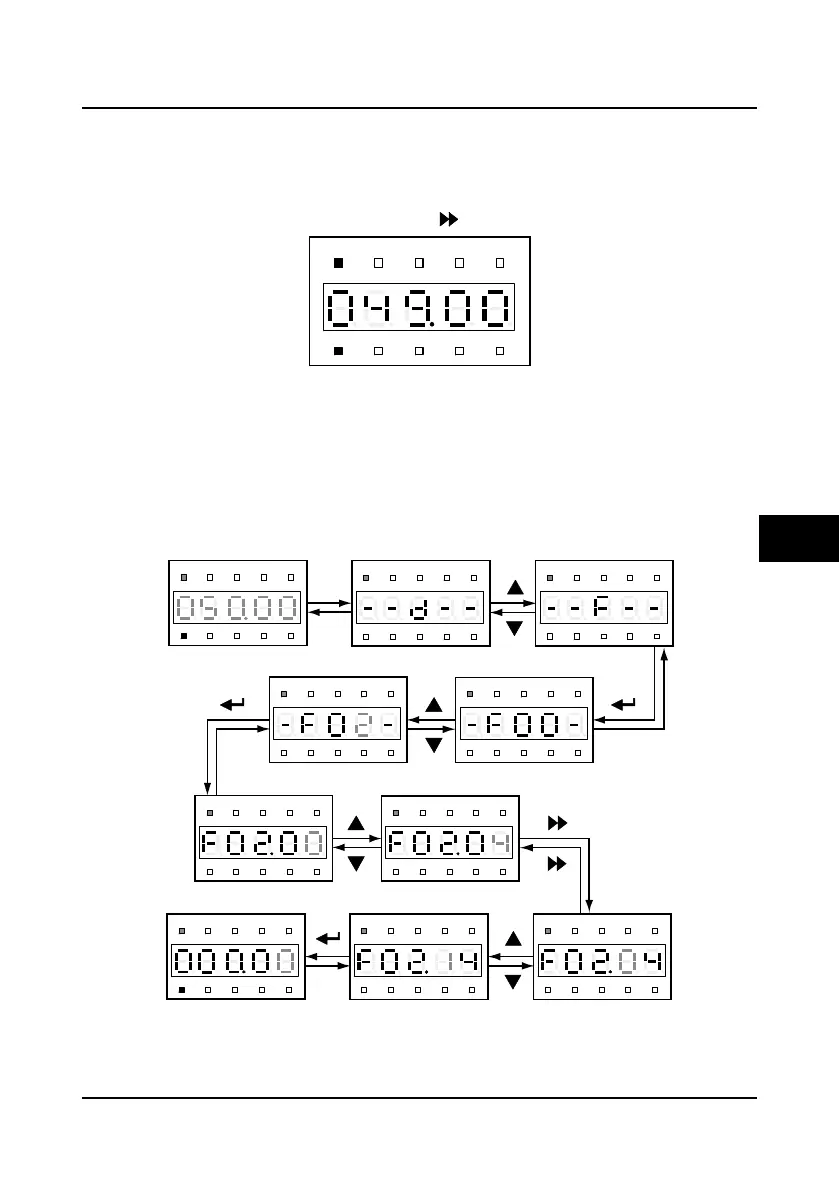
Four-level menu switching operation
The display panel of the HD30 inverter uses four-level menu configuration for parameter setting
or other operations.
Configuring mode can be displayed in 4-level menu: mode setting(first-level)
→
function
parameter group setting(second-level)
→
function parameter setting(third-level)
→
parameter
setting (fourth-level). The operation process is shown in Figure 5-4 and the description of the
keys is shown in Table 5-4.
Figure 5-4 Four-level operation process
Hz
A V RPM %
REVFWD ALM LO/RE LOCK
Hz
A V RPM %
REVFWD ALM LO/RE LOCK
Hz
A V RPM %
REVFWD ALM LO/RE LOCK
Hz
A V RPM %
REVFWD ALM LO/RE LOCK
Hz
A V RPM %
REVFWD ALM LO/RE LOCK
Hz
A V RPM %
REVFWD ALM LO/RE LOCK
Hz
A V RPM %
REVFWD ALM LO/RE LOCK
Hz
A V RPM %
REVFWD ALM LO/RE LOCK
Hz
A V RPM %
REVFWD ALM LO/RE LOCK
Hz
A V RPM %
REVFWD ALM LO/RE LOCK
Hz
A V RPM %
REVFWD ALM LO/RE LOCK
First-level menuStopping status
PRG
PRG
PRGPRG
PRG
First-level menu
Second-level menuSecond-level menu
Third-level menu Third-level menu
Third-level menuThird-level menuFourth-level menu
5

 To Next Page
 Loading...