Shenzhen Hpmont Technology Co., Ltd Chapter 5 Operation Instructions
HD30 Series Inverters User Manual ―47―
The inverter can be reset by pressing key, or by sending the reset commands via the
control terminal or communication reset port.
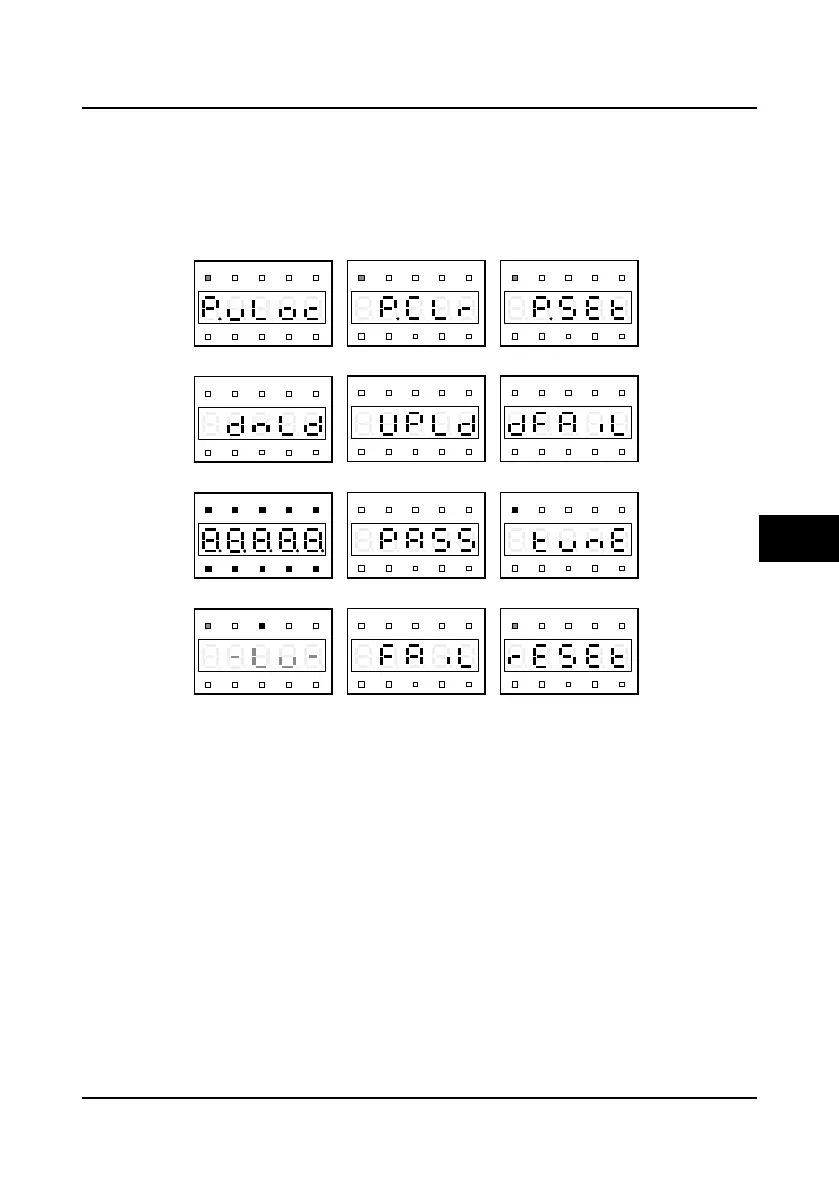
Special display status
The special display status includes the setting and unlocked password status, upload and
download parameter, power on initialization, parameter auto-tuning, display panel self-check and
restored factory settings, as shown in Figure 5-7.
Figure 5-7 Special display status
Hz
A V RPM %
REVFWD ALM LO/RE LOCK
Hz
A V RPM %
REVFWD ALM LO/RE LOCK
Hz
A V RPM %
REVFWD ALM LO/RE LOCK
Hz
A V RPM %
REVFWD ALM LO/RE LOCK
Hz
A V RPM %
REVFWD ALM LO/RE LOCK
Hz
A V RPM %
REVFWD ALM LO/RE LOCK
Hz
A V RPM %
REVFWD ALM LO/RE LOCK
Hz
A V RPM %
REVFWD ALM LO/RE LOCK
Hz
A V RPM %
REVFWD ALM LO/RE LOCK
Hz
A V RPM %
REVFWD ALM LO/RE LOCK
Hz
A V RPM %
REVFWD ALM LO/RE LOCK
Hz
A V RPM %
REVFWD ALM LO/RE LOCK
Unlock password success
Clear password success
Set password success
Downloading parameters
Uploading parameters
Download parameters error
Power on initialization
Power on initialization
Display panel self-check success
Display panel self-check error
Parameter auto-tuning
Restore factory setting
5

 To Next Page
 Loading...