17
Names and Functions of Parts
Chapter 1 Installation and Preparation
Names and Functions of
Parts
ViewPoint 8050 Videoconferencing
Terminal
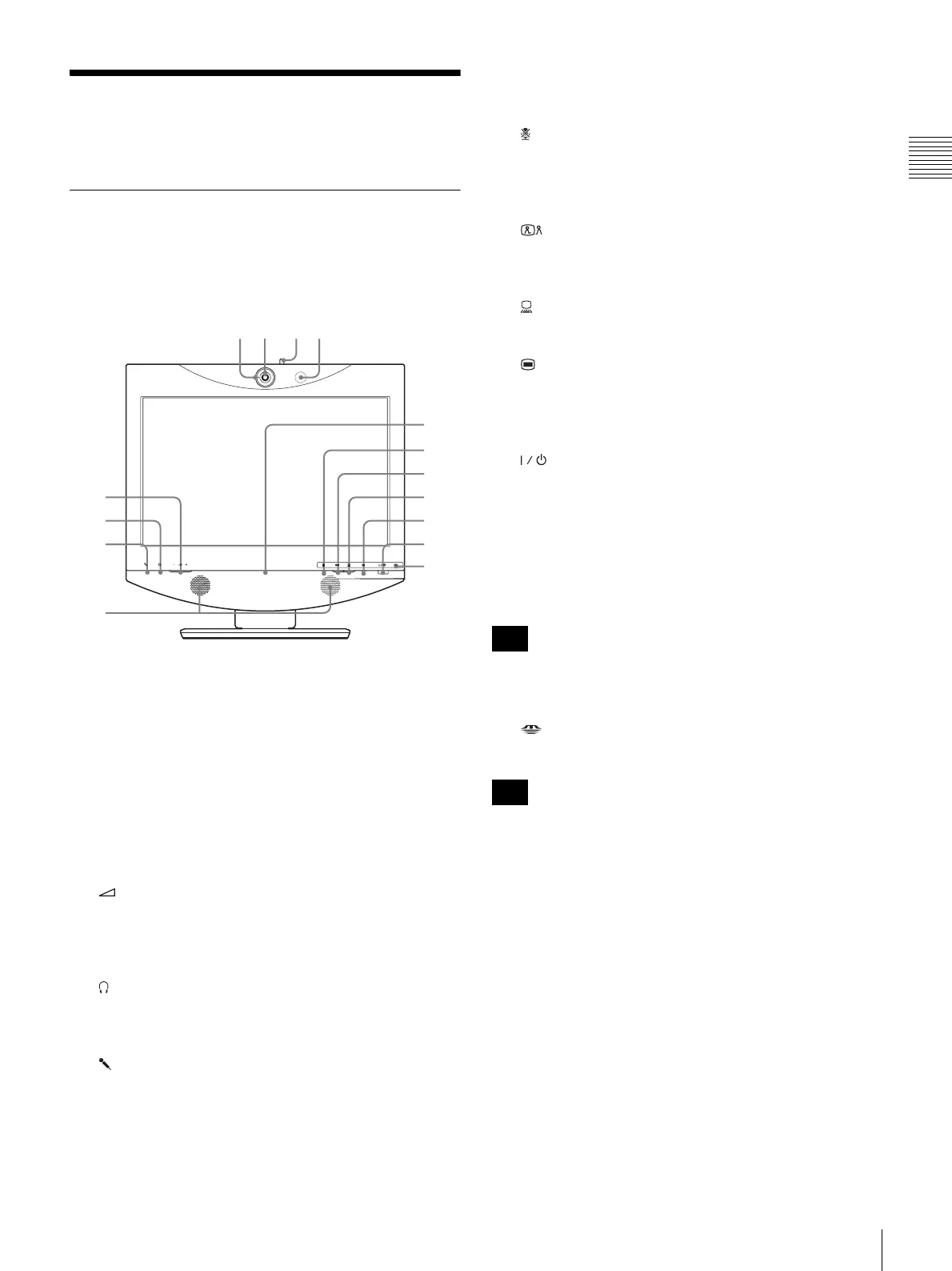
Front view
a Tally lamp
Lights up when local video is being sent to the remote
system.
b Camera lens
c Lever for lens cover
Lets you close the camera lens.
d Microphone
e (Volume) buttons
Serve to adjust the volume.
+: Increases the volume level.
–: Decreases the volume level.
f (Phones) jack (stereo mini jack)
Allows connection of a pair of headphones (commercially
available).
g (Mic) jack (mini jack)
Allows connection of a microphone.
h Speakers
i Online lamp
Shows mainly the incoming/outgoing call status.
j (Mic Off) button and indicator
Lets you suppress the sound from the local system. Press
the button again to resume sending the sound to the remote
system.
k (Videoconference) button and indicator
Serves for switching from computer screen to
videoconference screen.
l (PC) button and indicator
Serves for switching to computer screen.
m (Menu) button
Press to bring up the Setup menu.
Press and hold this button for 3 seconds during communication
to bring up the DTMF soft keyboard on the screen.
n (Power) switch and indicator
Turns power to the system on and off.
When using the system as a computer screen in PC mode,
pressing the switch once turns the power off.
When using the system in videoconference mode, pressing
the switch once sets the system to standby mode. To turn
the power off in videoconference mode, press the switch
again within 5 seconds of the first press.
The power switch does not function during a
communication session.
o “Memory Stick” indicator
Shows the status of the “Memory Stick” slot.
Do not remove the “Memory Stick” when this indicator is lit.
9
q;
qa
qs
qd
5
6
7
8
qf
qg
Note
Note



 To Next Page