83
Switching Between Videoconference Display and Computer Display
Chapter 6
Use as Computer Display
Switching Between Videoconference Display and
Computer Display
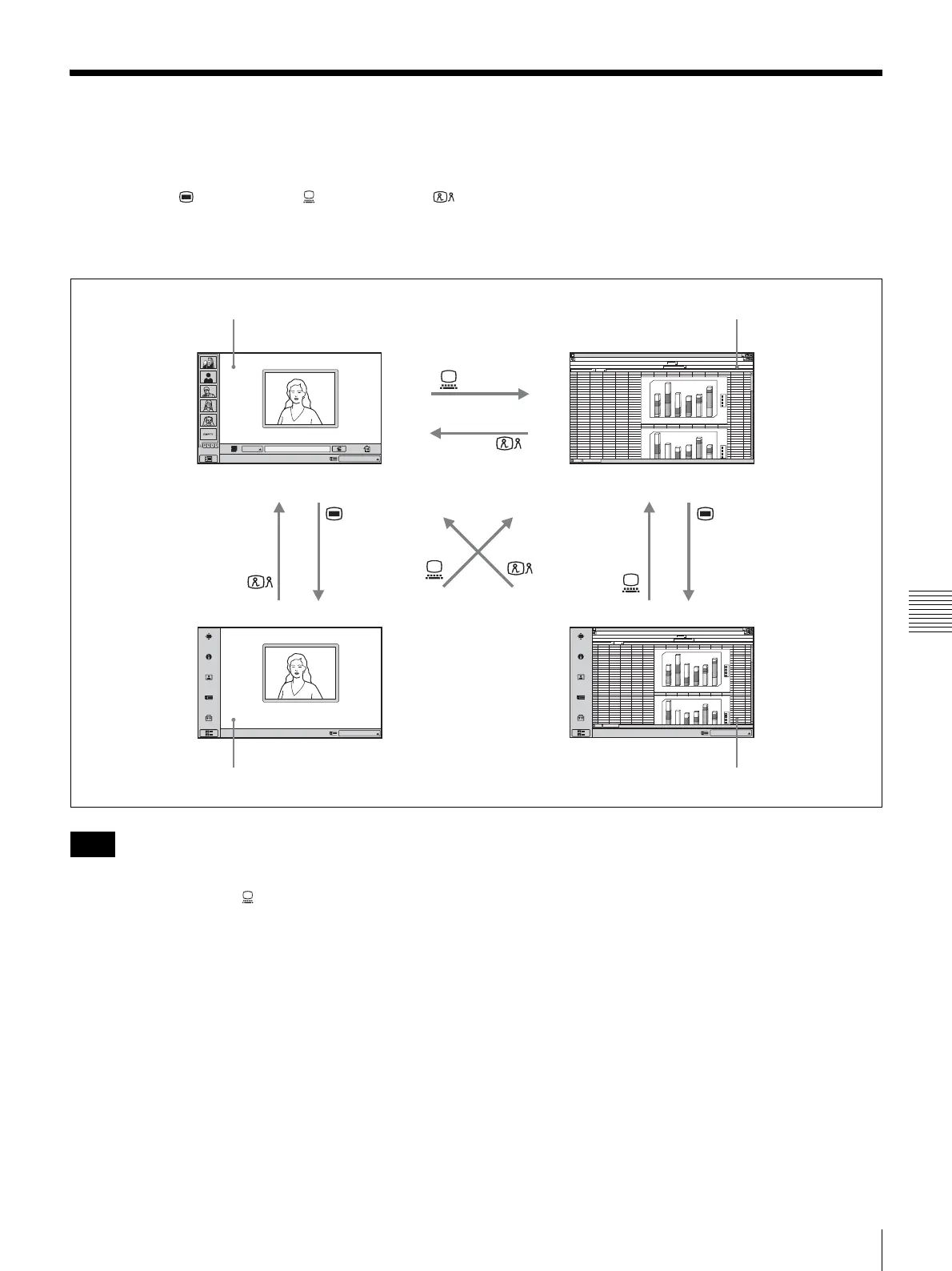
You can use the (Menu) button, (PC) button, and
(Videoconference) button at the bottom right of the unit to
switch between the videoconference screen and computer
screen display.
• When the ViewPoint 8050 is not connected to a
computer, pressing the (PC) button to switch to
computer display will disable the mouse.
• If a sub-picture is being displayed during a
communication session, the sub-picture will remain
visible also when you switch to computer display.
However, the video shown on the sub-picture will be
either from the remote system or the local system.
• When separate mice are being used for the ViewPoint
8050 and for the computer, the currently active mouse
will depend on the current display screen. While the
normal computer screen is displayed, the mouse
connected to the computer is active. When other screens
are displayed, the mouse connected to the ViewPoint
8050 is active.
1
2
3
4
5
6
7
8
9
10
11
12
13
14
15
16
17
18
19
20
21
22
23
24
25
26
27
28
29
30
31
32
33
34
12
4
5
6
69
44
46
67
12
16
7
76
23
45
26
57
23
15
34
56
76
38
13
12
ABCDE F GHI J KL MN
d
c
b
a
1
0
2
0
4
0
5
0
6
0
1
0
0
1
2
0
1
4
0
1
6
0
180
2
3
4
5
6
d
c
b
a
4
0
5
0
6
0
1
0
0
1
2
0
1
4
0
1
6
0
180
abc d
4
5
6
12
46
69
67
12
16
45
78
7
45
26
57
23
15
23
56
76
23
34
12
13
abc d
IP
1
2
3
4
5
6
7
8
9
10
11
12
13
14
15
16
17
18
19
20
21
22
23
24
25
26
27
28
29
30
31
32
33
34
12
4
5
6
69
44
46
67
12
16
7
76
23
45
26
57
23
15
34
56
76
38
13
12
ABCDE F GHI J KLMN
d
c
b
a
1
0
2
0
4
0
5
0
6
0
1
0
0
1
2
0
1
4
0
1
6
0
180
2
3
4
5
6
d
c
b
a
4
0
5
0
6
0
1
0
0
1
2
0
1
4
0
1
6
0
180
abc d
4
5
6
12
46
69
67
12
16
45
78
7
45
26
57
23
15
23
56
76
23
34
12
13
abc d
Click Icon to go into the function.
Click Icon to go into the function.
Click Icon to go into the function.
IP:
012.345.678.912
IP:
012.345.678.912
IP:
012.345.678.912
Videoconference screen (launcher menu) Normal computer screen
Videoconference screen (setup menu) Computer screen (setup menu)
Notes



 To Next Page