158 Powermax30 XP Service Manual 808150 Revision 0
6 – Power Supply Component Replacement
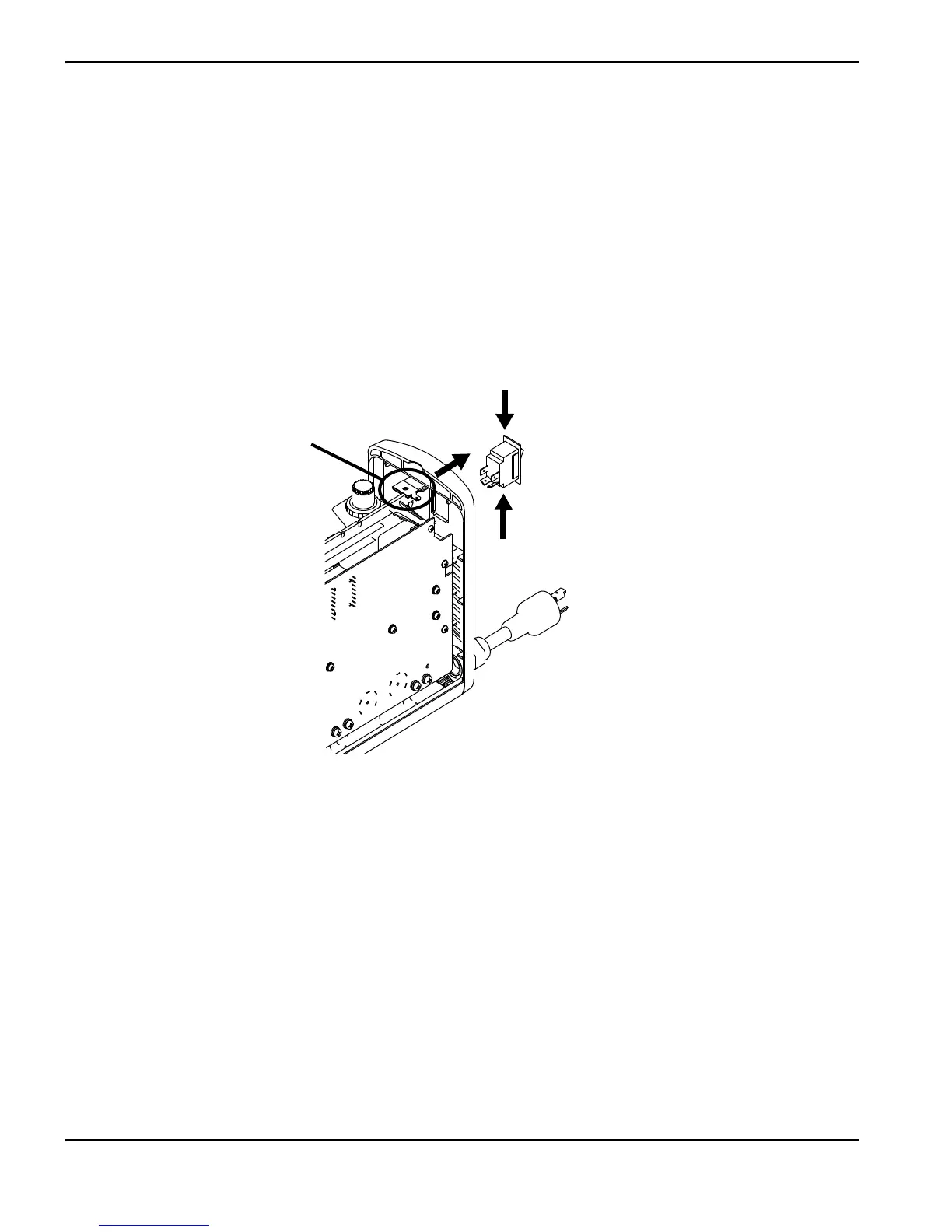
8. Disconnect the ground wire from the ground wire clip near the top of the rear panel. See Figure 90.
9. Disconnect the 4 wires from the back of the power switch.
10. Using a small blade screwdriver, press down one of the tabs on the top of the power switch, and push that corner of
the switch out of the rear panel.
11. Press down the other tab on the top of the power switch, and push that corner of the switch out of the panel. Make
sure the first tab does not snap back into place as you release the second tab.
12. Repeat the previous two steps on the bottom of the power switch to push the bottom of the switch out of the rear
panel. Remove the switch completely from the panel.
Figure 90
13. Disconnect the power cord from the power supply. See Remove the power cord and strain relief on page 98.












 To Next Page