2
INSTALLATION AND CONNECTIONS
2-5
IC-7610
REMOTE1
REMOTE ACC(2)
ANT
GND
IC-PW2
GND
ACC1INPUT1
IC-7610
GND
REMOTE1
REMOTE
ACC
(2)
INPUT1
INPUT2
ACC1 ANT
REMOTE ACC(2)
IC-7610
GND
GND
ANT1
IC-PW2
REMOTE2
ACC2
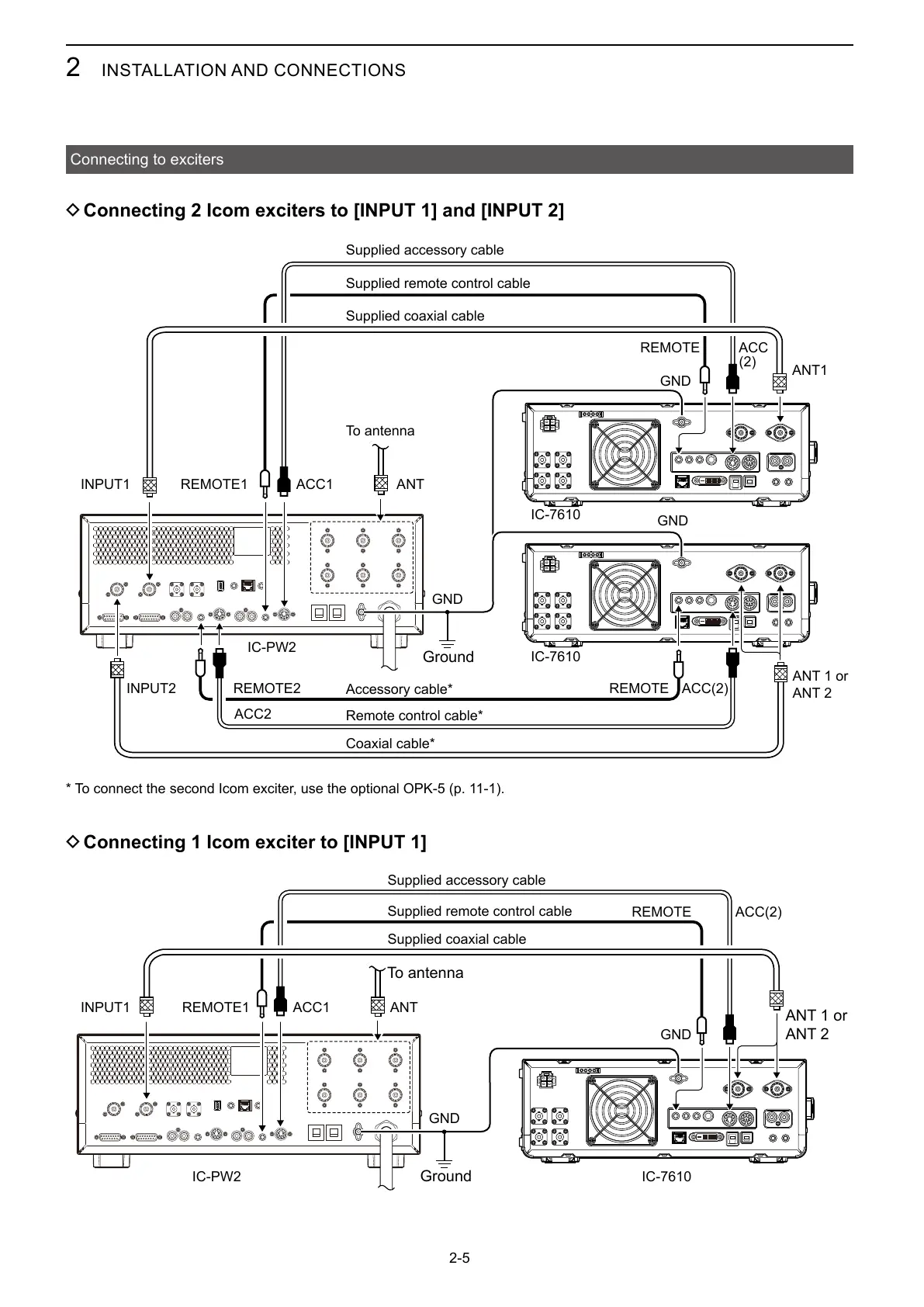
Connecting to exciters
D Connecting 2 Icom exciters to [INPUT 1] and [INPUT 2]
D Connecting 1 Icom exciter to [INPUT 1]
Supplied accessory cable
To antenna
Ground
ANT 1 or
ANT 2
Supplied remote control cable
Supplied coaxial cable
Accessory cable*
Remote control cable*
Coaxial cable*
Ground
ANT 1 or
ANT 2
To antenna
Supplied coaxial cable
* To connect the second Icom exciter, use the optional OPK-5 (p. 11-1).
Supplied accessory cable
Supplied remote control cable



 To Next Page