4
BASIC OPERATION
4-6
Meter display
z Po: Displays the relative RF output power.
z ID
z
z VD
z SWR: Displays the SWR of the antenna at the
z ALC: Displays the ALC level.
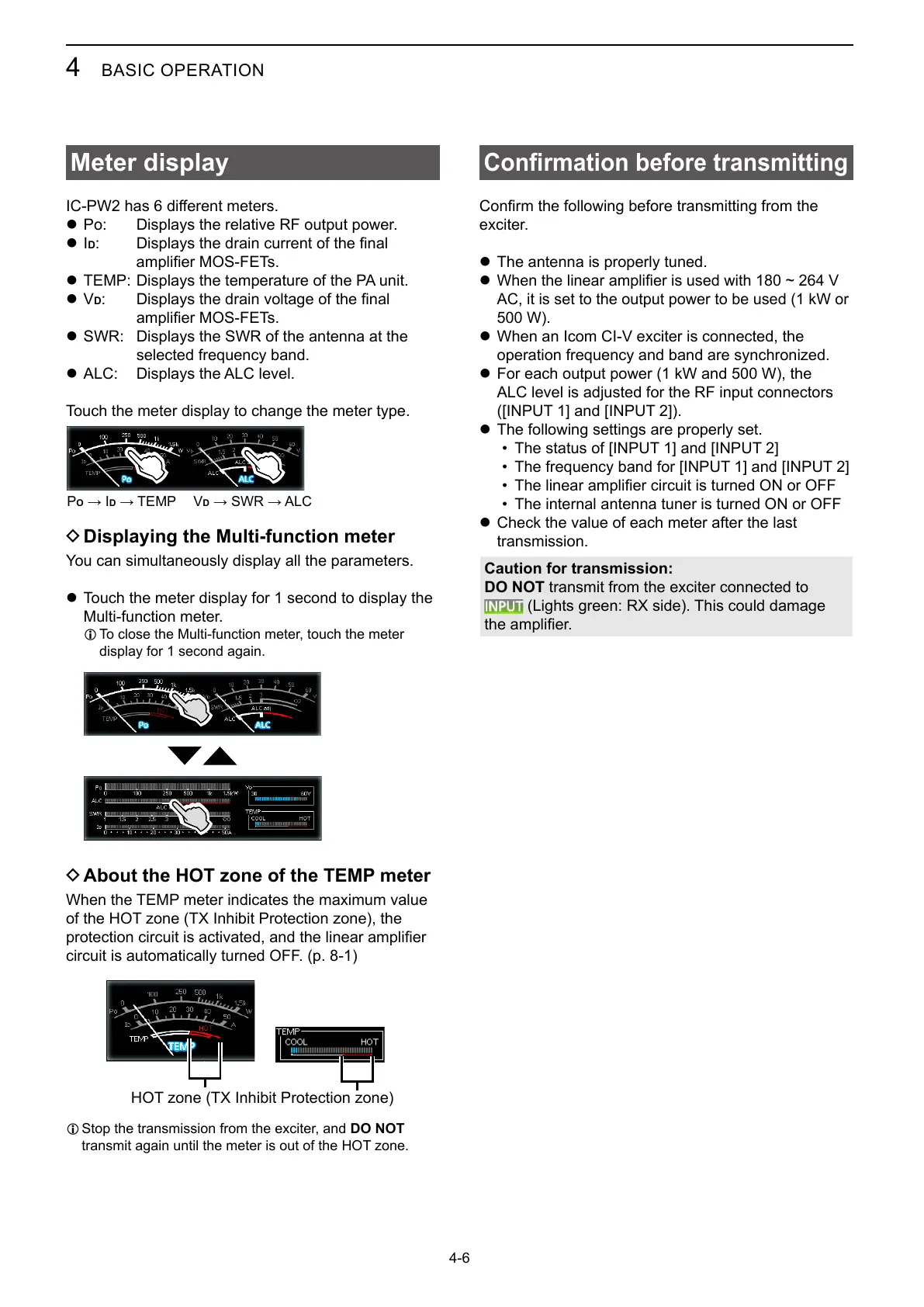
Touch the meter display to change the meter type.
POD VD
D Displaying the Multi-function meter
You can simultaneously display all the parameters.
z Touch the meter display for 1 second to display the
L
display for 1 second again.
D About the HOT zone of the TEMP meter
circuit is automatically turned OFF. (p. 8-1)
L Stop the transmission from the exciter, and DO NOT
Conrmation before transmitting
exciter.
z The antenna is properly tuned.
z
AC, it is set to the output power to be used (1 kW or
z When an Icom CI-V exciter is connected, the
z
ALC level is adjusted for the RF input connectors
([INPUT 1] and [INPUT 2]).
z The following settings are properly set.
• The status of [INPUT 1] and [INPUT 2]
•
•
• The internal antenna tuner is turned ON or OFF
z Check the value of each meter after the last
transmission.
Caution for transmission:
DO NOT transmit from the exciter connected to
(Lights green: RX side). This could damage



 To Next Page