EasyManua.ls Logo

Icom IC-PW2 - Clock Backup Battery Replacement

Icom IC-PW2
68 pages
Print Icon
To Next Page IconTo Next Page
To Previous Page IconTo Previous Page
Loading...
9

9-3
Clock backup battery replacement

for the internal clock and timer functions.
When the backup battery is exhausted, the linear

time.
R WARNING! DISCONNECT

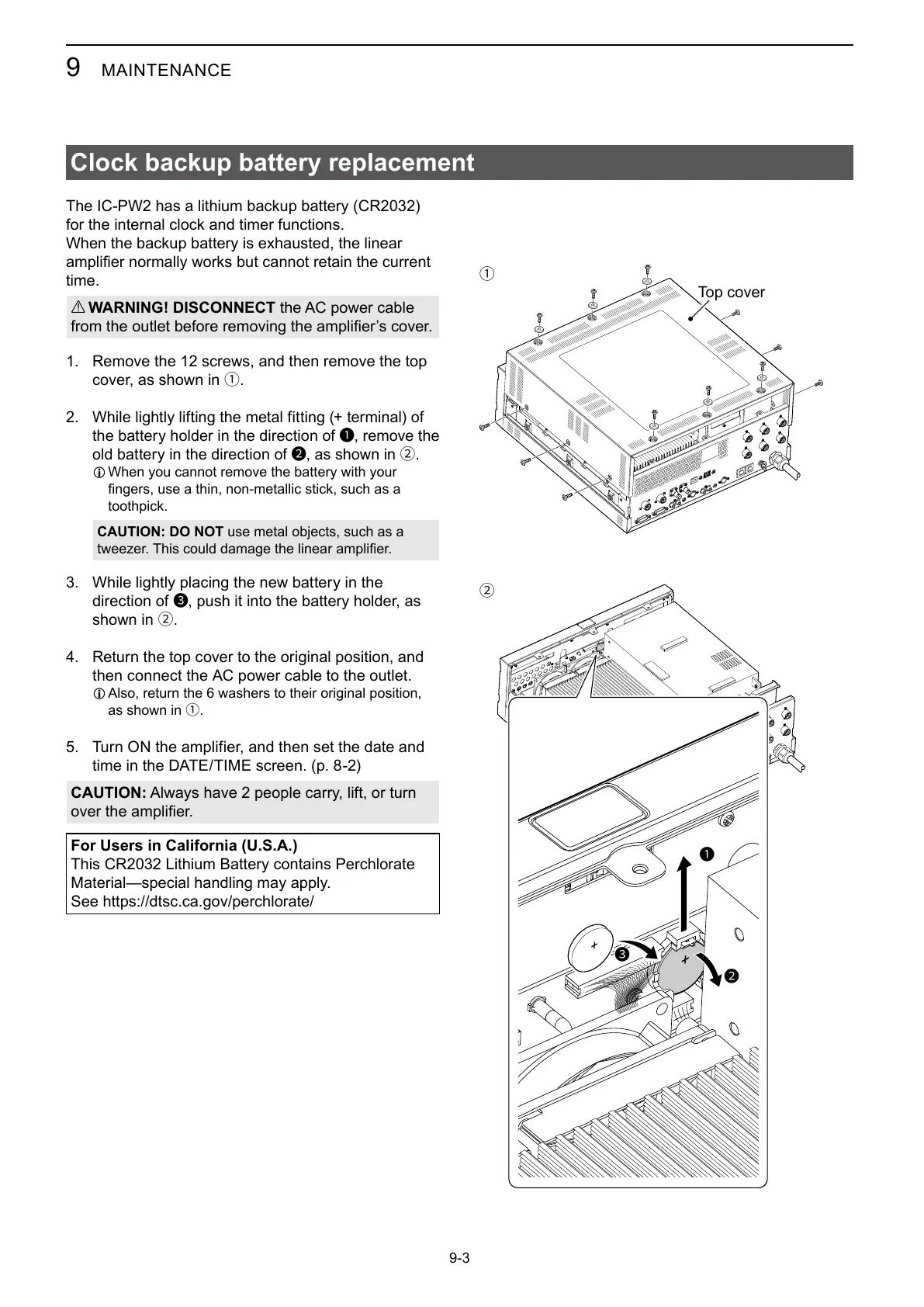
1. 
cover, as shown in 1.
 
the battery holder in the direction of 1, remove the
old battery in the direction of 2, as shown in 2.
L When you cannot remove the battery with your

toothpick.
CAUTION: DO NOT

3. While lightly placing the new battery in the
direction of 3, push it into the battery holder, as
shown in 2.
4. Return the top cover to the original position, and

L 
as shown in 1.
5. Turn ON the amplifier, and then set the date and

CAUTION:

For Users in California (U.S.A.)

Material—special handling may apply.
See https://dtsc.ca.gov/perchlorate/
1
2
1
2
33
Top cover

Table of Contents

Related product manuals