9
9
9-4
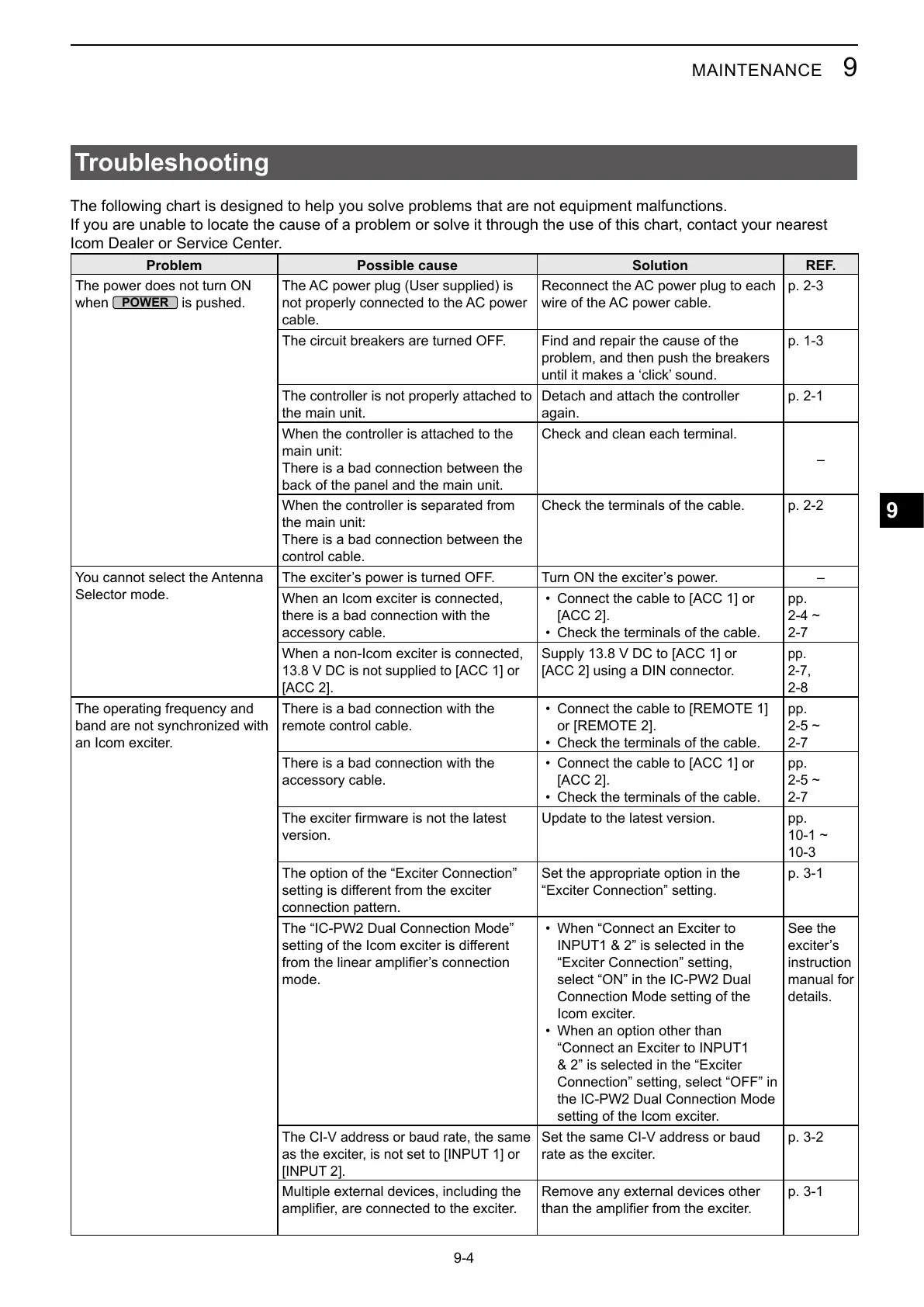
Troubleshooting
If you are unable to locate the cause of a problem or solve it through the use of this chart, contact your nearest
Icom Dealer or Service Center.
Problem Possible cause Solution REF.
The power does not turn ON
when
is pushed.
cable.
The circuit breakers are turned OFF. Find and repair the cause of the
problem, and then push the breakers
p. 1-3
The controller is not properly attached to
the main unit.
Detach and attach the controller
again.
When the controller is attached to the
main unit:
There is a bad connection between the
back of the panel and the main unit.
Check and clean each terminal.
–
When the controller is separated from
the main unit:
There is a bad connection between the
control cable.
Check the terminals of the cable.
Selector mode.
–
When an Icom exciter is connected,
there is a bad connection with the
accessory cable.
•
• Check the terminals of the cable.
pp.
When a non-Icom exciter is connected,
or
using a DIN connector.
pp.
band are not synchronized with
an Icom exciter.
There is a bad connection with the
remote control cable.
• Connect the cable to [REMOTE 1]
• Check the terminals of the cable.
pp.
There is a bad connection with the
accessory cable.
•
• Check the terminals of the cable.
pp.
version.
pp.
The option of the “Exciter Connection”
connection pattern.
Set the appropriate option in the
“Exciter Connection” setting.
p. 3-1
mode.
• When “Connect an Exciter to
“Exciter Connection” setting,
Connection Mode setting of the
Icom exciter.
• When an option other than
Connection” setting, select “OFF” in
setting of the Icom exciter.
See the
instruction
manual for
details.
rate as the exciter.
Multiple external devices, including the
Remove any external devices other
p. 3-1



 To Next Page