INSTALLATION AND CONNECTIONS
2
2
2-6
Connecting to exciters
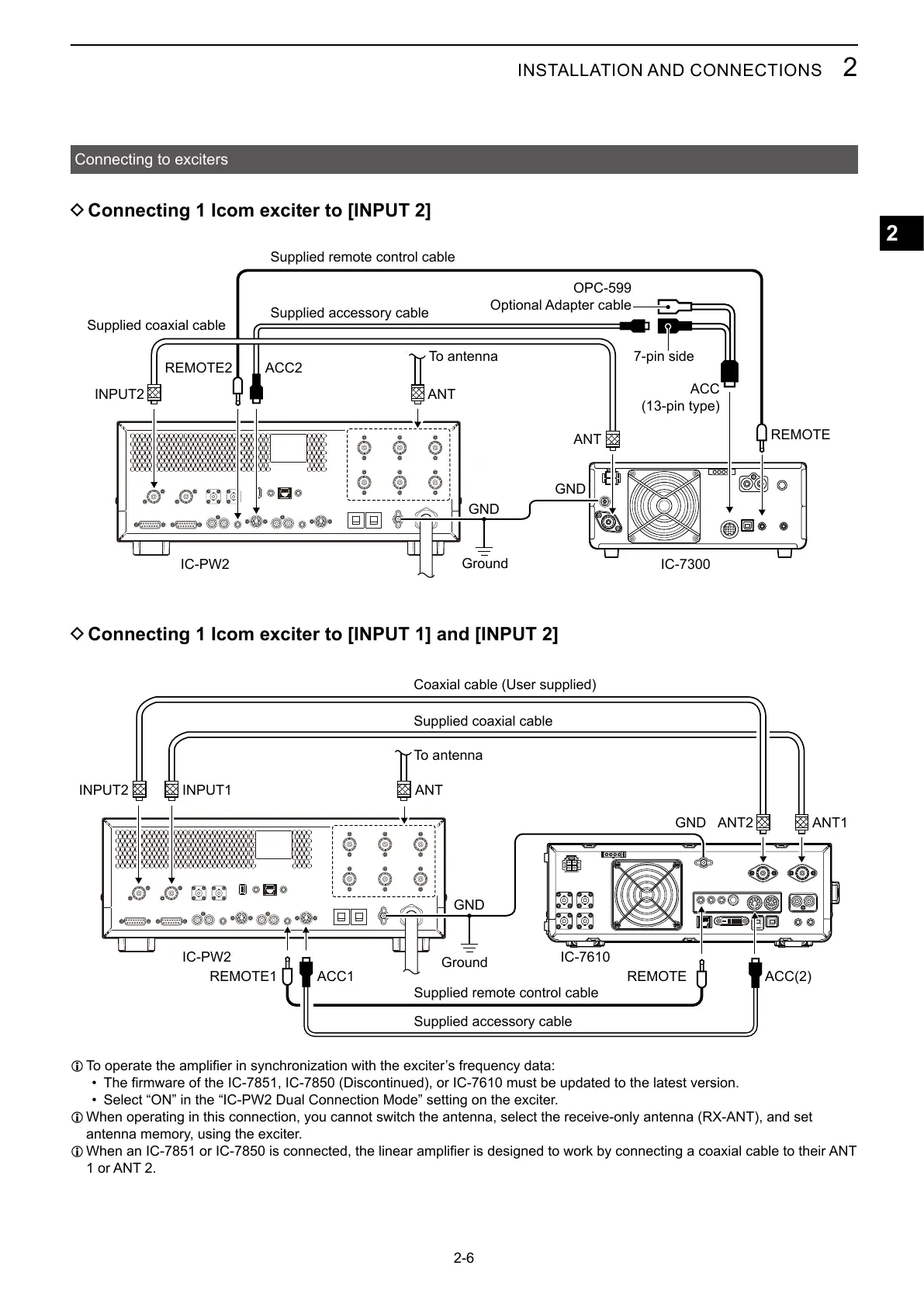
D Connecting 1 Icom exciter to [INPUT 2]
D Connecting 1 Icom exciter to [INPUT 1] and [INPUT 2]
REMOTE2
ANT
IC-PW2
GND
ACC2
INPUT2
GND
IC-7300
ANT
REMOTE
7-pin side
ACC
(13-pin type)
OPC-599
Optional Adapter cable
REMOTE1
IC-PW2
ACC1
INPUT2
GND
ANTINPUT1
IC-7610
REMOTE ACC(2)
ANT1ANT2GND
Supplied coaxial cable
Coaxial cable (User supplied)
To antenna
Ground
Ground
To antenna
L
•
• Select “ON” in the “IC-PW2 Dual Connection Mode” setting on the exciter.
L When operating in this connection, you cannot switch the antenna, select the receive-only antenna (RX-ANT), and set
antenna memory, using the exciter.
L
1 or ANT 2.
Supplied accessory cable
Supplied remote control cable
Supplied accessory cable
Supplied remote control cable
Supplied coaxial cable



 To Next Page