9
9-5
Troubleshooting
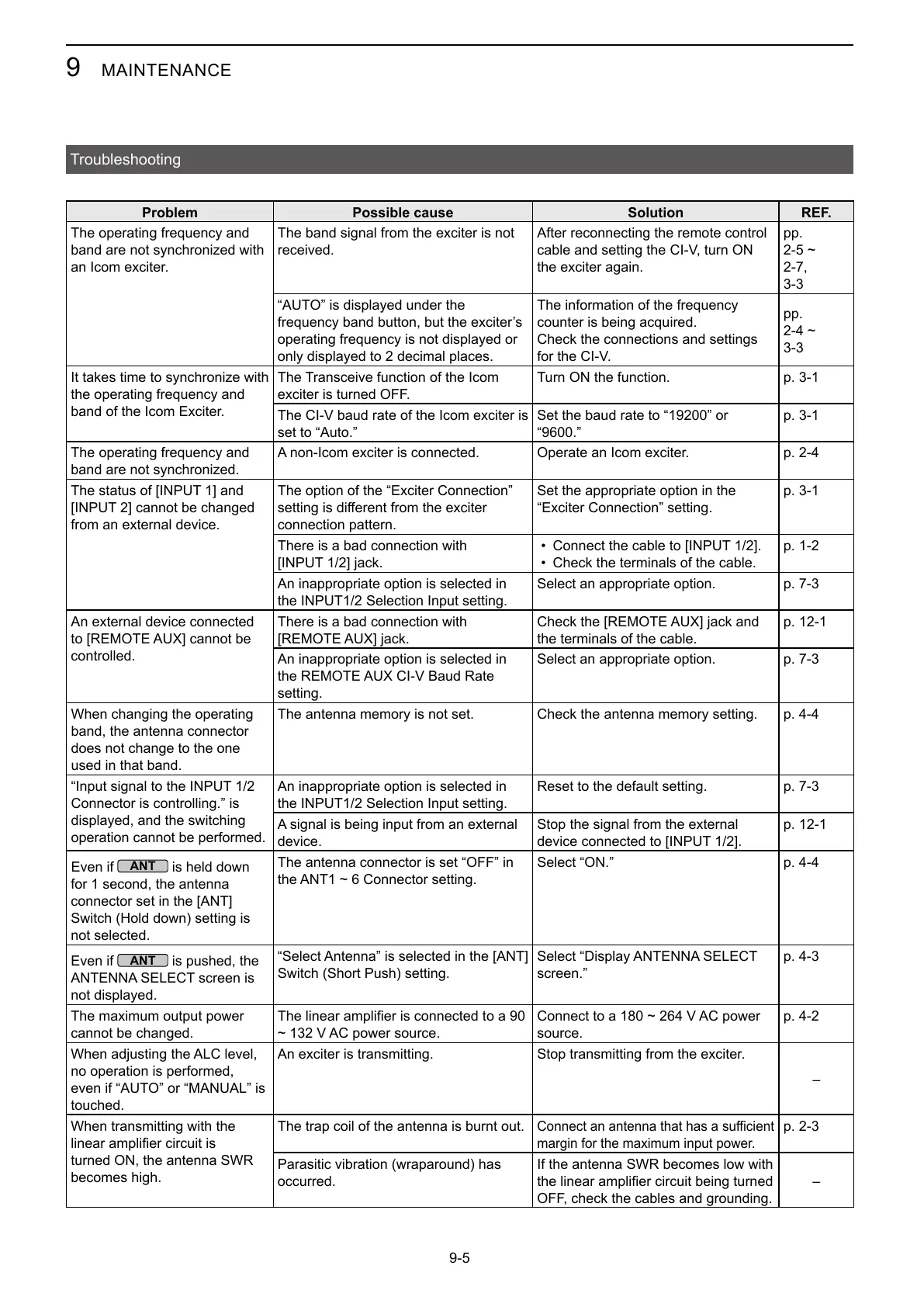
Problem Possible cause Solution REF.
band are not synchronized with
an Icom exciter.
The band signal from the exciter is not
received.
the exciter again.
pp.
3-3
Check the connections and settings
pp.
3-3
It takes time to synchronize with
band of the Icom Exciter.
The Transceive function of the Icom
exciter is turned OFF.
Turn ON the function. p. 3-1
p. 3-1
band are not synchronized.
Operate an Icom exciter.
from an external device.
The option of the “Exciter Connection”
connection pattern.
Set the appropriate option in the
“Exciter Connection” setting.
p. 3-1
There is a bad connection with
•
• Check the terminals of the cable.
Select an appropriate option.
controlled.
There is a bad connection with
the terminals of the cable.
setting.
Select an appropriate option.
When changing the operating
band, the antenna connector
does not change to the one
used in that band.
The antenna memory is not set. Check the antenna memory setting. p. 4-4
Connector is controlling.” is
displayed, and the switching
operation cannot be performed.
Reset to the default setting.
device.
Stop the signal from the external
Even if
is held down
for 1 second, the antenna
not selected.
The antenna connector is set “OFF” in
Select “ON.” p. 4-4
Even if
is pushed, the
not displayed.
screen.”
p. 4-3
The maximum output power
cannot be changed.
source.
no operation is performed,
touched.
Stop transmitting from the exciter.
–
When transmitting with the
turned ON, the antenna SWR
becomes high.
The trap coil of the antenna is burnt out.
margin for the maximum input power.
occurred.
If the antenna SWR becomes low with
OFF, check the cables and grounding.
–



 To Next Page