19 Image Vault
®
PRO Command
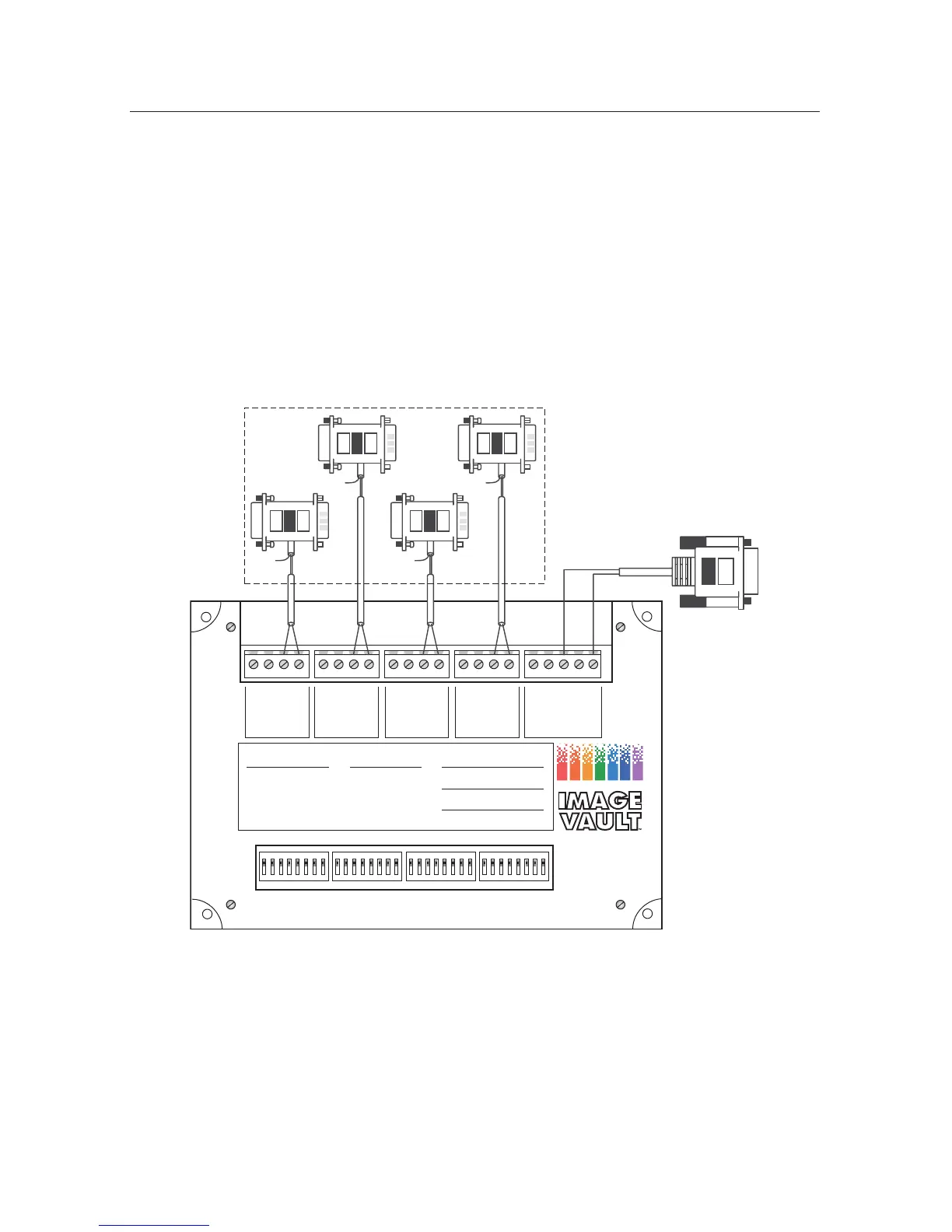
POS Quad Data Hub Wiring
The primary function of the POS Quad Data Hub is to bring up to four serial data
sources into one serial stream. Specify the accessory kit desired when ordering
data hubs. Any of the accessory kit hardware can be bundled with the Quad hub.
Such kits include four accessory pigtails plus one RS232 null modem cable. This
diagram illustrates (generically) how one POS Data Hub is wired.
ON
12345678
ON
12345678
ON
12345678
ON
12345678
+RS485
–RS485
GND
RS232
+RS485
–RS485
GND
RS232
+RS485
–RS485
GND
RS232
+RS485
–RS485
GND
RS232
+RS485
–RS485
GND
RX RS232
TX RS232
TO DVRFROM POS 1FROM POS 2FROM POS 3FROM POS 4
IVQ4 POS DATA HUB
SETUP POS 4 SETUP POS 3 SETUP POS 2 SETUP POS 1
BAUD:
19200
9600
4800
2400
1200
SWITCH #
1
OFF
ON
ON
ON
OFF
2
OFF
ON
ON
OFF
ON
3
ON
ON
OFF
ON
ON
7 DATA BITS
8 DATA BITS
1 STOP BITS
2 STOP BITS
RS232 IN
RS485 IN
SWITCH #
6
OFF
ON
7
ON
OFF
8
ON
OFF
PARITY:
NONE
EVEN
ODD
SWITCH #
IMAGE VAULT
Ph 888-462-4382 Fax 877-296-0038
www.image-vault.com
4
ON
OFF
ON
5
ON
ON
OFF
VIDEO SECURITY
D I G I T A L
Black
Black
Red
Red
DVR PIGTAIL
IVQ4 WIRING WITH ACCESSORY KIT
IV-9/IV-25/IV-G/IV-R POS PIGTAILS
AND HOME RUN WIRES



 To Next Page