D-0112389-I – 2022/04
Sera™ - Instructions for Use - EN Page 39
4.7.3.2 Time bar
During testing, the Time or progress bar will fill up, as good samples of data are obtained. When 180
seconds (3 minutes) of acceptable EEG samples have been acquired, the bar will be filled, and the test will
terminate automatically.
4.7.3.3 Test done screen
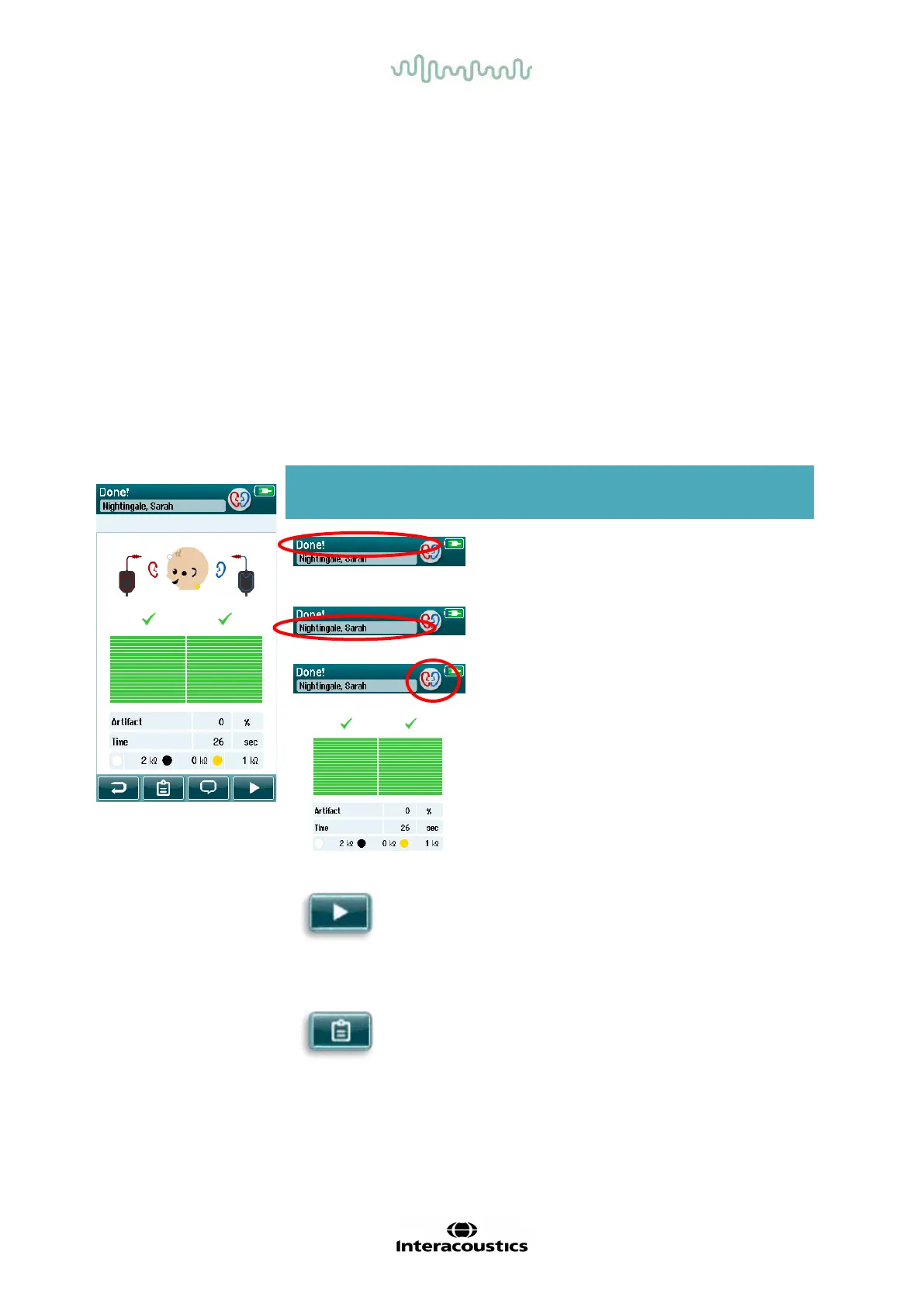
At the conclusion of a test, the result of the most recently completed test will continue to be visible (Table 7).
The ear selection control becomes active again so that the user can select the other ear for testing or can
repeat a test measure on the same ear.
The ear selection control can also be used to toggle between the last Automated ABR test performed on the
right and left ear during the session.
Table 7: Automated ABR Test done screen.
Displayed graphic Function name Description
Test status information.
Indicates test is done.
Patient information. Displays the selected
patient name.
Ear selection button. Toggle to select test
Test result bars, result
symbols and additional
test information.
Provides feedback
about the result(s) of
the most recent test
performed per ear.
Start button. Begins an impedance
check for a new test.
Show test list button. Opens list of all tests
performed in this
session.
Printing available if














 To Next Page