D-0112389-I – 2022/04
Sera™ - Instructions for Use - EN Page 41
4.8 OAE testing
During OAE testing, the screens will change to reflect the processes taking place and the options available
to the screener.
Please refer to the Sera
TM
Additional Information f or f urther information about TEOAE and
DPOAE and the protocols.
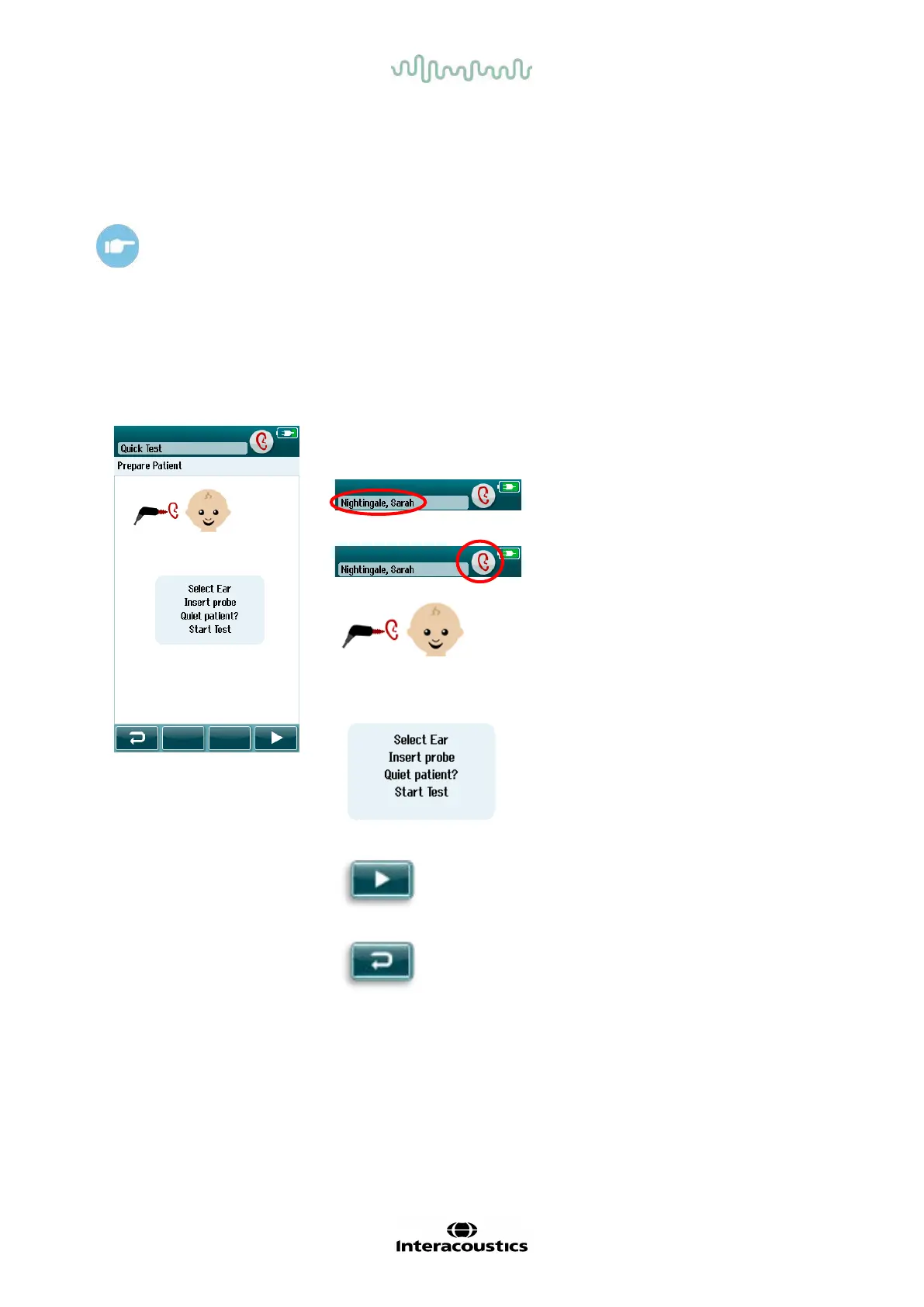
4.8.1 OAE initial test screen
The initial OAE screen displays the f ollowing inf ormation and instructions (Table 8).
Table 8: OAE initial test screen.
Displayed graphic Function name Description
Patient information. Displays the
selected patient
name.
Ear selection
button.
Toggle to select the
test ear.
Transducer.
image displayed
next to the baby
head reflects the
connected
transducer.
User instruction. Test instruction
information is
displayed.
Start button. Starts the probe
check.
Back button. Returns to the
previous screen.














 To Next Page