Wireless Access Point
User Guide
---End
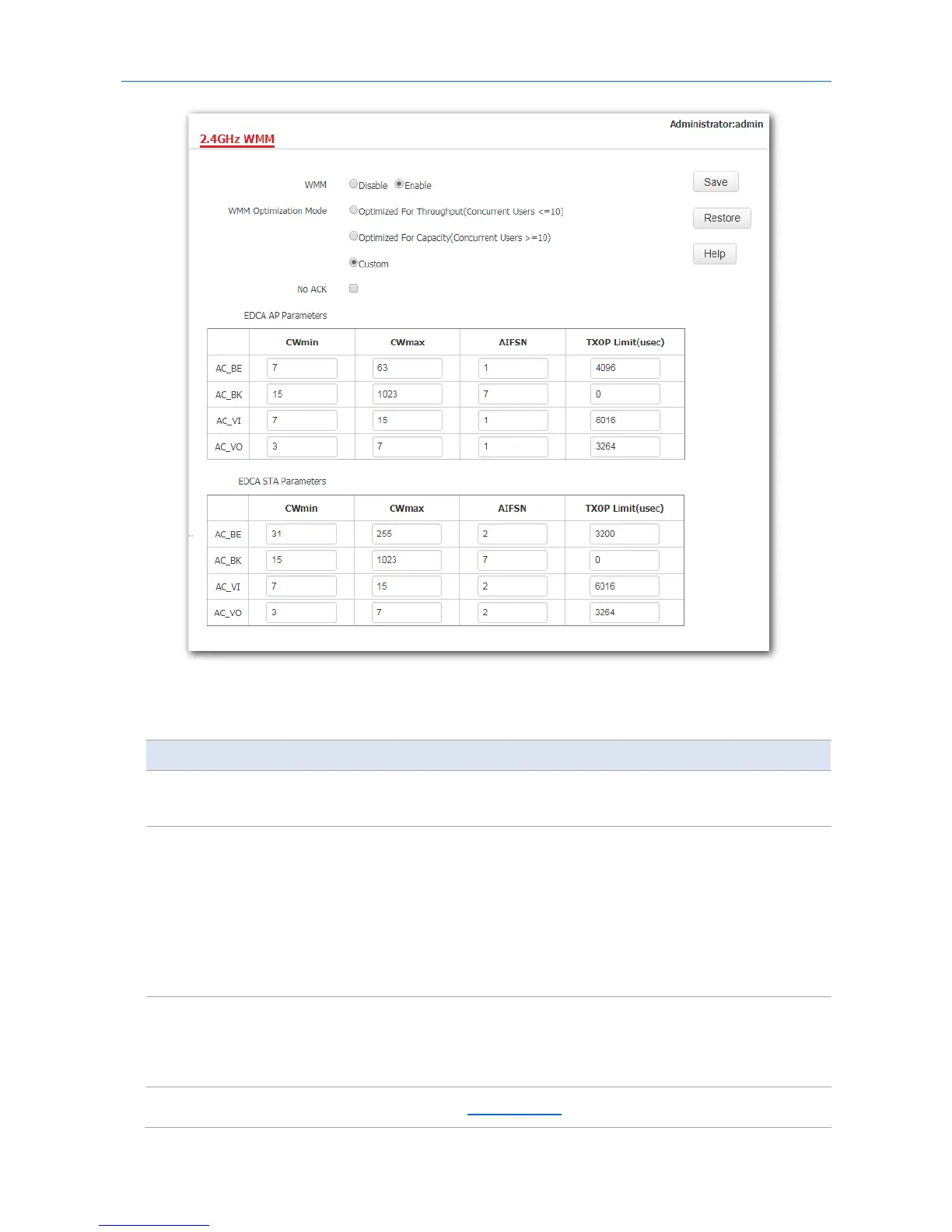
Parameter description
Parameter Description
WMM
−
Enable: It is used to enable the WMM function.
−
Disable: It is used to disable the WMM function.
WMM Optimization
Mode
It specifies the WMM optimization modes supported by the AP:
−
Optimized For Throughput: If 10 or less devices are connected to the AP, you
are recommended to select this mode to increase device throughput.
−
Optimized For Capacity: If more than 10 devices are connected to the AP,
you are recommended to select this mode to ensure device connectivity.
−
Custom: This mode enables you to set the WMM EDCA parameters for
manual optimization.
No ACK
This item appears only after you set your WMM Optimization Mode as Custom.
−
If the box is ticked, the No ACK policy is adopted.
−
If the box is unticked, the Normal ACK policy is adopted.
EDCA Parameters For details, refer to section 8.5.1 Overview.
66



 To Next Page