Wireless Access Point
User Guide
8.6 Access Control
8.6.1 Overview
It specifies that you can allow/disallow wireless devices with specified MAC addresses to access the AP’s
WiFi networks. The AP supports the following MAC address filter modes:
− Disable: It indicates that the access control function is disabled. In this case, all wireless devices
can access the AP’s WiFi networks.
− Allow: It indicates that only the wireless devices with the specified MAC addresses can access the
specific WiFi network of AP.
− Disallow: It indicates that only the wireless devices with the specified MAC addresses cannot
access the specific WiFi network of AP.
8.6.2 Configuring access control
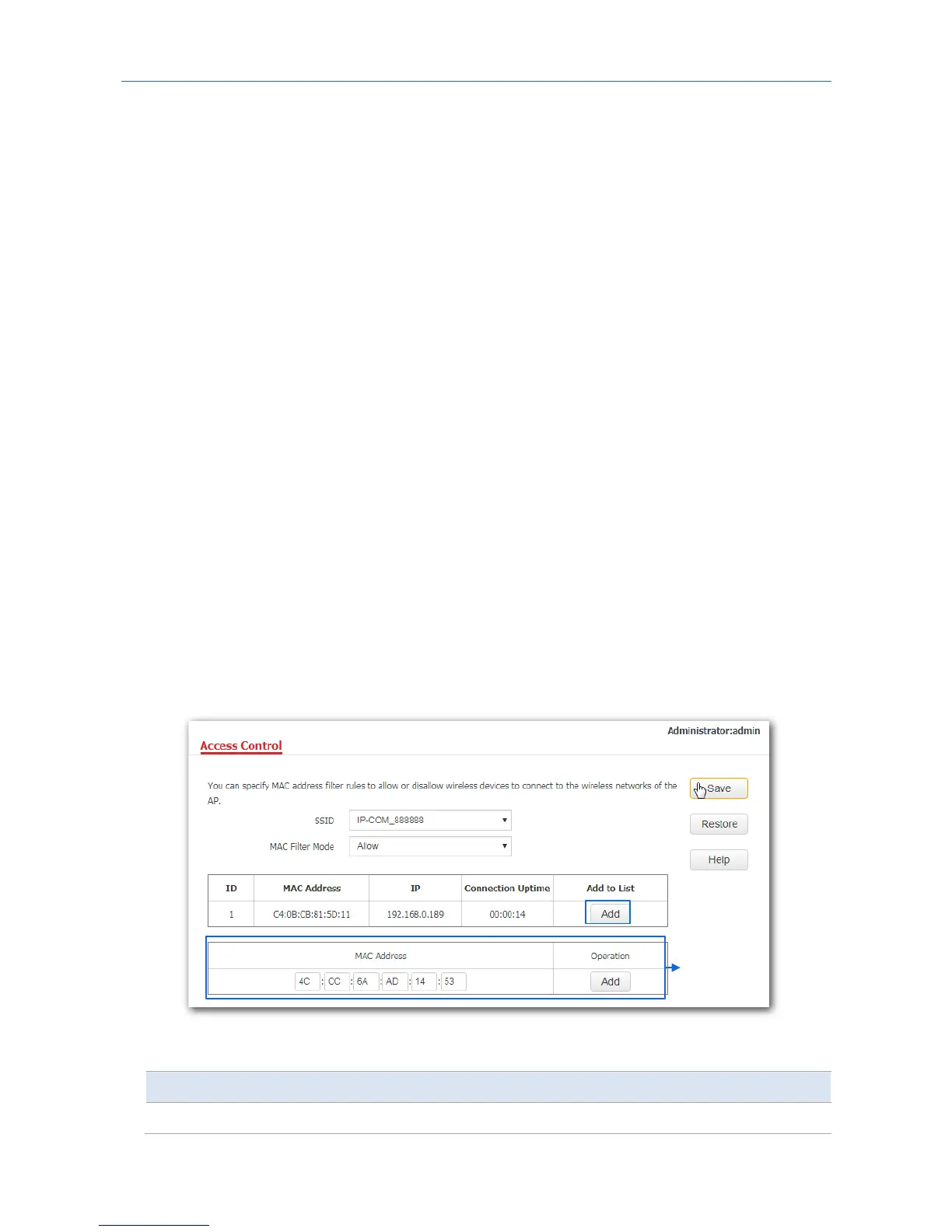
1. Choose Wireless > Access Control.
2. From the SSID drop-down list box, select the SSID on which the MAC address access control is
implemented.
3. Select an access control mode from the MAC Filter Mode drop-down list box.
- If you select Disable, the Access Control function will be disabled.
- If you select Allow or Disallow, enter the MAC addresses you want to control in the access control
list and click Add.
- If you want to control a wireless device that has been connected to the AP, directly click Add
corresponding to the device to add it to the access control list.
4. Click Save.
Parameter description
Parameter Description
SSID It specifies the SSID on which the MAC address access control is implemented.
Access control
list
67



 To Next Page