Wireless Access Point
User Guide
8.7 Advanced
8.7.1 Overview
This module enables you to make AP’s WiFi network and wireless transmission more efficiently through
enabling recognizing terminal type and filtering broadcast data functions. By default, these two functions
are disabled.
8.7.2 Changing the advanced settings
It is recommended that you’d better configure filtering WiFi networks’ broadcast data only under the
instructions of professional personnel, so as to prevent decreasing the WiFi performance of the AP.
In Advanced page, recognizing terminal type is not bound with filtering broadcast data function. It indicates
that users are allowed to enable either recognizing terminal type or filtering broadcast data function, or
enable both of them at the same time.
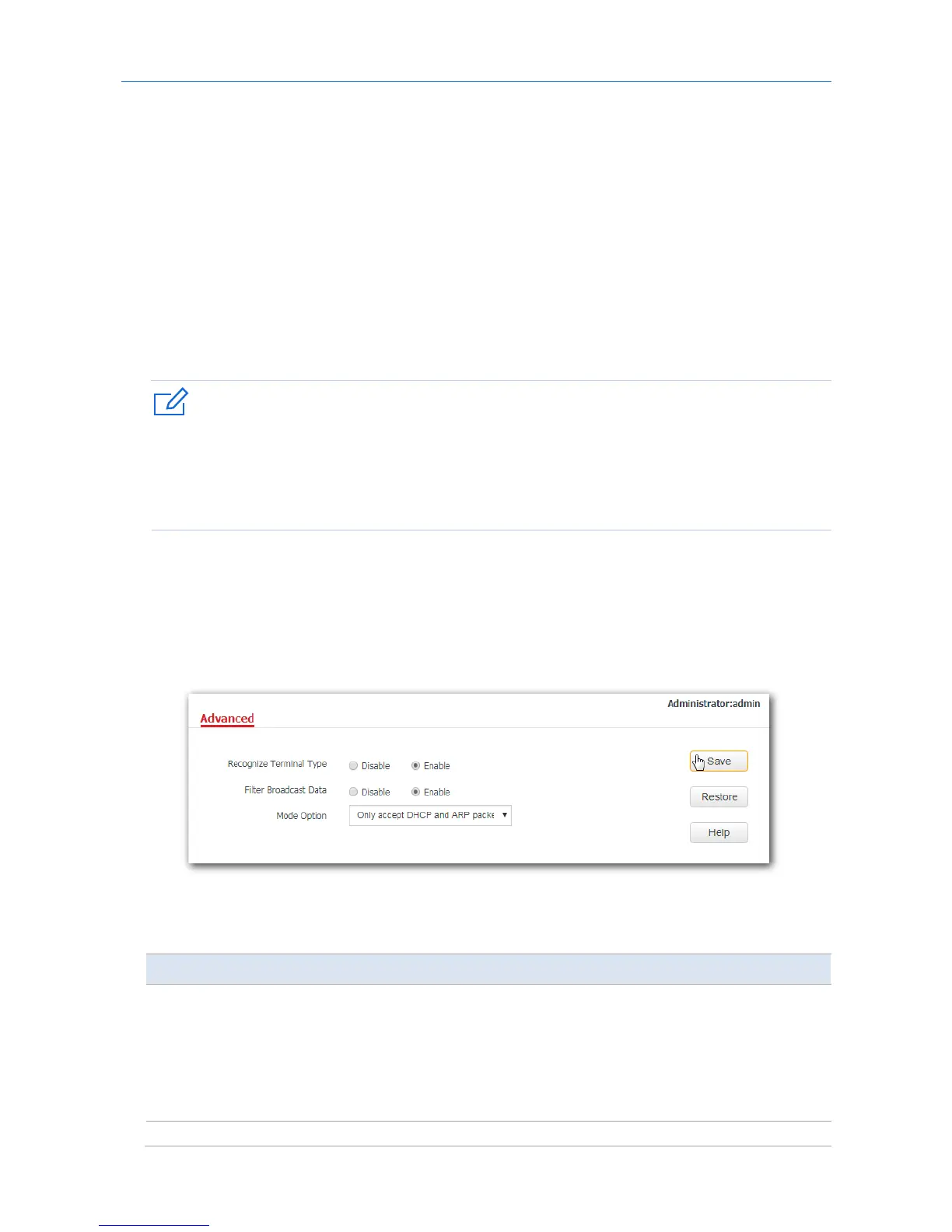
1. Choose Wireless > Advanced.
2. Recognize Terminal Type: Click Enable.
3. Filter Broadcast Data: Click Enable.
4. Mode Option: Select Only accept DHCP and ARP packets or Only accept ARP packets according to
your requirement, which is Only accept DHCP and ARP packets in this example.
5. Click Save.
---End
Parameter description
Parameter Description
Recognize Terminal
Type
It specifies whether to recognize and display types of the devices connected to AP’s
WiFi networks.
−
Disable: Click the circle beside it to disable the recognizing terminal type
function.
−
Enable: Click the circle beside it to enable the recognizing terminal type
function.



 To Next Page