Wireless Access Point
User Guide
Procedures:
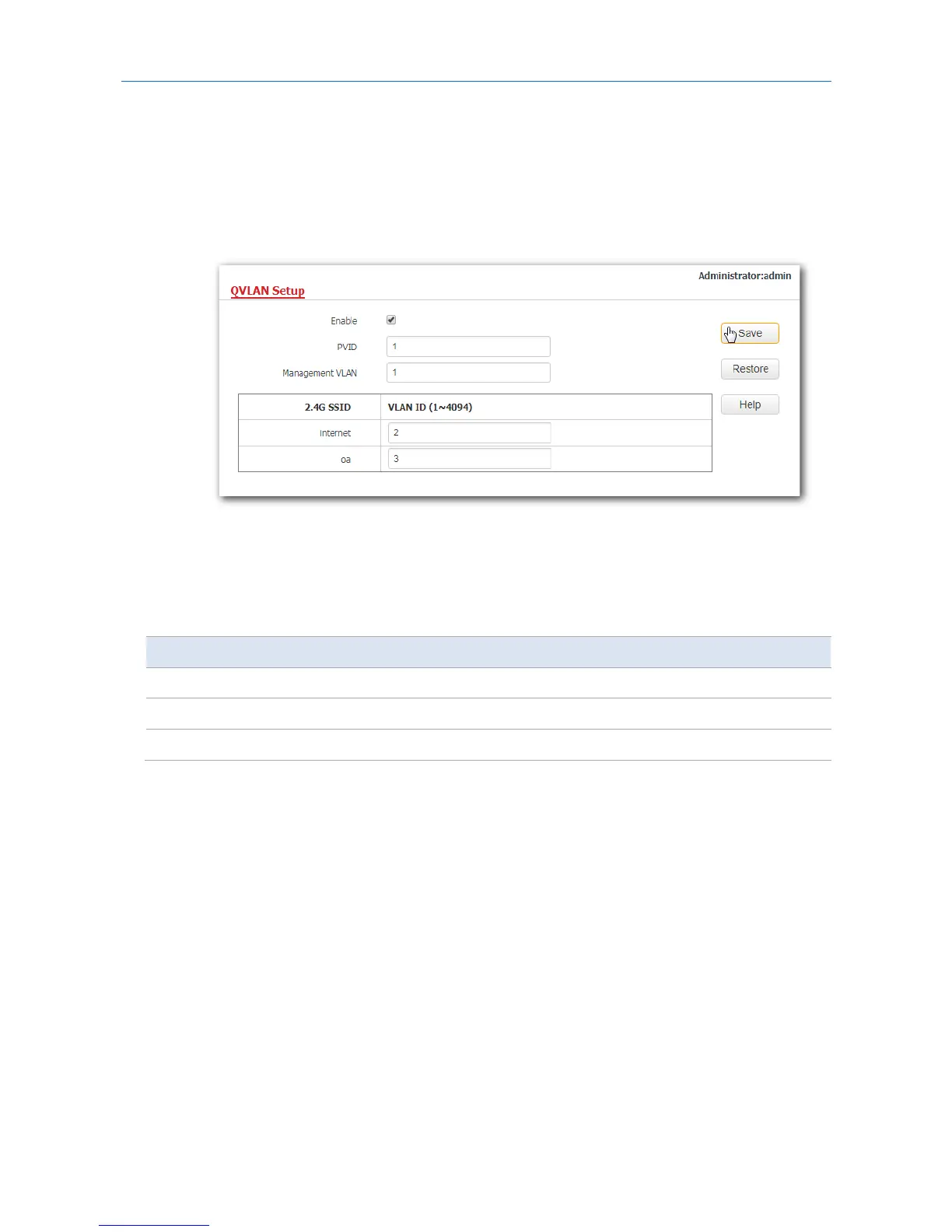
1. Configure the AP.
(1) Log in to the web UI of the AP and choose Wireless > QVLAN Setup.
(2) Select the Enable check box.
(3) Change the VLAN ID of the SSID internet to 2 and the VLAN ID of the SSID oa to 3.
(4) Click Save.
---End
Wait for the automatic reboot of the AP.
2. Configure the switch.
Create IEEE 802.1Q VLANs described in the following table on the switch.
Port Connected To Accessible VLAN ID Port Type PVID
AP 1, 2, 3 Trunk 1
Router 2 Access 2
Internal server 3 Access 3
Retain the default settings of other ports. For details, refer to the user guide for the switch.
---End
Verification
Wireless devices connected to the SSID internet can access only the internet, whereas the wireless
devices connected to the SSID oa can access only the LAN.
74



 To Next Page