www.janitza.com UMG 804
73
Configuring Virtual Meters
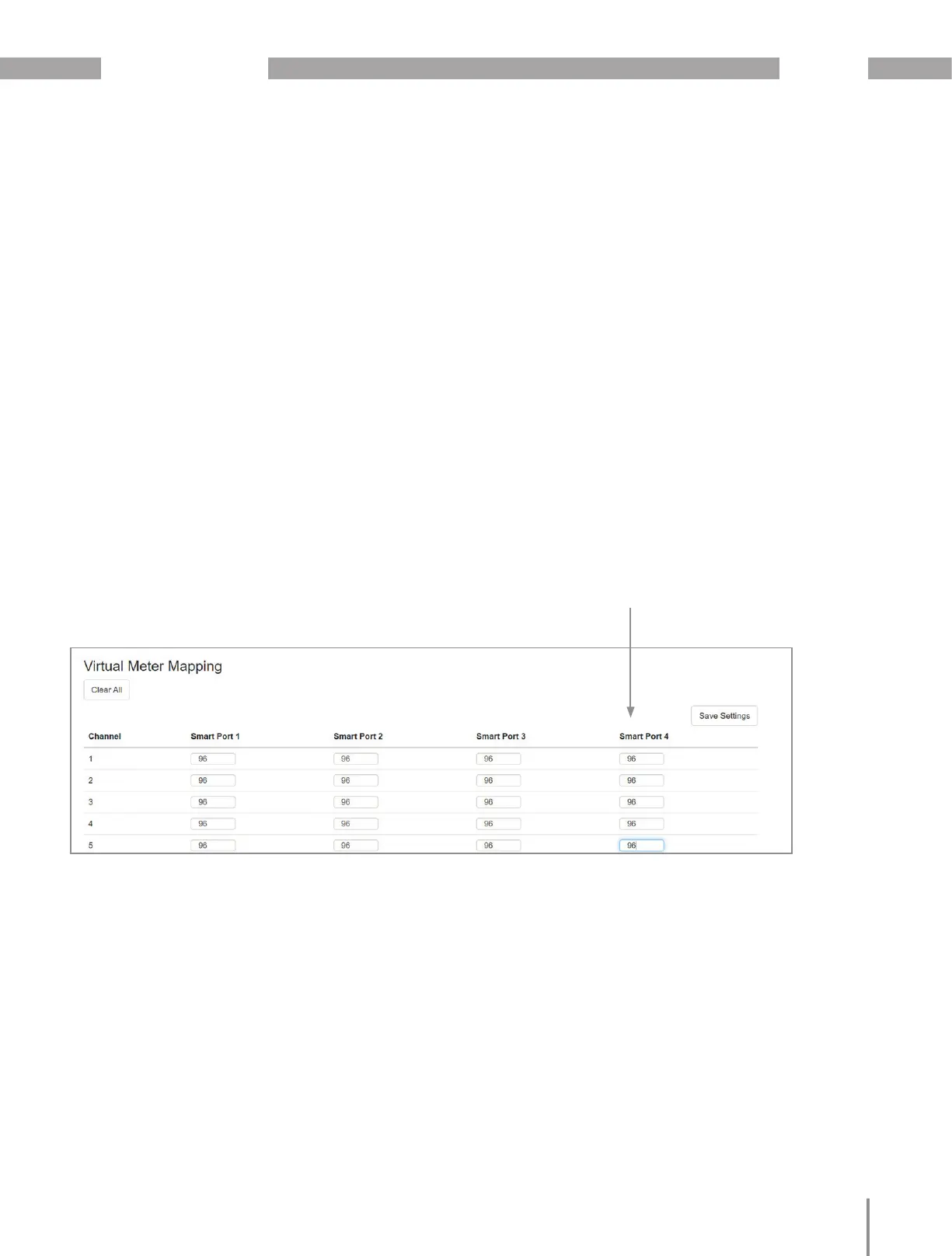
· To create a Virtual Meter go to the “configuration”
tab on the HTML interface and select “Virtual
Meter”.
· Using the Virtual Meter mapping template provi-
de a common Virtual Meter number “1-96” for all
the channels that are to be grouped to form the
Virtual Meter.
· Note that Virtual Meters and True Meters use the
same register maps and numbering allocation
(1-96) so Virtual Meters must not use any number
allocated to a True Meter. It is best to use high
numbers such as 94-95-96 for Virtual Meters to
ensure there is no conflict with True Meters.
· Refer to the Configuration Tables at the end of
this document to determine the correct channels
to group as this will vary with the configuration
setting.
· In this example all circuits are grouped
to virtual meter “96” creating a total for
the for the entire panelboard and elimi-
nating the need for main input current
transformers



 To Next Page