computer radio control system
EN
movement of the control surfaces during the change. Increasing the
number on the positive side “+” slows the deployment while
increasing the number on the negative side “-” slows return of the
surfaces to their original positions.
3. Butterfly/Crow Global or Separate Setting
The Butterfly/Crow mix configuration settings can be set collectively
for all flight modes by selecting the “G-(globe)” symbol or you can
allow individual aileron differential settings in each separate flight
mode by sellecting the “S-Separate” symbol.
4. Butterfly/Offset
Due to the request of many sailplane pilots this function was
updated. Now expanded to four screens, there are several added
options in this menu.
4. 4.
a. You can set an offset to the butterfly control so that there will be
a specified dead zone at the beginning of the control stick’s travel.
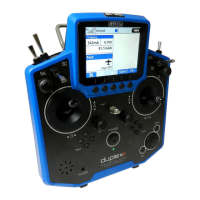
b. Ailerons/Flaps Adjustment
In the Ailerons/Flaps Adjustment menu you can set all the travel
needed for butterfly braking (for the flaps and ailerons). Also, you
can set a parameter called Diff. adjust which influences the aileron
differential. Positive values increase the upper travel of the aileron
servos, negative values increase the lower travel of the aileron
servos.
Actual values of
airbrake rates.
T h e v a l u e s
shown depend
on adjustments
m a d e i n
Butterfly Tuning
m e n u (see
below).
c. Elevator compensation
The butterfly mixing is always from zero to the full stick position so
the curve is a little bit modified to control the whole travel range. You
can choose between a standard curve, constant and X-point curve
types.
93


 To Next Page