– 129 –
②
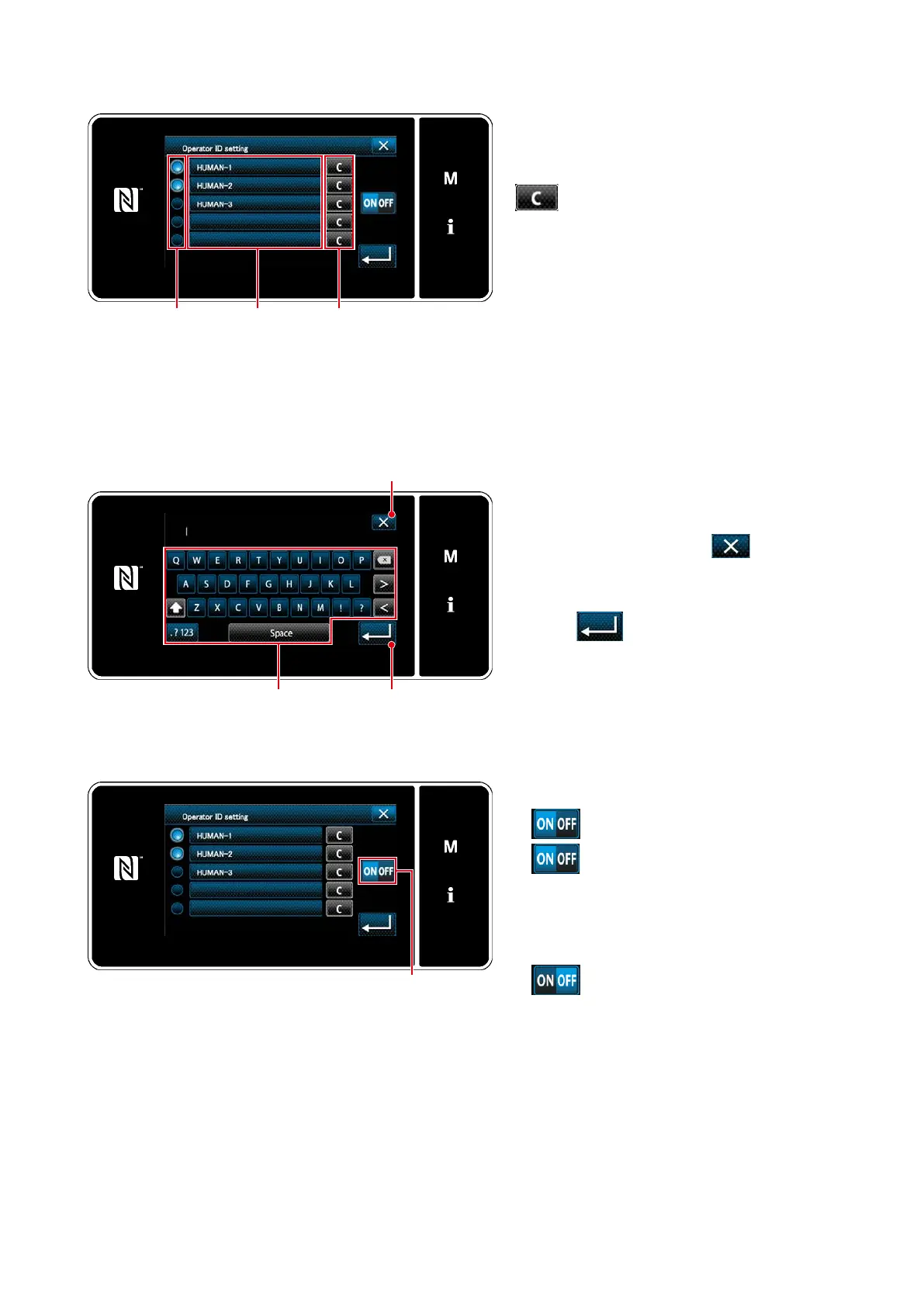
Editing the operator ID
❸
<Operator ID edit screen>
❹
Press
❸
.
The "operator ID input screen" is displayed.
The entered operator ID is cleared by pressing
❹
.
Enable/disable of each operator ID can be
selected by pressing
❺
.
❺
2. Use/non-use of the ID can be selected with
❼
.
→
The operator ID function is
used. The operator ID is dis-
played on the operator and the
operator's movement informa-
tion is recorded.
→
The operator ID function is not
used.
❻
1. The operator ID can be entered with the
character string button
❻
.
Cancel the operation with
❶
. The
current screen returns to the previous
screen.
Press
❷
to conrm the setting.
The "operator ID edit screen" is displayed.
③
Entering the operator ID
<Operator ID edit screen>
<Operator ID input screen>
(Use)
(Non-use)
* This function is enabled only in the case of IA-1 is connected to the sewing machine.
* Contact your distributor about connection between the sewing machine and IA-1.
❼
❶
❷



 To Next Page
 Loading...






