CAUTION: On the DC power supply, the V+ terminals are shunted internally together,
as are the V– terminals. The same polarity terminal can be wired together from the same
source to provide an additional current path in a higher power chassis. Do not connect
the terminals to different sources.
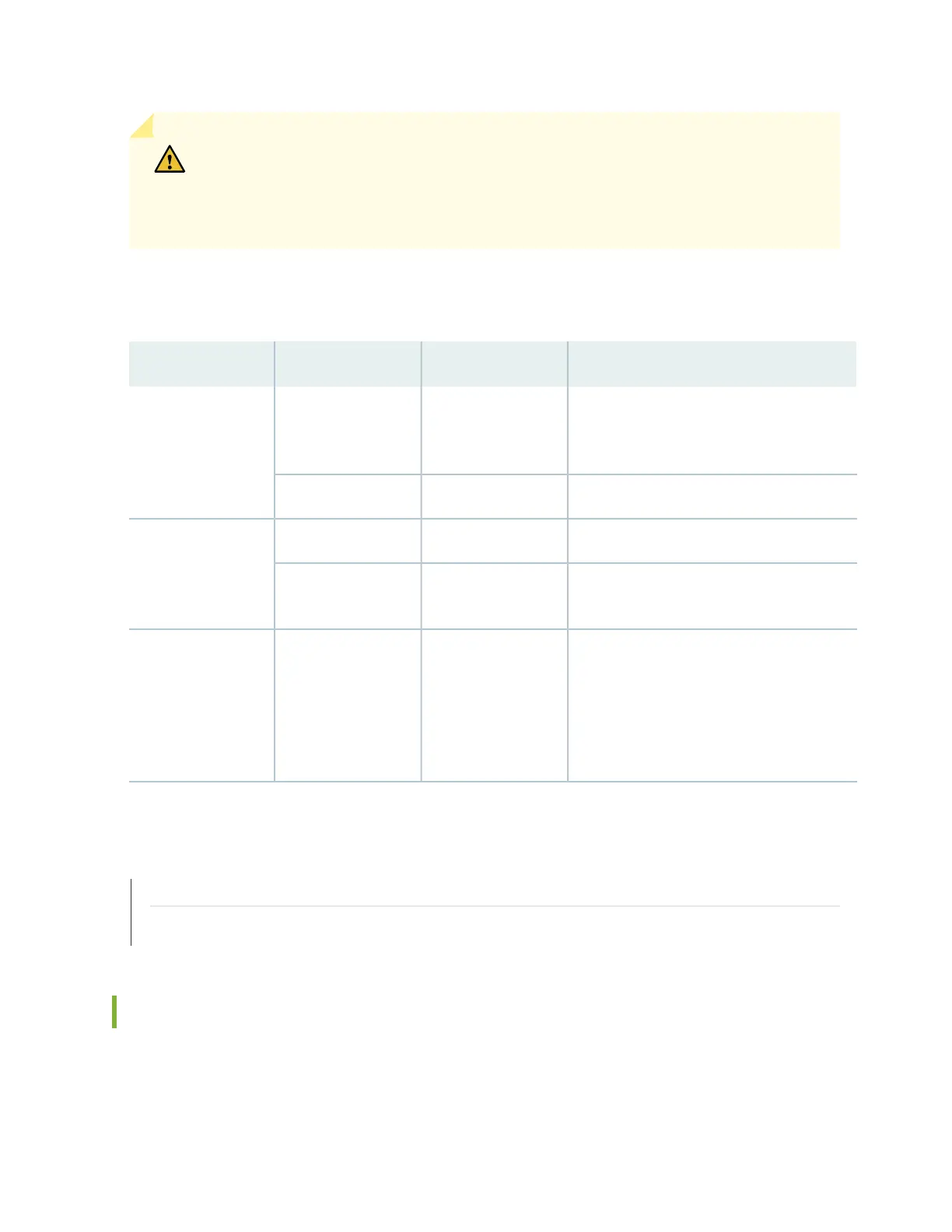
Table 10 on page 38 describes the LEDs on the DC power supply modules.
Table 10: DC Power Supply Module LEDs
DescriptionStateColorLabel
The power supply is disconnected from power
source, or the power supply is not receiving
power.
OffUnlitIN (Input)
Power supply is receiving power.On steadilyGreen
Power supply output is off.OffUnlitOUT (Output)
The power supply is sending out power
correctly.
On steadilyGreen
An error has been detected in the power
supply. Replace the power supply as soon as
possible. To maintain proper airflow through
the chassis, leave the power supply installed
in the chassis until you are ready to replace
it.
On steadilyAmber! (Fault)
SEE ALSO
Routine Maintenance Procedures for MX204 Routers | 115
Maintaining the MX204 Power Supplies | 126
MX204 Router AC Power Specifications
Table 11 on page 39 lists the AC power system electrical specifications.
38



 To Next Page