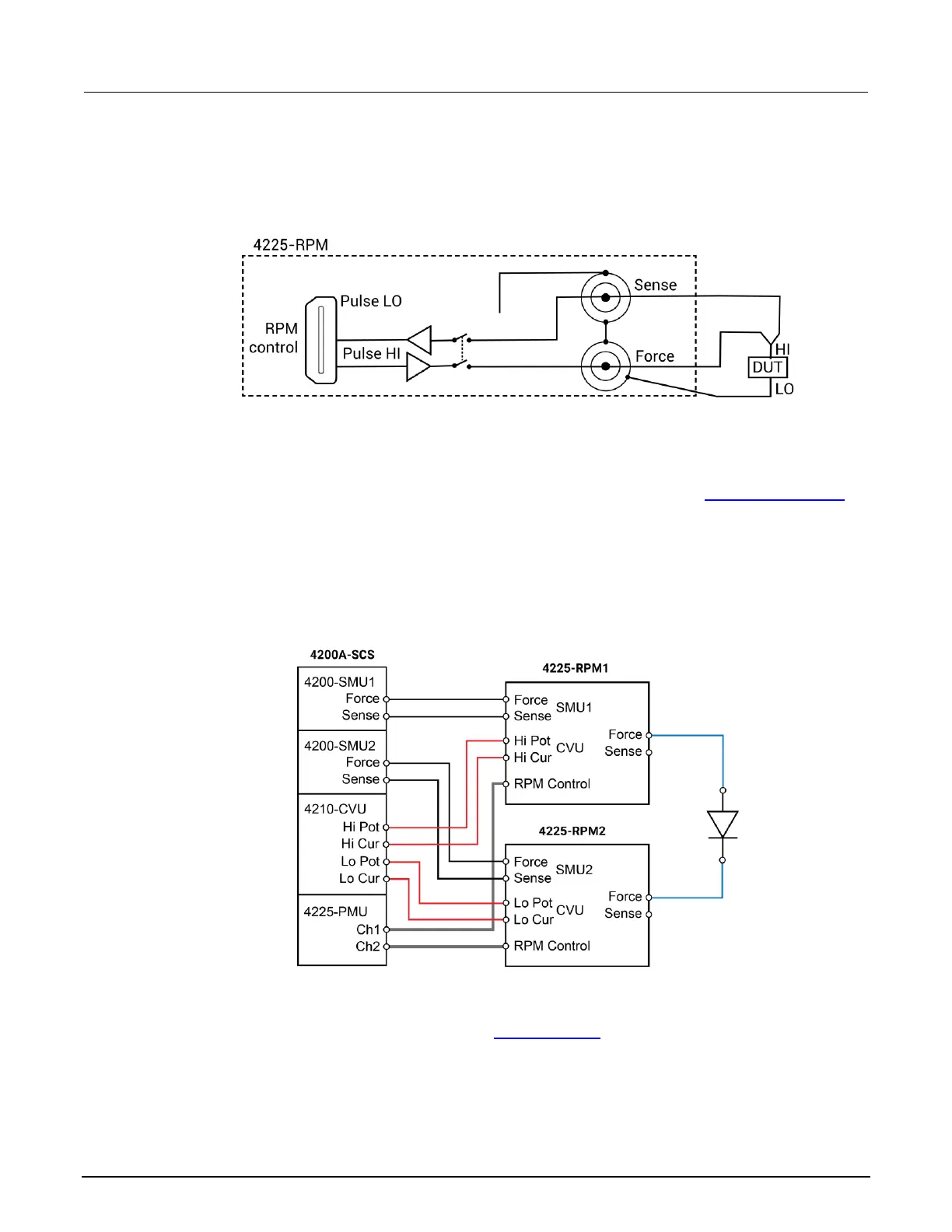
The following figure shows the diagram for remote sensing. Both Sense and Force are connected to
DUT HI.
Figure 8: Diagram for remote sensing
Using the RPM as a switch
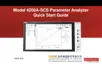
You can use the RPM to switch a PMU, CVU, or SMU to a DUT terminal. The RPM wiring diagram
(on page 2-5) figure shows the switches. The following figure shows a typical test configuration for
using an RPM as a switch for a PMU, SMU, and CVU. In general, one RPM per device terminal is
recommended. By default, the PMU (with RPM) is connected to the output unless a SMU or CVU is
switched in.
Figure 9: Test configuration for using RPM as a switch
Both the red cables (supplied with the CVU) and the blue cables (supplied with the optional
4210-MMPC cable kits) are 100 Ω. You can do remote sensing (on page 2-16) using the optional
4210-MMPC cable kits with the RPMs.



 To Next Page