GM Part
UTILITY (USER 5)
▀
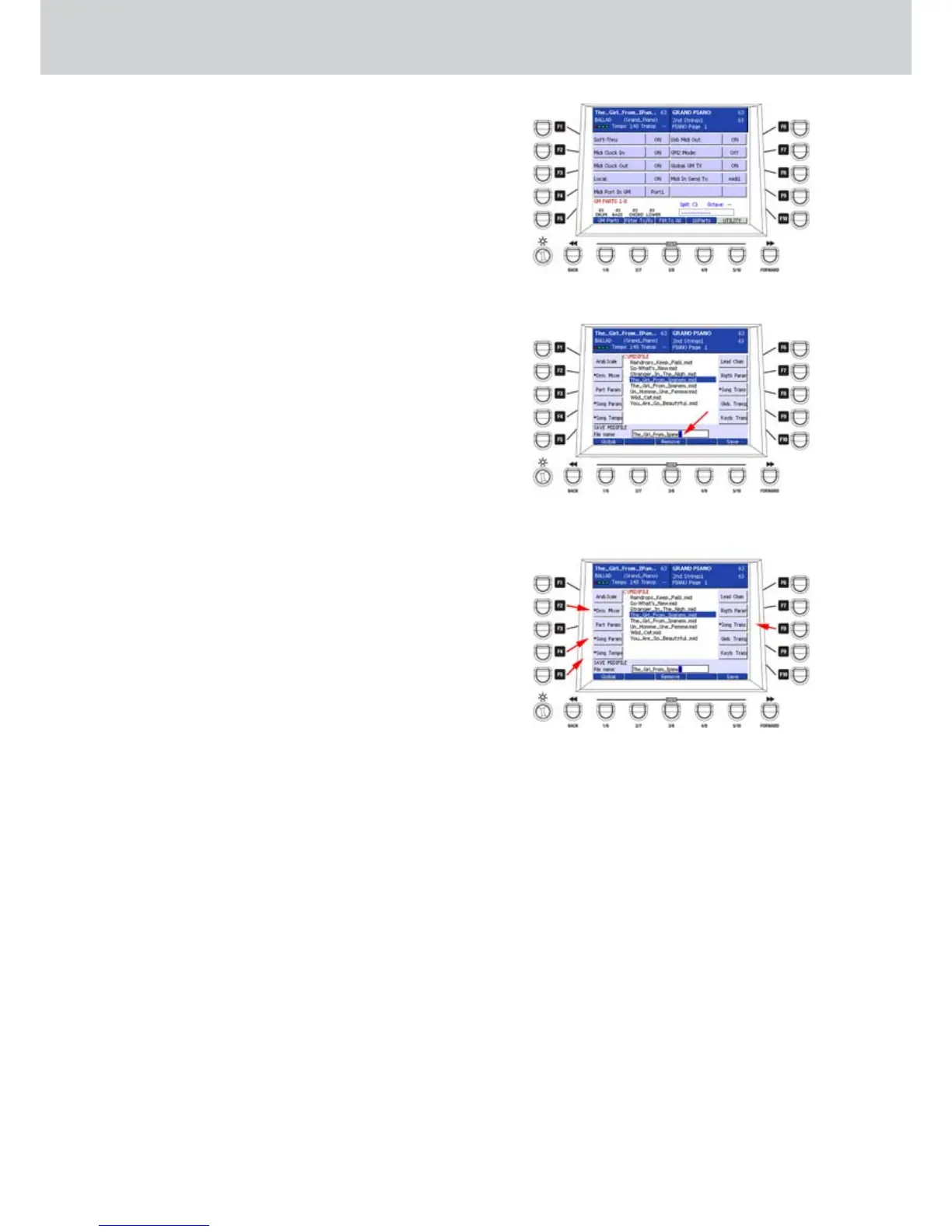
By pressing UTILITY, you can access the MIDI
utility window (Figure 169). Here you can set the
following parameters by pressing directly the
F1-F10 buttons:
F1–SOFT-THRU: enables the MIDI Thru.
•
F2–MIDI CLOCK IN: enables the MIDI clock
•
reception.
F3–MIDI CLOCK OUT: enables the MIDI
•
clock transmission.
F4–LOCAL: enables the Local On/Off
•
function of the keyboard.
F5–MIDI PORT IN GM: enables the MIDI IN 1
•
or 2 port for the General MIDI data reception.
F6–USB MIDI OUT: enables the MIDI
•
transmission on the USB port.
F7–GM2 MODE: enables the General MIDI 2
•
mode.
F8–GLOBAL GM TX: enables the General
•
MIDI global transmission.
F9–MIDI IN SEND TO: enables the data
•
transmission from the MIDI IN port to the
MIDI out 1 or 2 port.
Storing the changes into the MIDI file
From the window GM PARTS, when the MIDI file 1.
is playing back or paused, press the SAVE button
on the front panel. A dialogue window where to
type the file name will appear (Figure 170). Give
a name to the file by typing letters and numbers
directly on the keyboard and then press the USER
5 button (SAVE).
The MIDI file will be saved with the new name or
overwritten, if you leave the same name.
The parameters settings to store into the MIDI file
can be selected by using the F1-F10 buttons. The
options will be highlighted by an asterisk (Figure
171):
F1–Arab. Scale: Arabian scale settings
F2–Drm. Mixer: Drum Mixer settings
F3–Part Param: GM part parameters
F4–Song Param: Song parameters
F5–Song Tempo: Song tempo setting
F6–Lead Chan: Lead channel
F7–Right Param: Right hand parameters
F8–Song Trans: Song transposition
F9–Glob. Trans: Globale transposition
F10–Keyb. Trans: Keyboard transposition
Only for an example, in each MIDI file you can
2.
store:
Tempo settings modified by the TEMPO SLOW
•
FAST buttons.
Keyboard transposition (semitones and/or
•
octaves).
Song transposition.
•
MIDI file parts transposition.
•
Volume, Reverb and Chorus of each part.
•
Right hand instrument.
•
Single drum instruments settings of the drum, e.g.
•
muting some of them into the MIDI file.
Before storing the MIDI file you can choose the
GLOBAL or INITIAL option by using the USER 1
button and the REMOVE option by using the USER 3
button.
Figure 169
Figure 170
Figure 171



 To Next Page