General, Master1, Master2, Accord1, Accord2
You can save the MIDI settings in five Preset,
assigned to the USER buttons from 1 to 5:
General: General Preset
Master1: Master Keyboard Preset
Master2: Second Master Keyboard Preset
Accord1: MIDI accordion Preset
Accord2: Second MIDI accordion Preset
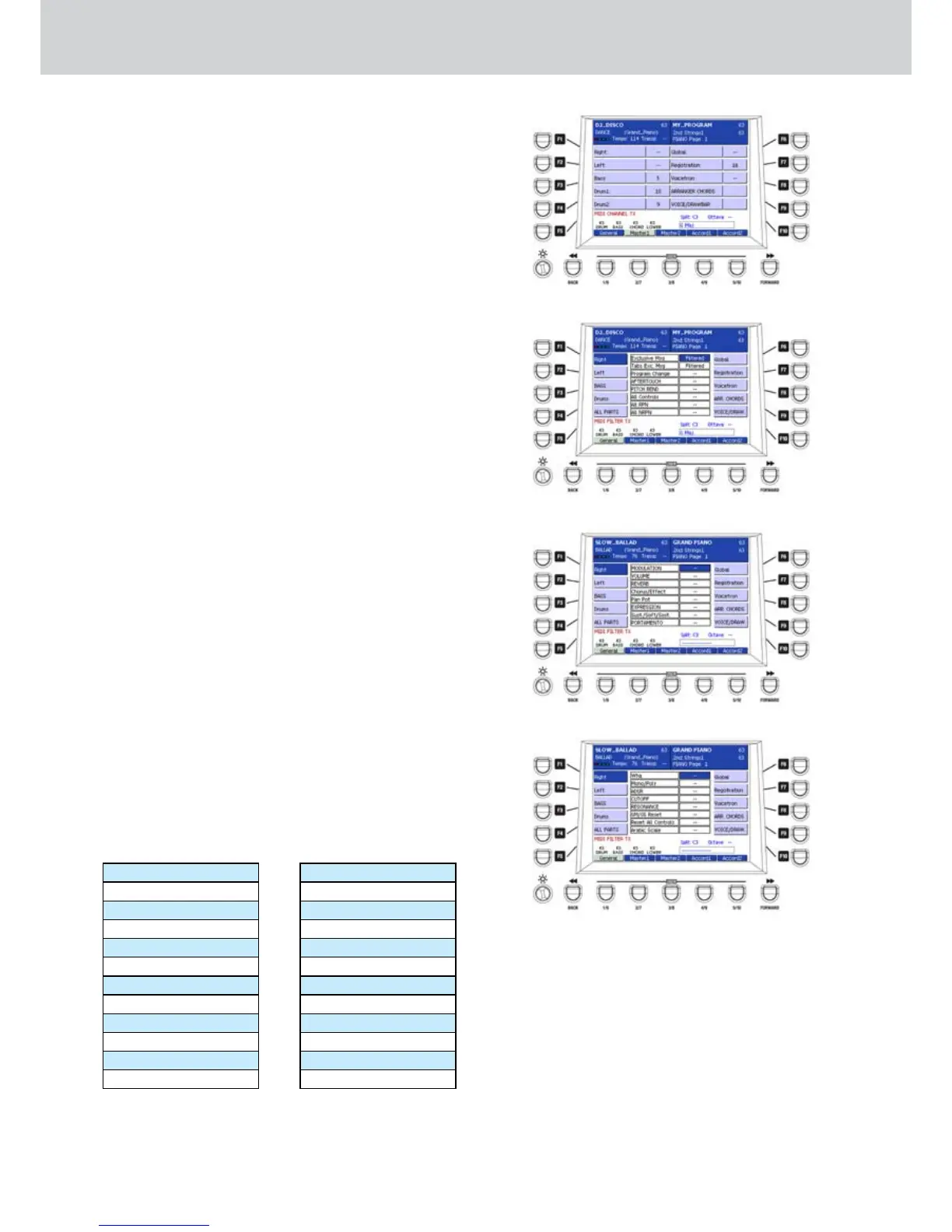
The Figure 212 shows the Master2 page (USER
2 button). The following explanation refers to the
General Preset. The procedure for the Master1,
Master2, Accord1 and Accord2 Presets are identical.
Saving the MIDI settings
To store the MIDI settings press the SAVE button on
the front panel. A brief “SAVE MIDI Setting” message
will appear. If you do not save the MIDI settings, the
previous settings will return at next keyboard start-up.
FILTER PROG.CHANGE TX
From the first screen of the MIDI menu, by pressing
the F2 button a window will appear where to set the
Program Change transmission filter (Figure 213).
By using the buttons F1-10 you can select the parts to
filter:
F1–Right
F2–Left
F3–Bass
F4–Drums
F5–ALL PARTS
F6–Global (global channel of the keyboard)
F7–Registration
F8–Voicetron
F9–ARRANGER CHORDS (opens another window)
F10–VOICE/DRAWBAR (opens another window)
Select the MIDI transmission filter options by using
the CURSOR
§ ¶
buttons
or the DATA/VALUE
wheel. Press the CURSOR Ó Á
buttons
to set the
“FILTERED” value to activate the filter, or the “—”
value to deactivate the filter. The filter options are the
following (Figure 213, 214, 215):
Figure 212
Figure 213
Figure 214
Figure 215
Exclusive Msg
Tabs Exc. Msg
Program Change
AFTERTOUCH
PITCH BEND
All Controls
All RPN
All NRPN
MODULATION
VOLUME
REVERB
Chorus/Effect
Pan Pot
EXPRESSION
Sust./Soft/Sost.
PORTAMENTO
WHA
Mono/Poly
ADSR
CUTOFF
RESONANCE
GM/GS Reset
Reset All Controls
Arabic Scale



 To Next Page