UTILITY
▀
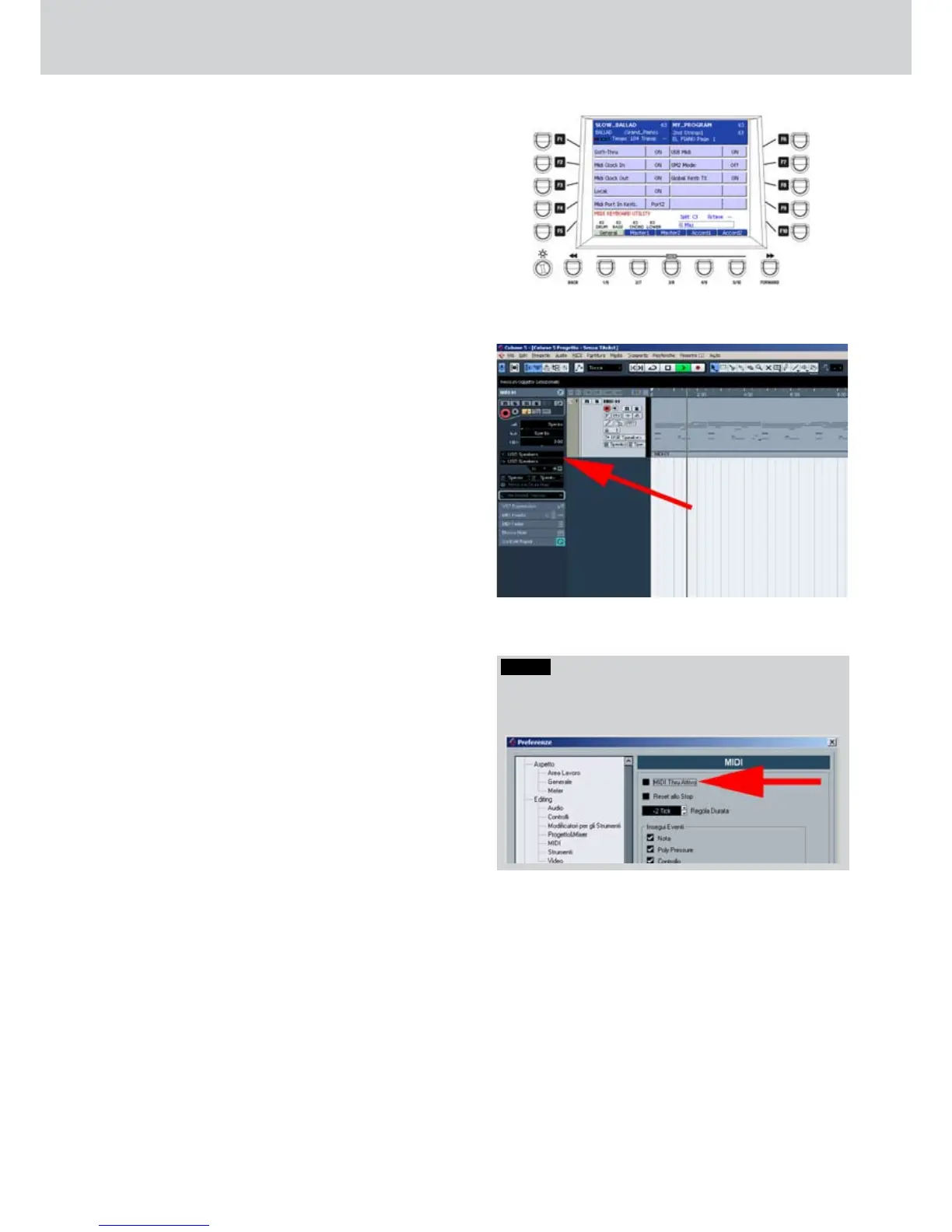
From the first screen of the MIDI menu, by
pressing the F4 button, the UTILITY page will
open, as shown in Figure 224. Here you can set
the following parameters, by pressing directly the
F1-F10 buttons:
F1–SOFT-THRU: enables the MIDI Thru. The
•
MIDI data to MIDI IN port will be transmitted
thru the MIDI Out port.
F2–MIDI CLOCK IN: enables the MIDI clock
•
reception.
F3–MIDI CLOCK OUT: enables the MIDI
•
clock transmission
F4–LOCAL: enables the Local On/Off
•
function of the keyboard. In Local Off you will
not hear any sound.
F5–MIDI PORT IN GM: enables the MIDI IN 1
•
or 2 port for the General MIDI data reception.
F6–USB MIDI OUT: enables the MIDI
•
transmission from USB port.
F7–GM2 MODE: enables the General MIDI 2
•
mode.
F8–GLOBAL GM TX: enables the General
•
MIDI transmission.
F9–MIDI IN SEND TO: enables the data
•
transmission from MIDI IN port to MIDI out 1
or 2 port.
USB MIDI OUT
When you can activate the USB MIDI OUT
mode from the UTILITY page, if the keyboard
is connected to the USB port of a computer, it
will be recognized as USB SPEAKERS driver
for the MIDI data transmission from and to the
computer.
When the keyboard is connected via USB to
a computer, the green LED of the USB (EXIT)
button will light.
The keyboard can be used as external
•
control unit and as sound module for MIDI
applications, such as Cubase, Sonar, Reaper
and so on, for example.
Once the MIDI application is open you can
•
select the MIDI In port and the MIDI Out port,
recognized as USB SPEAKERS.
In
•
Figure 225 the arrow indicates the MIDI IN
and MIDI OUT ports in a Cubase track.
Once the MIDI communication via USB is
•
open, you will be able to record MIDI tracks.
The material that you record via MIDI into a
•
track of the sequencer can be output directly
by using the Audya sound module.
For the correct playback of the parts and the
instruments, please use the same MIDI channels
for the transmission and the reception.
For example:
Right: MIDI channel 1, both TX and RX
Left: MIDI channel 2, both TX and RX
Bass: MIDI channel 3, both TX and RX
Chord1: MIDI channel 5, both TX and RX
Drum1: MIDI channel 10, both TX and RX
... and so on.
Figure 224
Figure 225
NOTE
Please disable the soft MIDI THRU function from the
sequencer application in order to avoid dangerous MIDI
loops.



 To Next Page