04 Singing | 47
Options:
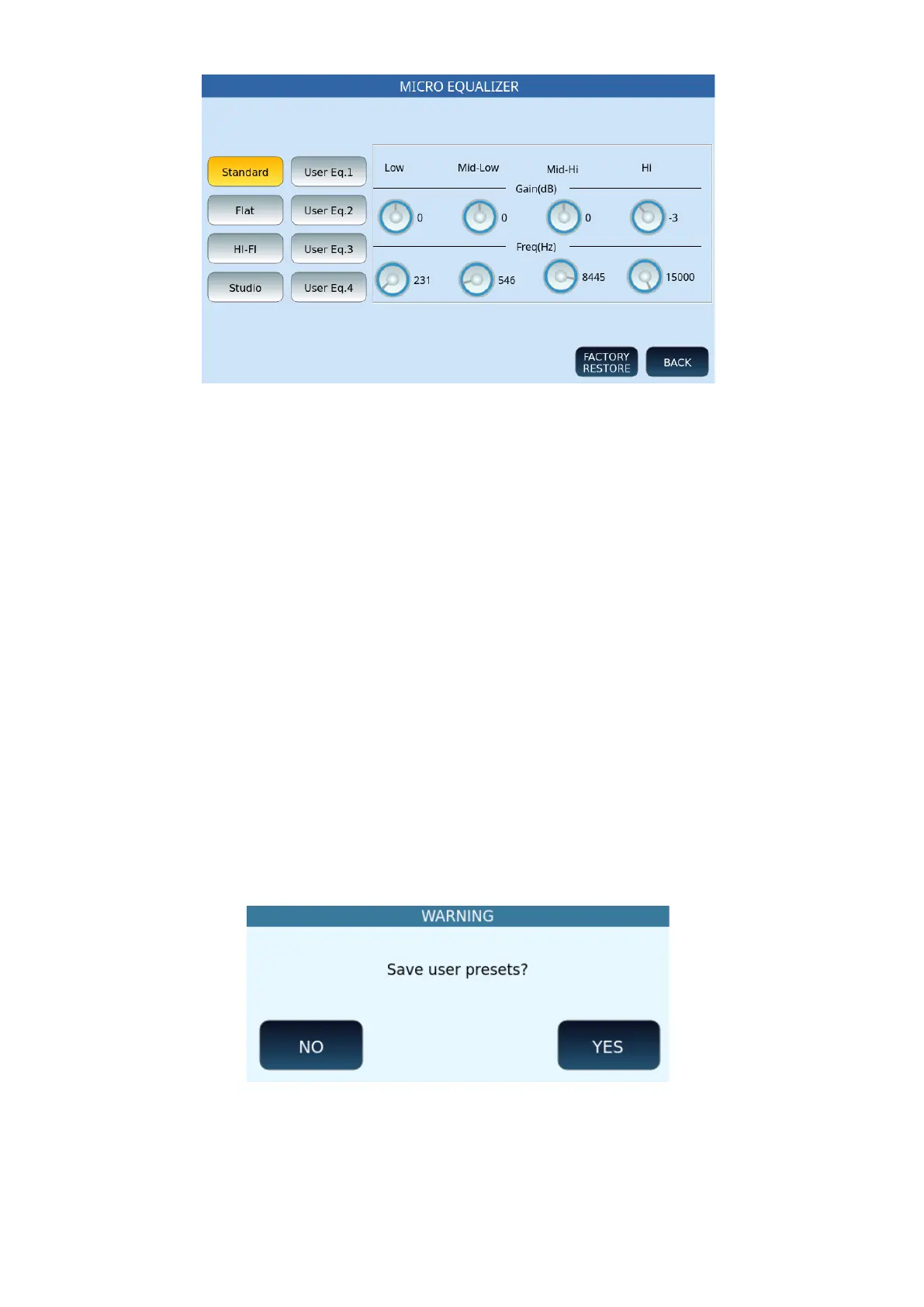
• Select one of the buttons on the left to call up one of the eight settings (four defaults
and four USERS): Standard, Flat, Hi-Fi, Studio, User Eq. 1/2/3/4.
• Gain (dB): Adjust the cut or increase below/above the centre frequency. The range is
from -12 to +12 dB.
• Freq (Hz): Set the centre frequency. The ranges of the different bands are from 80 to
2000 Hz (BASS), from 60 to 3000 Hz (MID-BASS), from 60 to 10300 Hz (MID-HIGH)
and from 500 to 15000 Hz (HIGH).
• The BACK button returns to the previous page.
• The FACTORY RESTORE button restores the factory defaults.
• Otherwise proceed with saving as follows.
Saving a personal microphone setup for instant future recall on stage or at the studio
All microphone-related parameters such as volume, reverb and echo, effects and equalizer
parameters can be saved in a user memory.
After changing the settings at one of the four User locations (Eq.1, Eq.2, Eq.3, or Eq.4),
proceed.
1. Tap SAVE on the front panel.
2. At the first pop-up window, confirm YES to save USER EQ to memory.
3. Touch NO to cancel the operation.



 To Next Page