76 34410A/11A/L4411A User’s Guide
2 Features and Functions
Frequency and Period
External Triggering
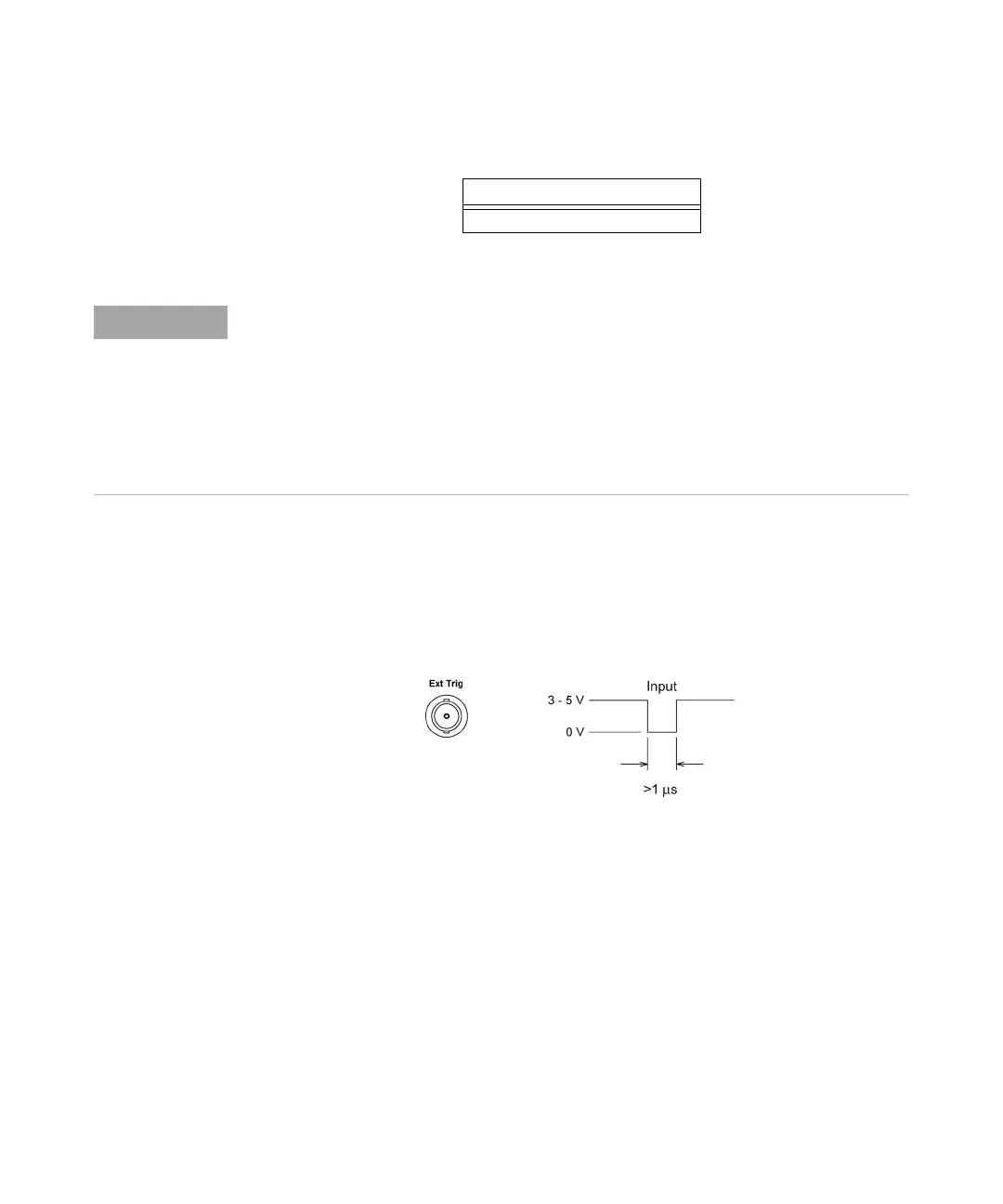
External triggering takes one reading (or the specified number of readings) each time the
multimeter receives a pulse on the rear–panel Ext Trig connector. You may select
whether the multimeter uses the rising edge (POS) or falling edge (NEG) of the external
trigger signal to trigger a reading (see “Trigger Slope” on page 78). The diagram below
shows the Ext Trig connector timing (for a negative pulse).
• The multimeter buffers one external trigger. If the multimeter is currently taking a
reading while another trigger occurs, that second trigger is accepted. After the
reading in progress is completed, the stored trigger is issued.
• The Trig annunciator turns on when the multimeter is waiting for an external trigger.
Trigger Delay
1 s
Temperature is measured using the 2–wire or 4–wire resistance function. The above
tables for resistance apply to temperature, but all temperature measurements use
autoranging. The range in use cannot be predicted; thus, nor can the delay. Use the
TRIGger:DELay? command to query the actual trigger delay for a temperature
measurement.
For capacitance measurements the automatic trigger delay is zero (capacitor discharge is
part of the measurement). The continuity and diode test functions ignore the trigger
delay.



 To Next Page