Hybrid DVR (HD Series)
13
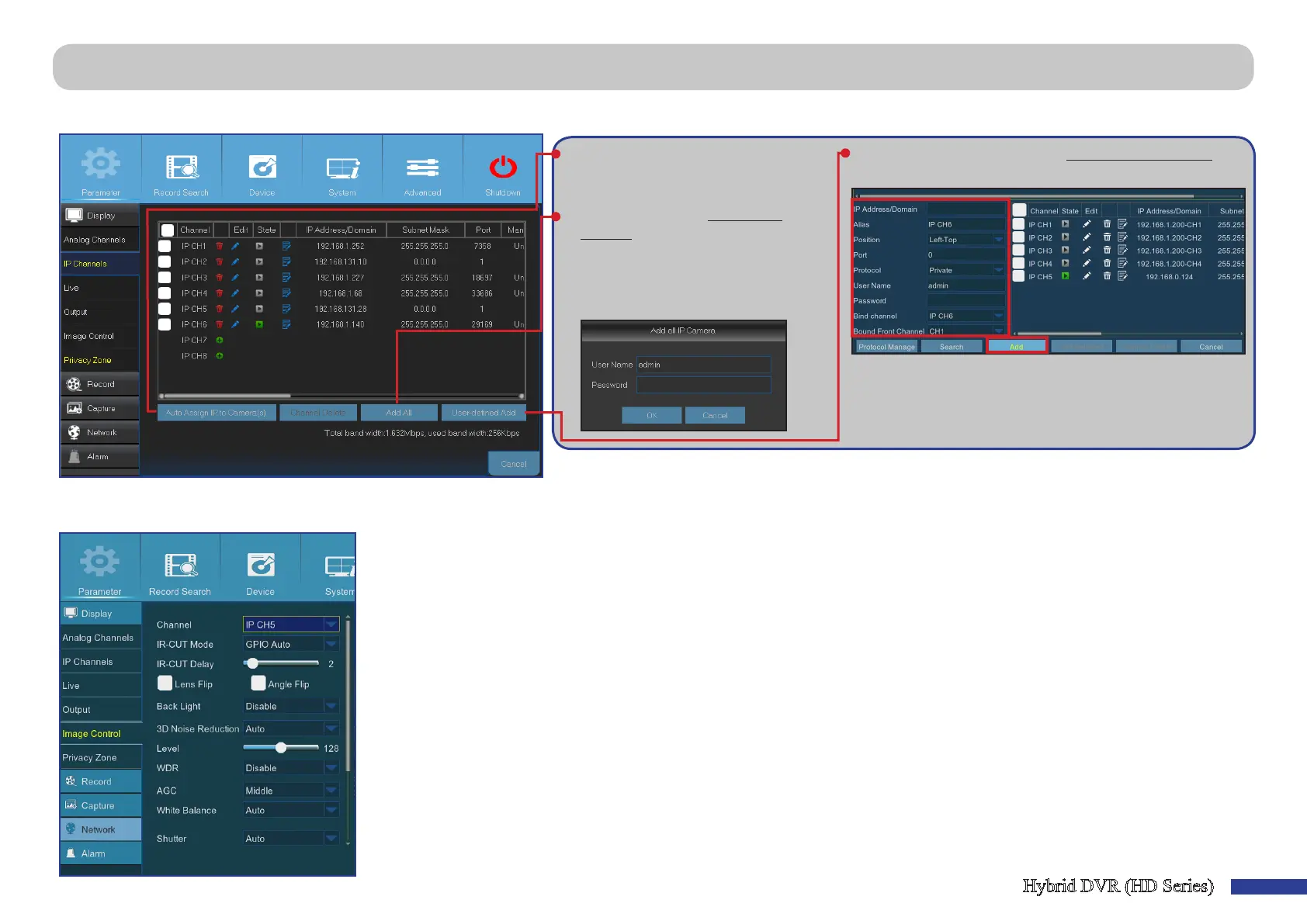
This menu allows you to add and modify IP cameras conguraons.
• Auto Assign IP to Camera(s): Click to
reassign an IP address to the IP camera
that is already connected to the DVR.
• Add All: Click to add local ONVIF
cameras (DVR and IP cameras are
connected to the same router). To
complete the connecon, enter user
name and password of the IP camera,
and click OK.
• User-dened Add: Click to add remote ONVIF cameras over
the Internet.
Enter the connecon parameters of the IP camera: IP Address/
Domain, Port, Protocol, User Name, and Password. Then click
Add.
This menu allows you to congure the camera sengs. Some IP cameras may not support this feature and the IP camera sengs cannot also be changed using the DVR.
• Channel: Select the channel you want to modify.
• IR-CUT Mode: Select the desired built-in lter switch-over
mode to ensure the camera works properly both in the
daylight and night.
• IR-CUT Delay: Set the IR-CUT switching me delay.
• Lens Flip/Angle Flip: Check to enable automac lens ip
and/or angle ip.
• Back Light: Enable this feature to compensate the darkness
of the subject when shoong against bright light sources.
For example, sunlight.
• 3D Noise Reducon: Enable this feature to digitally
minimize video noise and extend the DVR storage.
• Level: Set the noise reducon level.
• WDR (Wide Dynamic Range): Enable to allow
automacally adjust the brightness and contrast of the
video when shoong in the darkness with bright light
sources.
• AGC (Automac Gain Control): Congure when shoong
in changing lightning environments. The video image is
brightened in dark areas.
• White Balance: Choose the white balance level between
Auto (automac adjustment), Manual (manual adjustment
of red and blue gain), indoor (opmized according to the
indoor environment).
• Shuer: Set the shuer mode.
• Time Exposure: Choose the exposure me of the camera.
Main Menu > Parameter > Display > IP Channels & Image Control



 To Next Page