Hybrid DVR (HD Series)
31
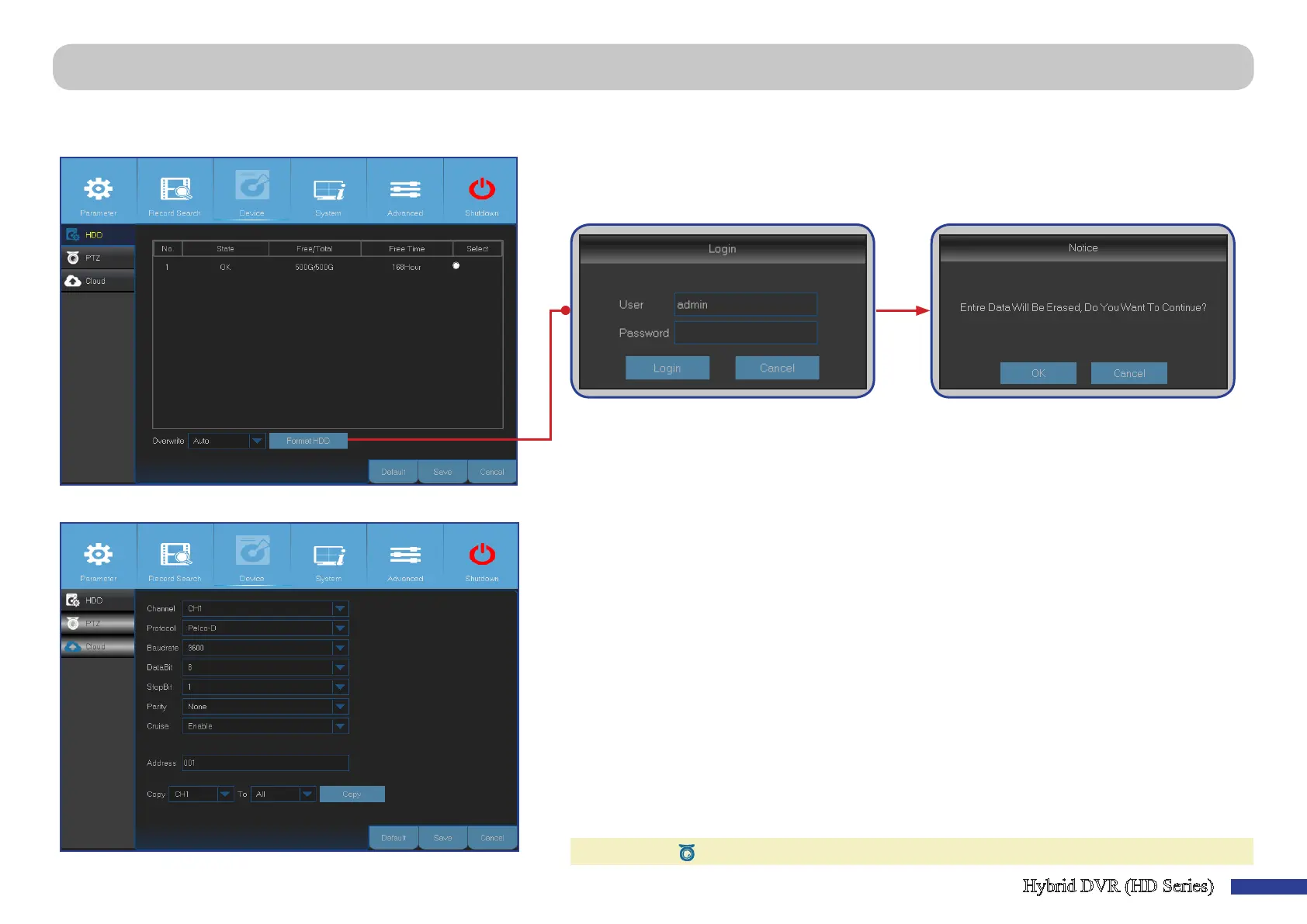
Main Menu > Device > HDD & PTZ
This menu allows you to congure the internal HDD that the DVR uses for saving the recordings. You need to format the HDD only at the rst startup and if you replace the
HDD.
• Format HDD: Select the HDD you want to format and then click Format HDD. To start formang,
you need to enter your user name and password and then click OK to conrm to connue
formang.
• Overwrite: Use this opon to overwrite the old recordings on the HDD when the HDD is full. For
example, if you choose the opon 7 days then only the last 7 days recordings are kept on the
HDD. To prevent overwring any old recordings, select Disable. If you have disabled this funcon,
please check the HDD status regularly, to make sure the HDD is not full.
This menu allows you to congure the PTZ (Pan-Tilt-Zoom) sengs for the dome camera.
• Channel: Choose a channel where is connected a dome camera.
• Protocol: Choose the communicaon protocol between the PTZ capable camera and DVR.
• Baudrate: The speed of the informaon sent from the DVR to the PTZ-capable camera. Make sure
it matches the compability level of your PTZ-capable camera.
• DataBit/StopBit: The informaon between the DVR and PTZ-capable camera is sent in individual
packages. The DataBit indicates the number of bits sent, while the EndBit indicates the end of
the package and the beginning of the next (informaon) package. The available parameters for
DataBit are the following: 8, 7, 6, 5. The available parameters for the StopBit are 1 or 2.
• Parity: Is necessary for error check. See the documentaon of your PTZ-capable camera, to
congure this seng.
• Cruise: Enable to allow to use the Cruise mode. In order to use the Cruise mode, you need to set a
number of preset points.
• Address: Set the command address of the PTZ system. Please be noted that each PTZ-capable
camera needs a unique address to funcon properly.
NOTE: Click on the Quick Camera Toolbar to start using the PTZ funcon.



 To Next Page