Hybrid DVR (HD Series)
25
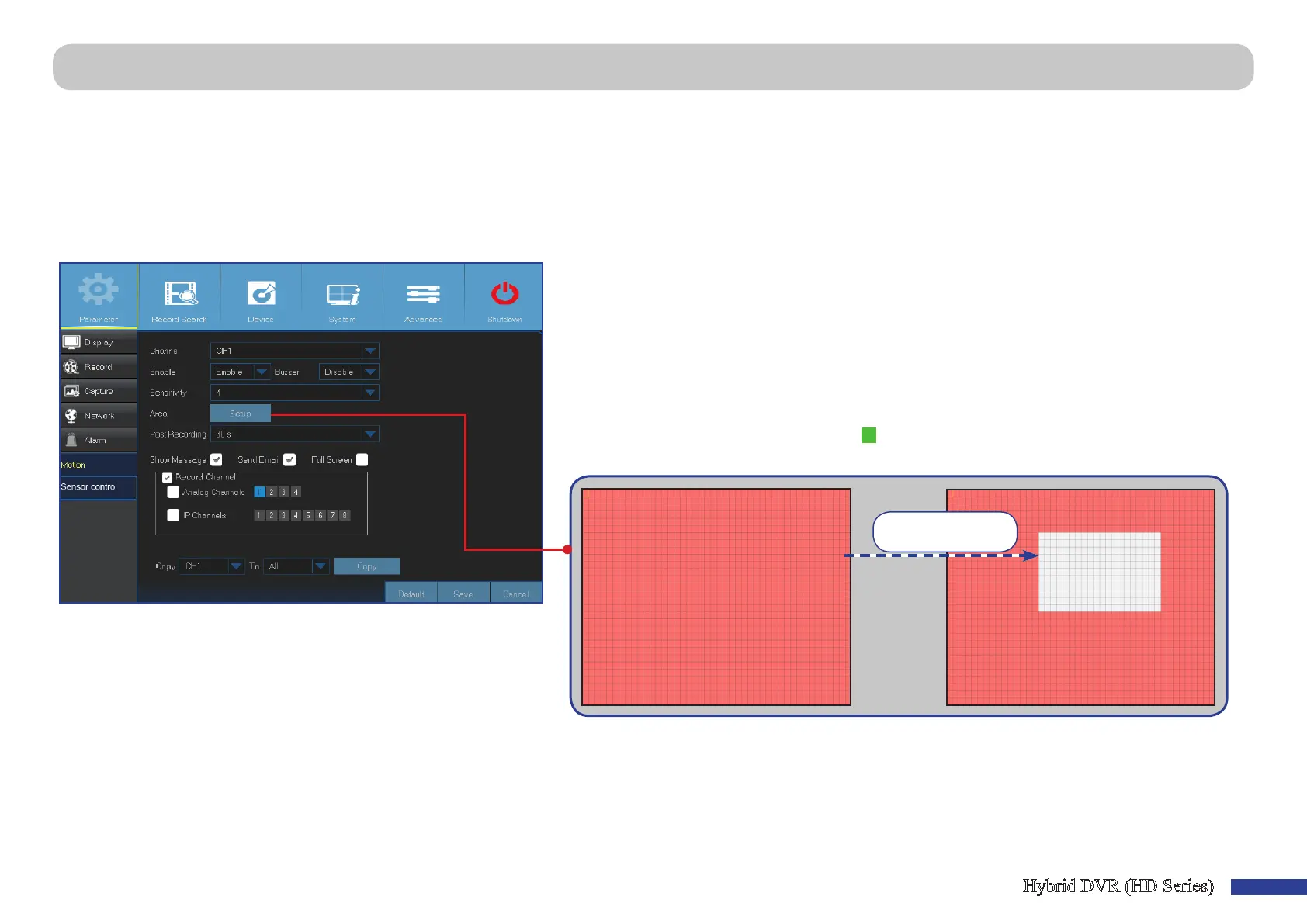
Main Menu > Parameter > Alarm > Moon
This menu allows you to congure moon parameters. The moon detecon is prey straight forward, the DVR simply compares one frame to another. A sucient amount
of dierence is interpreted as moon. When the moon is detected, the system can be set to automacally iniate recording. In this menu you can select the channels
where you want the moon based recording to take place.
By default, the whole screen is marked for moon detecon (red blocks). If you want to disable the moon detecon on an area, you need to click the grid cursor and then
drag the mouse to highlight the scope to unmark the area (transparent block).
If you set the moon detecon at a high sensivity level (“8” is the most sensive) then the frequency of false alarm events increases. Vice versa if the sensivity level is
too low (“1” is the least sensive), you might increase the risk that a signicant moon event will not trigger the moon detecon to record.
• Send Email: You can let the DVR to send you an auto-email when
the moon is detected. To set up the email schedule, please see
“Main Menu > Parameter > Network > Email & Email Schedule” on
page 23.
• Full Screen: If this funcon is enabled and a moon is detected in
a channel, you will see that channel in full screen.
• Analog Channels / IP Channels: Here you can select which
channels you want to include to the moon detecon. If the
moon is detected, the recording will start immediately on those
channels.
• Channel: Select the channel you want to set the moon detecon.
• Enable: Enable or disable the funcon.
• Buzzer: The DVR can use its internal buzzer to emit an alarm tone. You can set the buzzer duraon
in seconds when the moon is detected.
• Sensivity: Set the sensivity level.
• Post Recording: You can set how long aer an event occurs that the DVR will connue to record.
The recommended recording length is 30 seconds but it can be set higher up to 5 minutes.
• Show Message: Check the box to display “
“ icon on the screen when the moon is detected.
• Area: To setup moon area, click Setup.
Area is unmarked



 To Next Page