Hybrid DVR (HD Series)
19
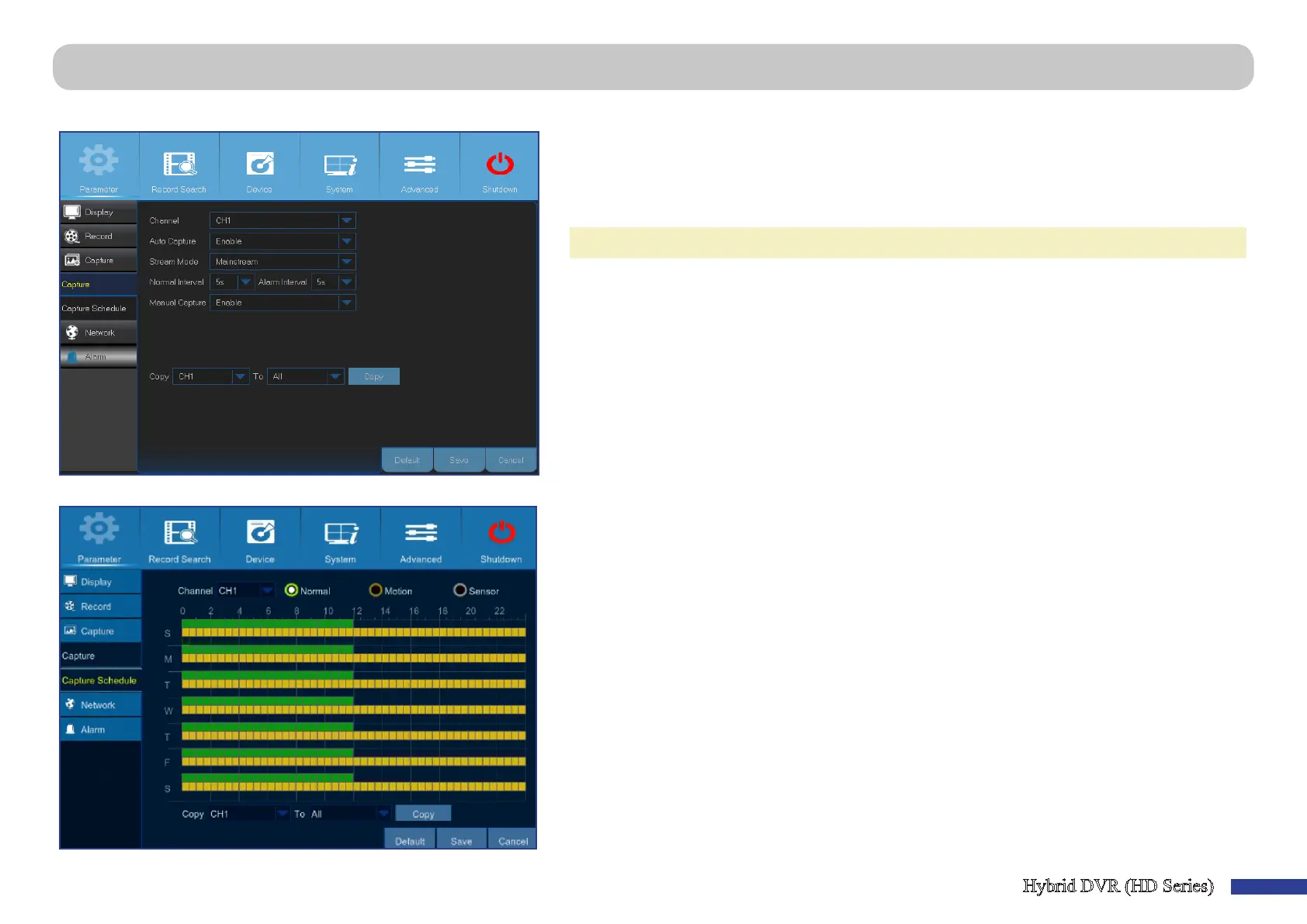
Main Menu > Parameter > Capture > Capture & Capture Schedule
This menu allows you to congure the snapshot capturing parameters.
• Channel: Select the channel to set its capture parameters.
• Auto Capture: Enable or disable automac capturing on the channel. When this feature is
enabled, you can select the snapshot capturing interval.
• Stream Mode: Select the image resoluon.
NOTE:
When the Auto Capture is enabled, you can select the image capturing interval.
• Normal Interval: Snapshots are captured based on normal interval.
• Alarm Interval: Snapshots are captured based on alarm interval only when a moon is detected.
Please make sure Alarm > Moon is enabled for the channel.
• Manual Capture: Enable or disable manual capturing on the channel.
This menu allows you to congure the snapshot capturing schedule.
In the following example the Normal Interval is set to 30s and Alarm Interval is set to 5s. According
to the schedule, normal capturing and moon capturing are taking place simultaneously from 0AM
~ 12PM. From 12PM ~ 24AM the capturing is based on moon only.
-From 0AM ~ 12PM the snapshots are captured every aer 30 seconds if no moon is detected. If
moon is detected, the snapshots are captured every aer 5 seconds.
-From 12PM ~ 24PM the snapshots are captured every aer 5 seconds only if moon is detected.
Otherwise, there is no snapshot captured during this me period.
• Channel: Select the channel to set its snapshot capturing schedule.
• Normal: When the me slot is marked green, this indicates the channel is capturing snapshots
based on the Normal Interval.
• Moon: When the me slot is marked yellow, this indicates the channel is capturing snapshots
based on Alarm Interval only when a moon is detected.



 To Next Page