28
Hybrid DVR (HD Series)
Playback Recordings
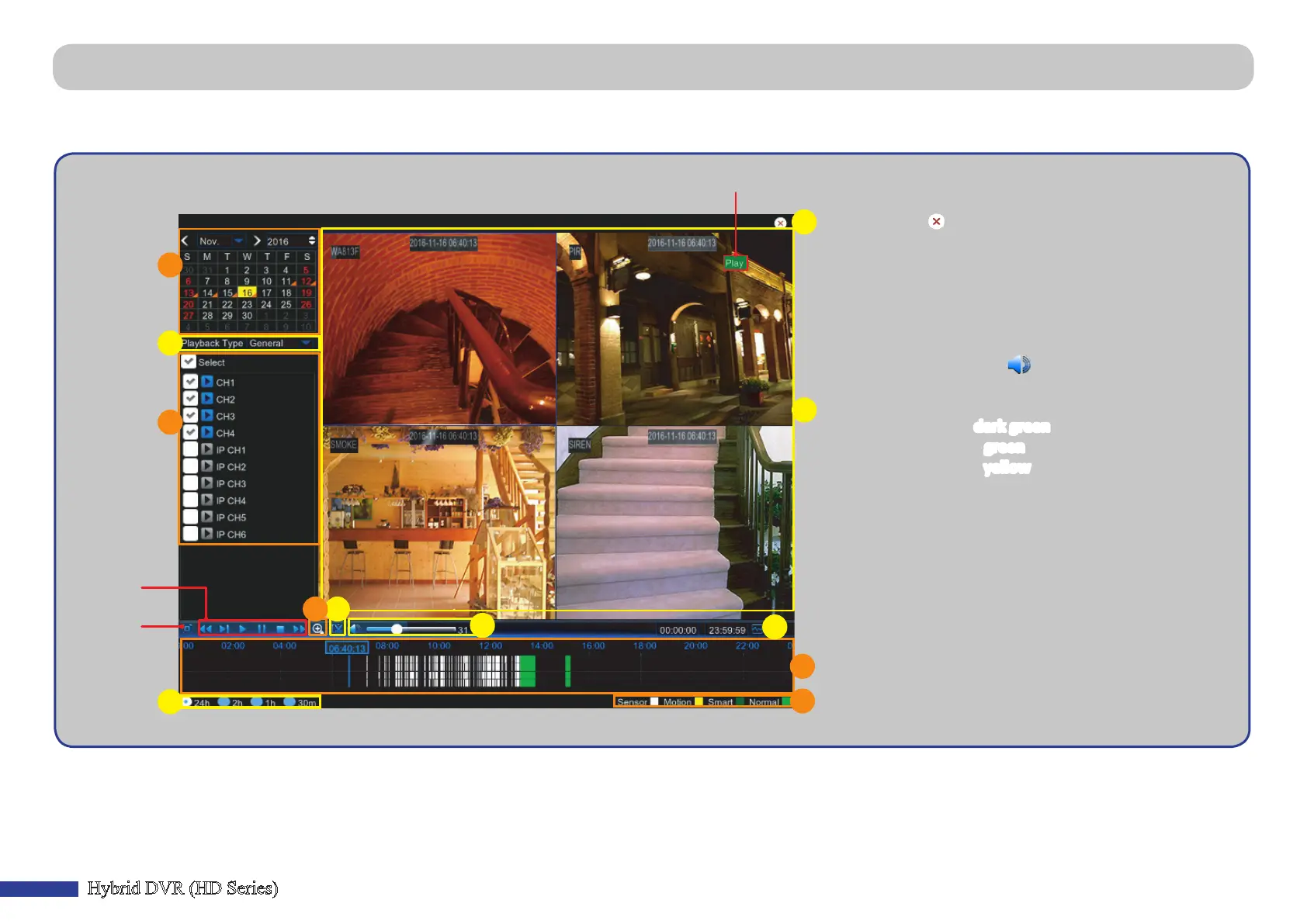
a) Close: Click to close the Playback screen.
b) Recording(s): Video recordings from selected channels.
c) Smart Search: Please see more in
“Smart Search” on page 29.
d) Trim Video: Please see more in
“Trimming Videos” on page 30.
e) Volume Control: Slide the sliderbar to increase or
decrease volume. Click to mute audio.
f ) Zoom In: Click to zoom in.
g) Time Bar: The color indicates the video recording type:
- Smart recording (dark green)
- Normal recording (green)
- Moon recording (yellow)
- Sensor recording (white)
h) Recording Type Indicator: Moon, Smart, Sensor, and
Normal.
i ) Time Frame: Select Playback meline.
j ) Channels: Check the channels to playback.
k) Playback Type: Select the playback type between
General, Events, Picture, and Sensor.
l ) Recording Calendar: Dates marked with orange triangles
have recordings.
Playback Status
Playback
Control
d
e
g
l
j
h
i
k
a
b
f
c
Full screen
• Playback Screen
Main Menu > Record Search > General, Events & Picture (connued)



 To Next Page