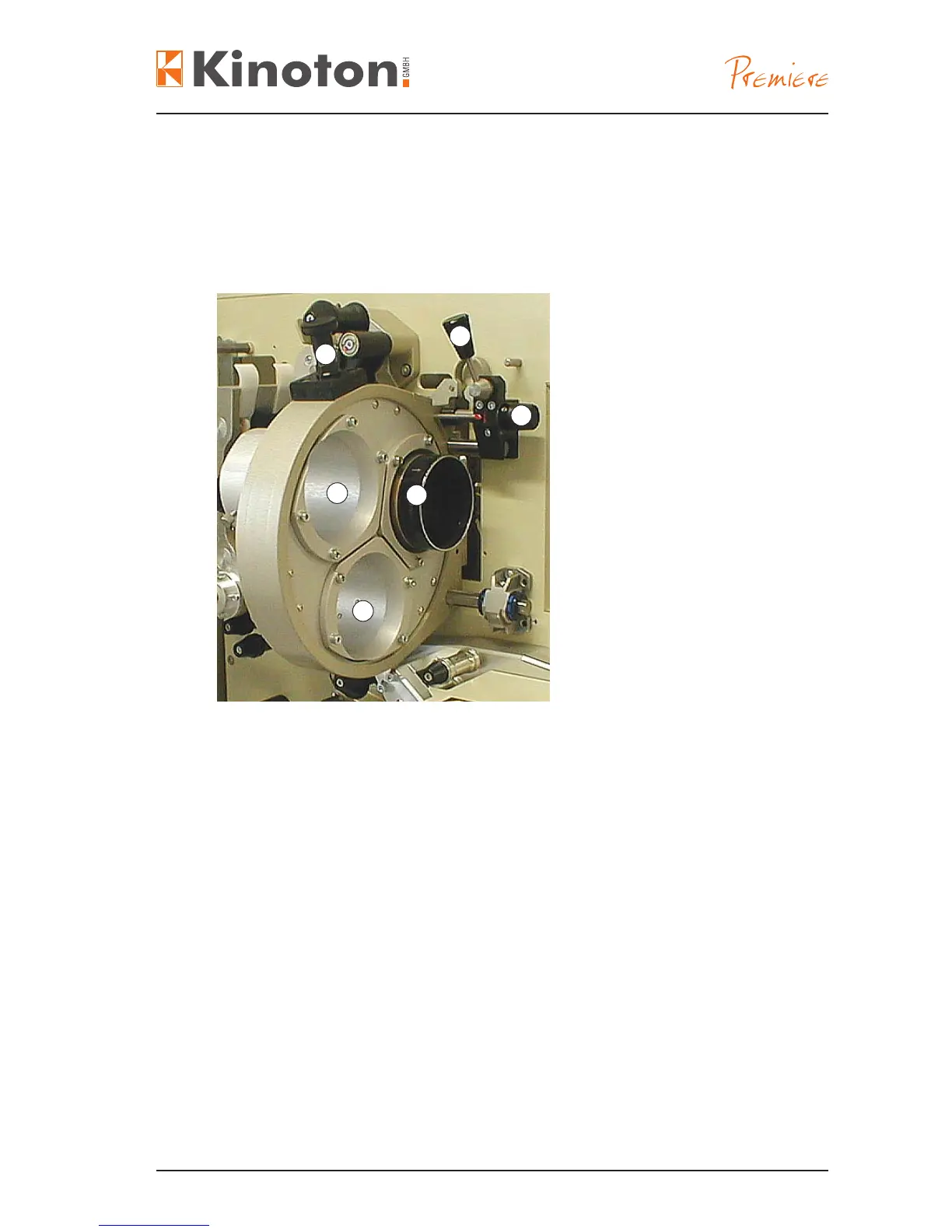
Film Gate Components
Issue: 08/2012
The lens turret can hold two or three lenses. By turning the turret the needed lens
can be positioned in front of the lm gate. This can be done manually or electronically
controlled.
Lens tubes
Á Lens in lens tube
 Handle (arresting pin)
à Focusing knob (manual)
Ä Position lever for moving the lens
turret away from the gate
• For inserting a lens loosen the knurled screws and push the lens into the lens tube.
$The tubes are labelled for a suitable lens: CS (1:2.40), WS (1:1.85) or NS (1:1.33).
• Precisely focus each lens in its tube by moving the lens in its tube and without
adjusting the focus knob.
• Then fasten the lens with the knurled screw.
X
Some lenses may require rings to support the rear section; these are available from
Kinoton.
• For easy lm threading ip the position lever - the lens turret will move away from
the lm gate.
• To rotate a lens into position, pull out the handle and turn the lens turret to the
desired position. Let handle drop – lens turret is positioned.
X
It is possible to set the handle so it remains up so that the turret can continuously
rotate. This position is not used for normal operation.
2
1
3
4
5
1



 To Next Page