Issue: 08/2012
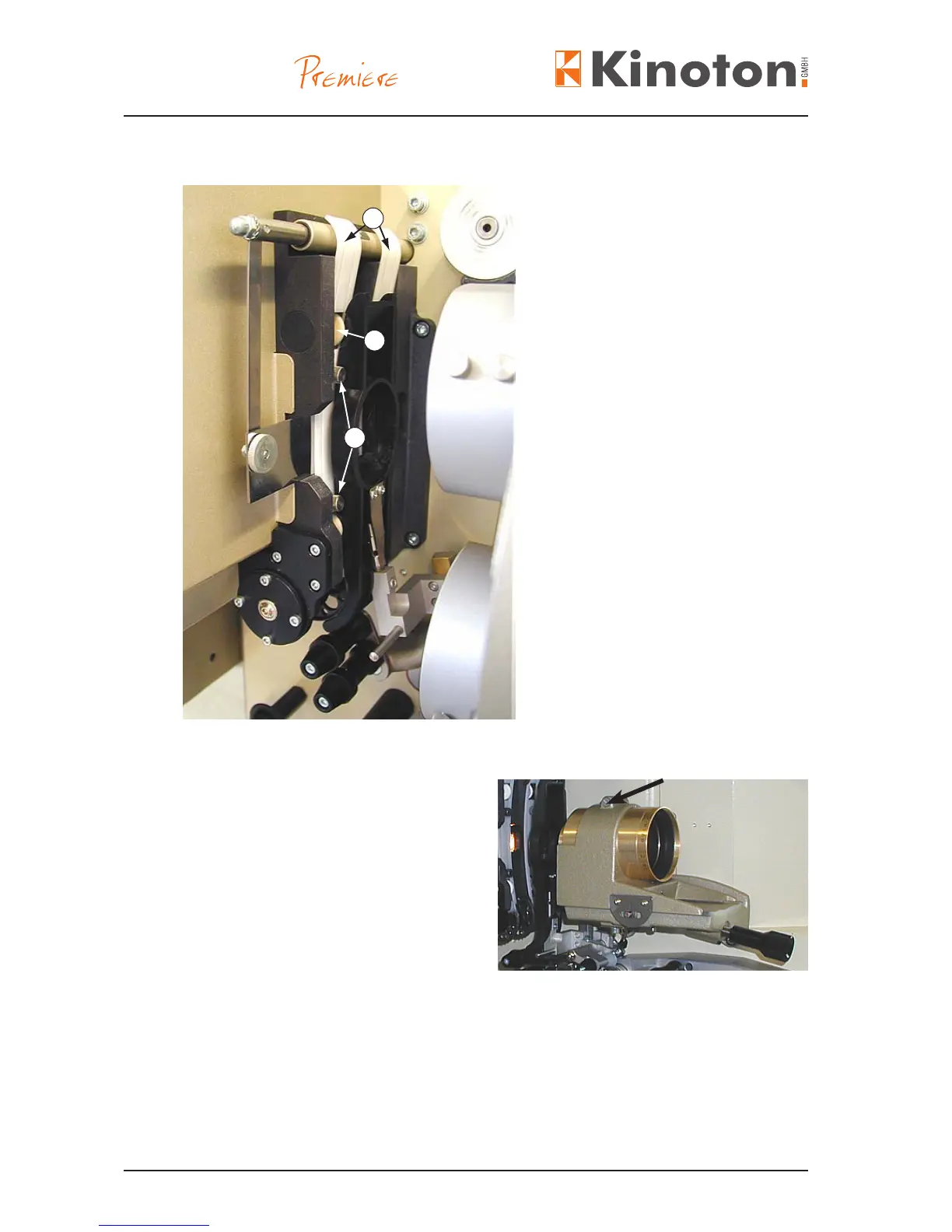
Film runner strips (2)
Á Ceramic rollers (2 per strip)
 Knurled fastening screws (4)
• Loosen the knurled fastening screws
and remove the old runner strips
and insert the new runner strips.
$They must lay in parallel to the
vertical lm gate edges.
The small spring-suspended
ceramic rollers must have a free
clearance.
$The seat is correct, if the conic
ending running strips are lying lightly
on the sprocket without touching
the teeth, so that a perfect lm run
even with splices is assured in both
directions.
• Tighten the knurled screws.
• For setting up lenses, set scale in the
mid-position.
• Loosen the clamping screw (arrow)
and push the lens into the holder until
picture is sharp (basic adjustment).
• Tighten the clamping screw again.
• Repeat the adjustment for each lens
without turning the focus knob.
• To adjust the picture focus nally turn the knob slightly as required.
1
2
3



 To Next Page