Troubleshooting106 107
5.4 KOBOLD SP600
Fault Possible causes and rectification
The SP600 switches itself off
and the LED waves are lit up red.
It is possible that the motor is overstrained.
• Switch off the vacuum cleaner.
• Let the motor cool down.
• Switch the vacuum cleaner back on.
The vacuum cleaner switches itself
off and the SP600 switches off si-
multaneously.
The LED waves are flashing red and
the inspection flap comes open.
Moisture has been sucked in.
• Switch off the vacuum cleaner.
• Using a kitchen towel, dry the area of the suction
channel that is exposed by the inspection flap.
• After the device has dried completely, switch on the
vacuum cleaner and close the secondary air flap of
the SP600.
• It is possible that this step will need to be repeated
several times.
When switching on the vacuum
cleaner, the LED waves light up red.
The inspection flap on the SP600 has been opened be-
fore the vacuum cleaner was switched on.
• Switch off the vacuum cleaner.
• Close the flap.
• Then switch the vacuum cleaner back on again.
The suction channel of the SP600 is
blocked.
• Switch off the vacuum cleaner.
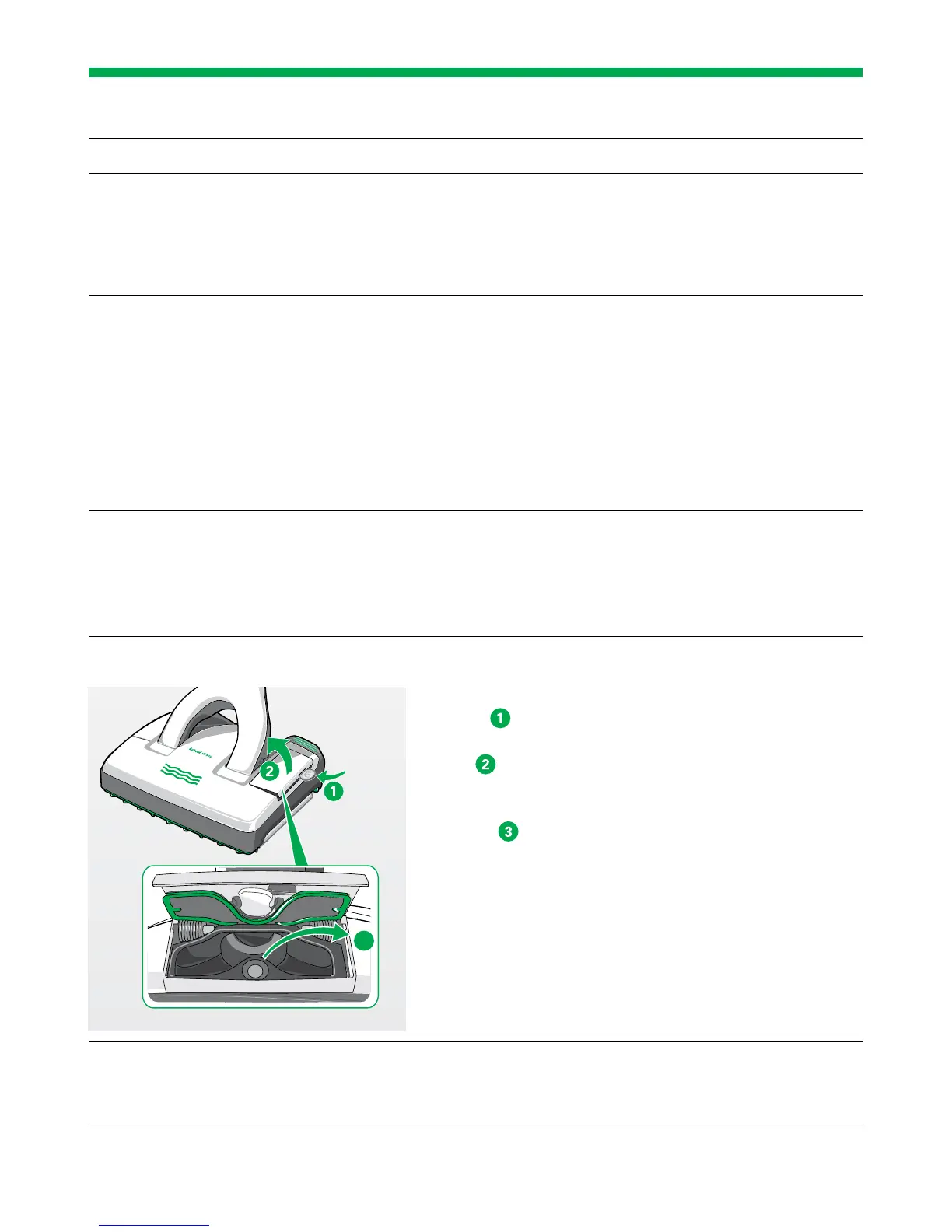
• Open the inspection flap on the left hand side of the
device. This can be done by inserting a coin into the
groove
.
The magnetic latch on the inspection flap comes
open
. You can now clearly see inside the suction
channel.
• Remove any objects that are blocking the suction
channel
. To do this, use an appropriate object
(e.g. screwdriver, crochet needle).
• Close the inspection flap again by pressing it shut.
The magnetic latch on the inspection flap will click
into place and it is now firmly closed.
• Also check whether the suction openings between
the sealing lips are clear. If necessary, shake out any
objects inside.
The joint connector of the SP600 is
blocked.
• Remove the blockage with a suitable tool
(e.g. screw driver, crochet hook).
3


 To Next Page