5.2 KOBOLD EB400 AUTOMATIC ELECTRIC BRUSH
Fault Possible causes and rectification
The Automatic Electric Brush is too
loud.
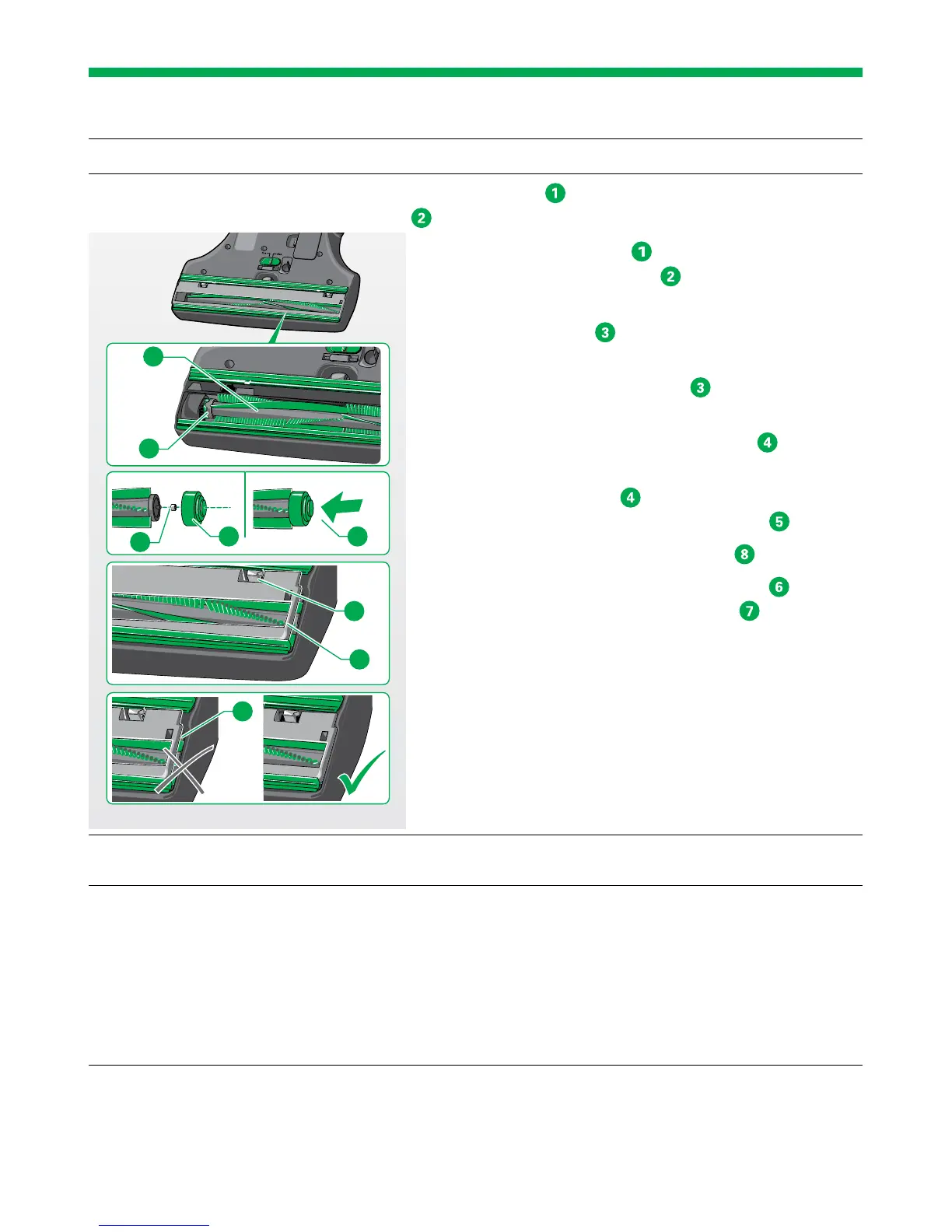
The roller brush
is not mounted on the TORX
®
cam
of the gear mechanism.
• Check if the roller brush
is correctly inserted and
mount it on the TORX
®
cam of the gear mecha-
nism if necessary.
The small bearing ball
of the cup and ball bearing is
missing.
• Make sure that the bearing ball
is properly in-
serted.
The green cap of the cup and ball bearing
is not
properly installed.
• Check if the green cap
is properly installed. If
not then position the green cap correctly
.
The floor plate is not properly engaged
.
• Make sure that both locks (left and right)
engage
audibly with a click during installation
.
Maybe original Kobold accessories were not used,
which can lead to bearing or motor damage.
• Use original Kobold roller brushes only.
An object might have got stuck in the area around the
roller brushes.
• Remove the object.
Threads have coiled around the roller
brush.
• Cut the threads as described in the chapter “Clean-
ing the roller brush” on page 94.
The slider for switching between
coarse materials and fine dust on
the underside of the Automatic
Electric Brush cannot be moved.
The Automatic Electric Brush is in hard floor mode.
• Make sure that the Automatic Electric Brush was
properly switched off. Connect the automatic elec-
tronic brush with the vacuum cleaner and in the
standby position (joint locked) switch them on and
back off.
The Automatic Electric Brush is now in carpet mode.
3
2
1
5
7
6
4
8
9


 To Next Page