Operation54 55
3.4.6 GETTING THE KOBOLD SP600 READY
FOR USE
RELEASING THE CLOTH HOLDER FROM THE
KOBOLD SP600
WARNING
Risk of electric shock!
• For your own safety, switch off the vacuum
cleaner at the handle every time you replace the
MF600 cleaning cloth.
To attach the cleaning cloth to the cloth holder, the
cloth holder must first be removed.
1. Attach the SP600 to the vacuum cleaner as
described in the chapter ”3.4.4 Attaching the
Kobold SP600” on page 52.
2. Put the vacuum cleaner in the standby position
as described in the chapter “3.4.5 Setting and re-
leasing the standby position on the Kobold
SP600” on page 52.
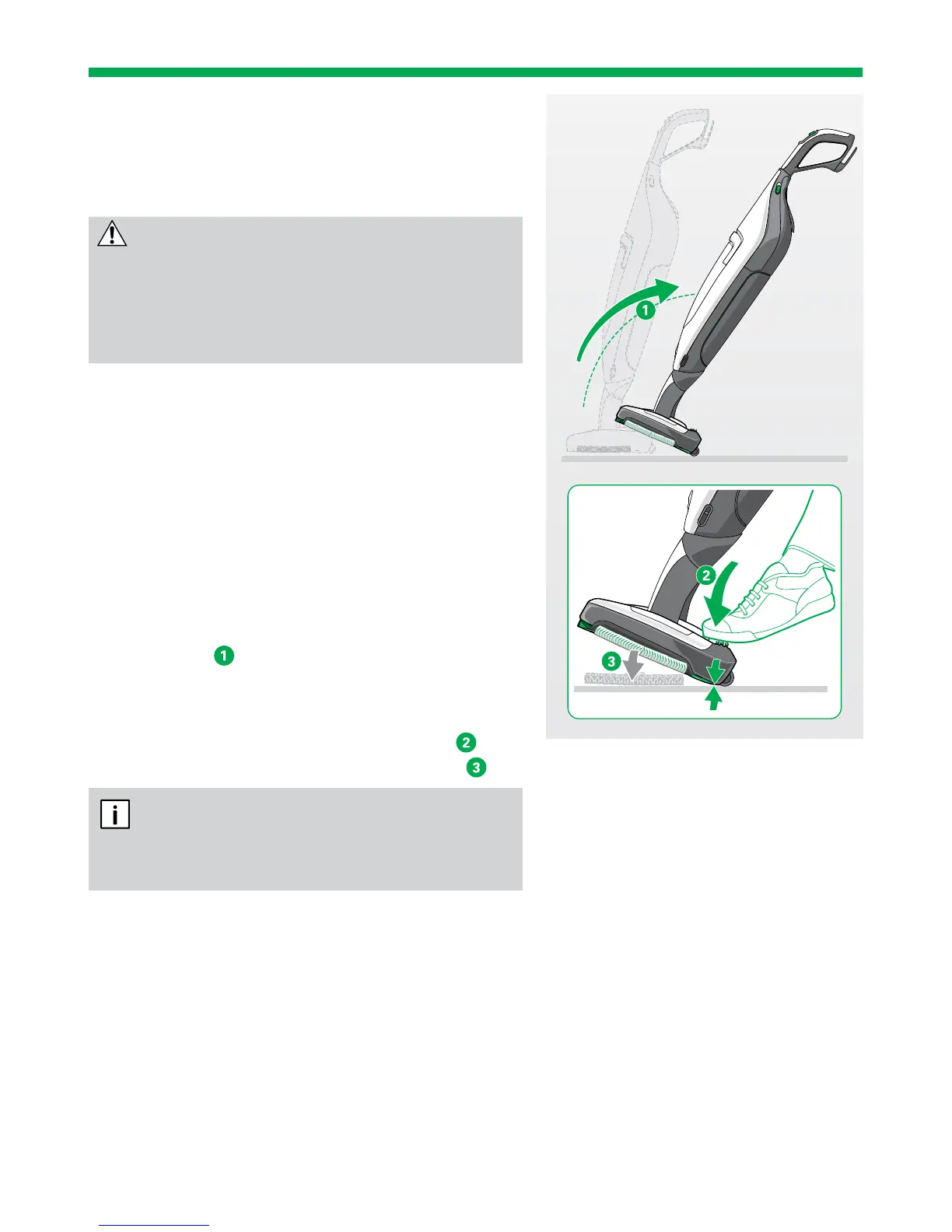
3. Tilt the vacuum cleaner backwards in the stand-
by position
.
The SP600 is now positioned on its rollers.
4. Press the green pedal positioned at the back of the
vacuum cleaner on the left with your foot
.
The cloth holder is released from the device
.
It is only possible to eject the cloth holder
when the Kobold vacuum cleaner is tilted back-
wards on its rollers in the standby position.


 To Next Page