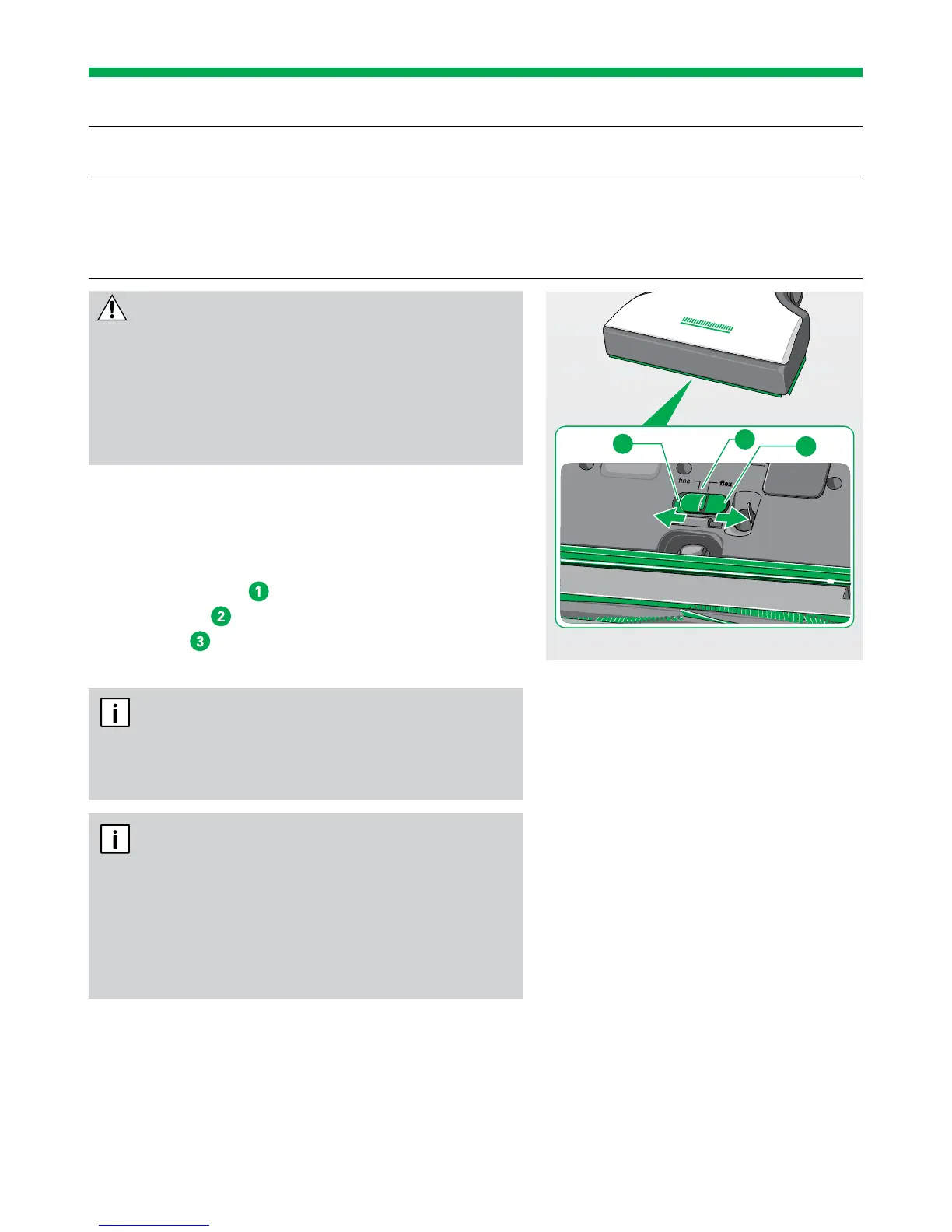
SWITCHING BETWEEN FLEX/FINE
Flex setting Your Automatic Electric Brush is perfectly pre-set with the flex
setting for everyday vacuuming.
Fine setting You can adjust the Automatic Electric Brush specifically for
vacuuming fine dust from joints and cracks.
You will obtain maximum dust collection, from a wooden floor
with lots of joints for example.
CAUTION
Risk of injury due to the rotating brush!
• Always switch the Kobold VK200 Upright
Vacuum Cleaner off at the main switch before
changing the setting on the bottom of the
Kobold EB400 Automatic Electric Brush.
1. Switch the Upright Vacuum Cleaner off at the
main switch.
The Automatic Electric Brush automatically
defaults back to carpet mode.
2. Move the slider
on the underside of the device
to position
(fine) for fine dust from joints or
position
(flex) for picking up coarse material
from smooth floors.
We generally recommend the flex setting.
Only select the fine setting for floors with large
joints or cracks, such as wooden floorboards.
When the Kobold EB400 Automatic Electric
Brush is in hard floor mode, the slider cannot be
operated. In this case, switch the Kobold VK200
Upright Vacuum Cleaner off and back on again at
the main switch to set the Kobold EB400 Auto-
matic Electric Brush to carpet mode.
2
3
1


 To Next Page