Chapter 7 CVS-842/852/843
Functional Registration Operation Manual
7-12 93132692-00
7.4 The 3-Division Screen display and its gain settings
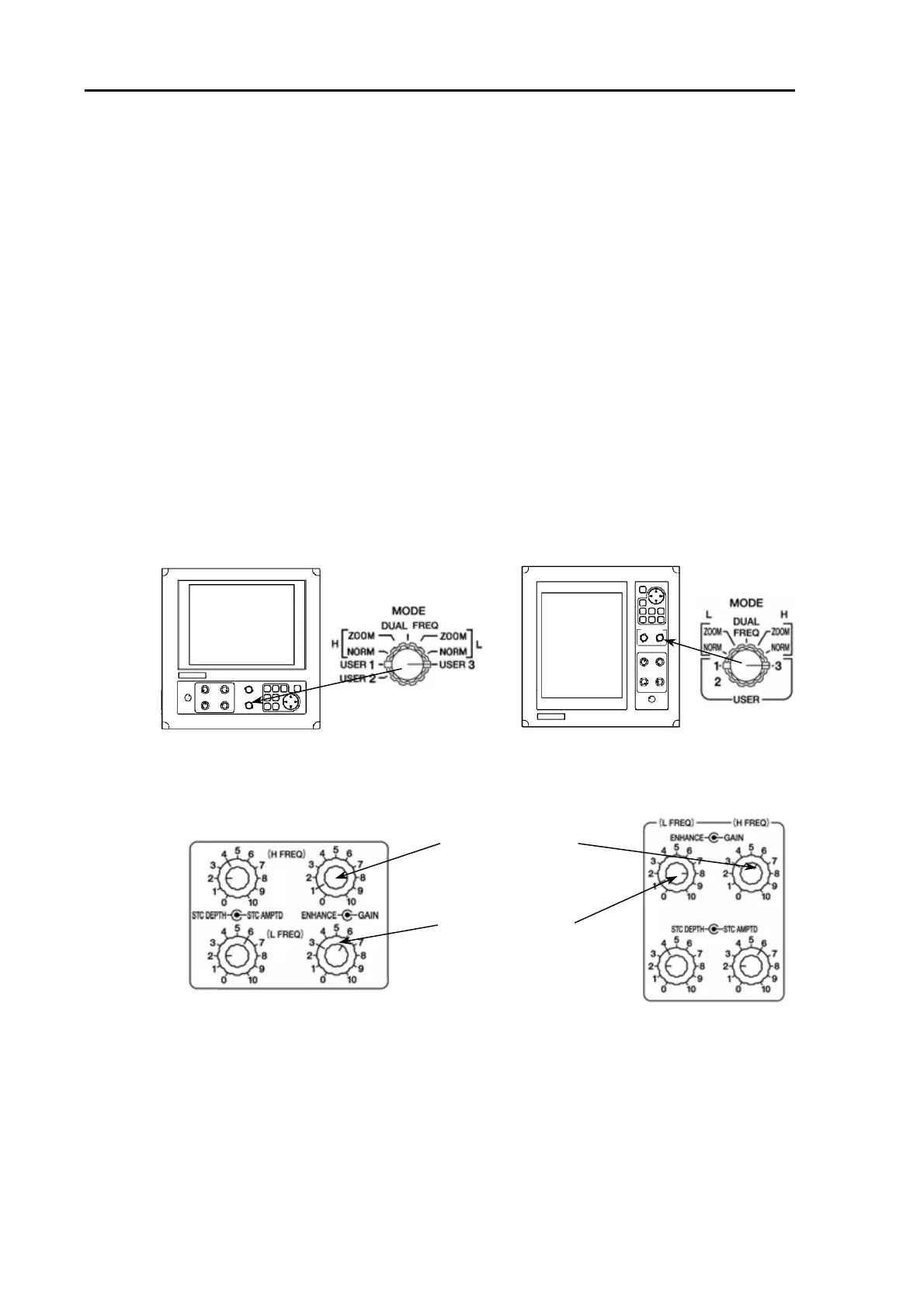
Set the MODE switch to USER 3.
(1)The gain adjustment for High Frequency 1 can be made with the H FREQ GAIN control.
(2) The gain adjustment for Low Frequency can be made with the L FREQ GAIN control.
(3) The gain control for High Frequency 2 can be made only when the 3-Division Screen is selected.
(4) Press the up or low arrow key to display the gain control window.
(5) While this window is displayed, the gain control is effective. To increase the gain, press the up
arrow key. To decrease the gain, press the down arrow key. The window will disappear 5 seconds
after the last key operation has been done.
NOTE:
In the Shift mode, the up and down arrow keys are solely used for the image shift operation. To
attempt adjusting gain control for High Frequency 2 image, exit the shift mode first and carry out the
operation.
CVS-842/852 CVS-843
djusts the High
Frequency gain.
djusts the Lo
Frequency gain.



 To Next Page