Chapter 6 CVS-842/852/843
Using the Menu Operation Manual
NOTE 1: No Information Window is available in CVS-843.
CAUTION: The following external devices must be connected to display the information in
the window: A navigation receiver that supplies the NMEA serial data for own ship position, even
osition and own ship’s speed indications. A temperature and speed sensor (ST-80-1/90-1/100-1)
for water temperature and own ship’s speed indications.
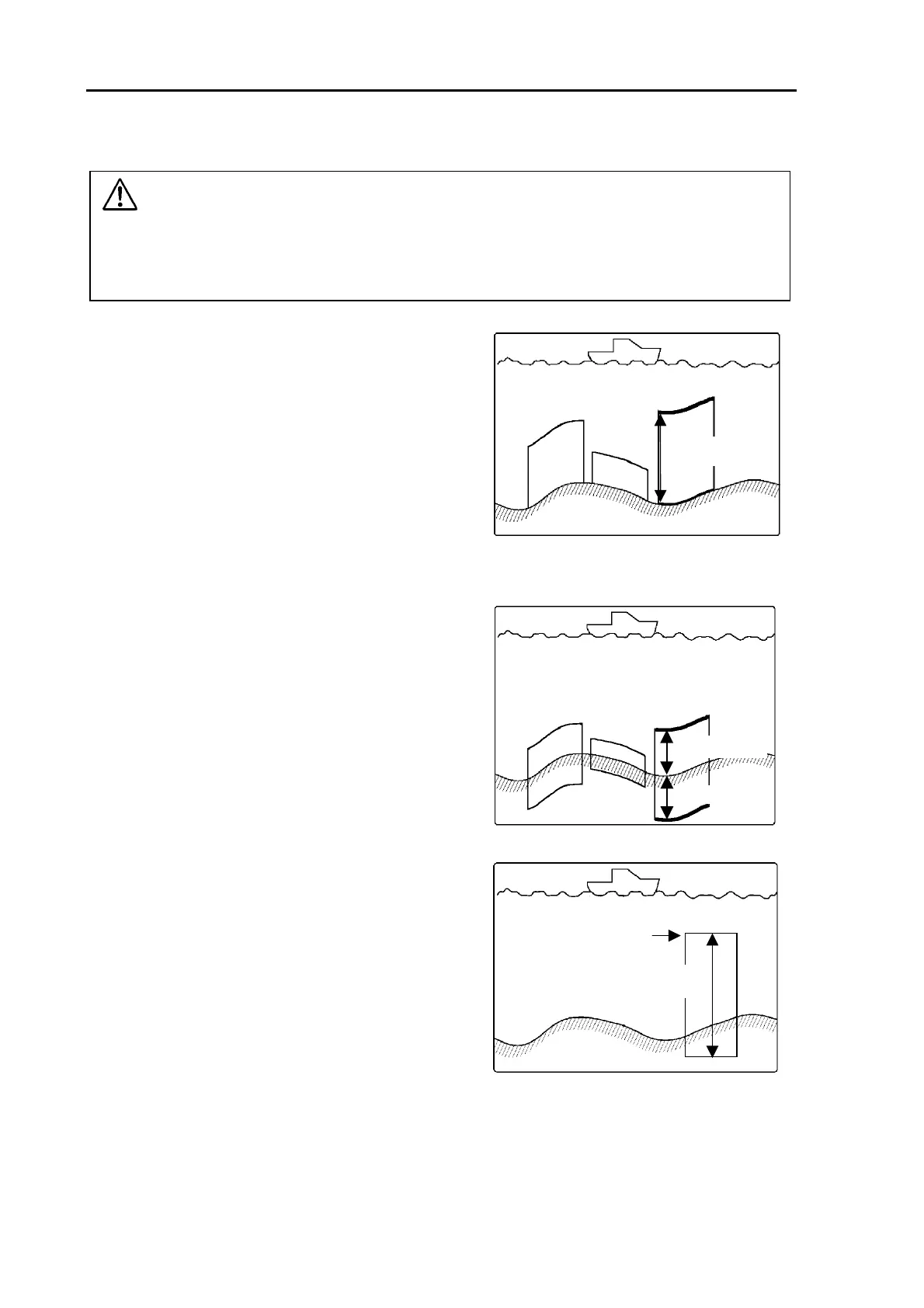
6.6.3 Zoom type
Zoom range
BTM (Bottom)
The bottom image is always fixed in the lower part
of the screen even though the depth changes.
Figu layre 6.10 Layout of BTM image disp
BD (Bottom Discrimination)
Even though the sea bottom depth changes, the top
surface of the sea bottom is displayed as a flat surface in
order to serve as a reference. A range of measurement
is also taken underneath the reference.
This results in being able to distinguish school of fish and bottom
Normal Range
Discrimination
quality that may be at the sea bottom.
Figure 6.11 Layout of BD image display
ZOOM(Zoom)
Zoom start depth
Zoom range
A zoomed image is shown in reference to a
specified depth. In this mode, the seabed echoes
are always shown even when the depth changes.
Figure 6.12 Layout of ZOOM image display
6-10 0093132692-05



 To Next Page