CVS-842/852/843 Chapter 6
Operation Manual Using the Menus
Chapter 6 Using the menu
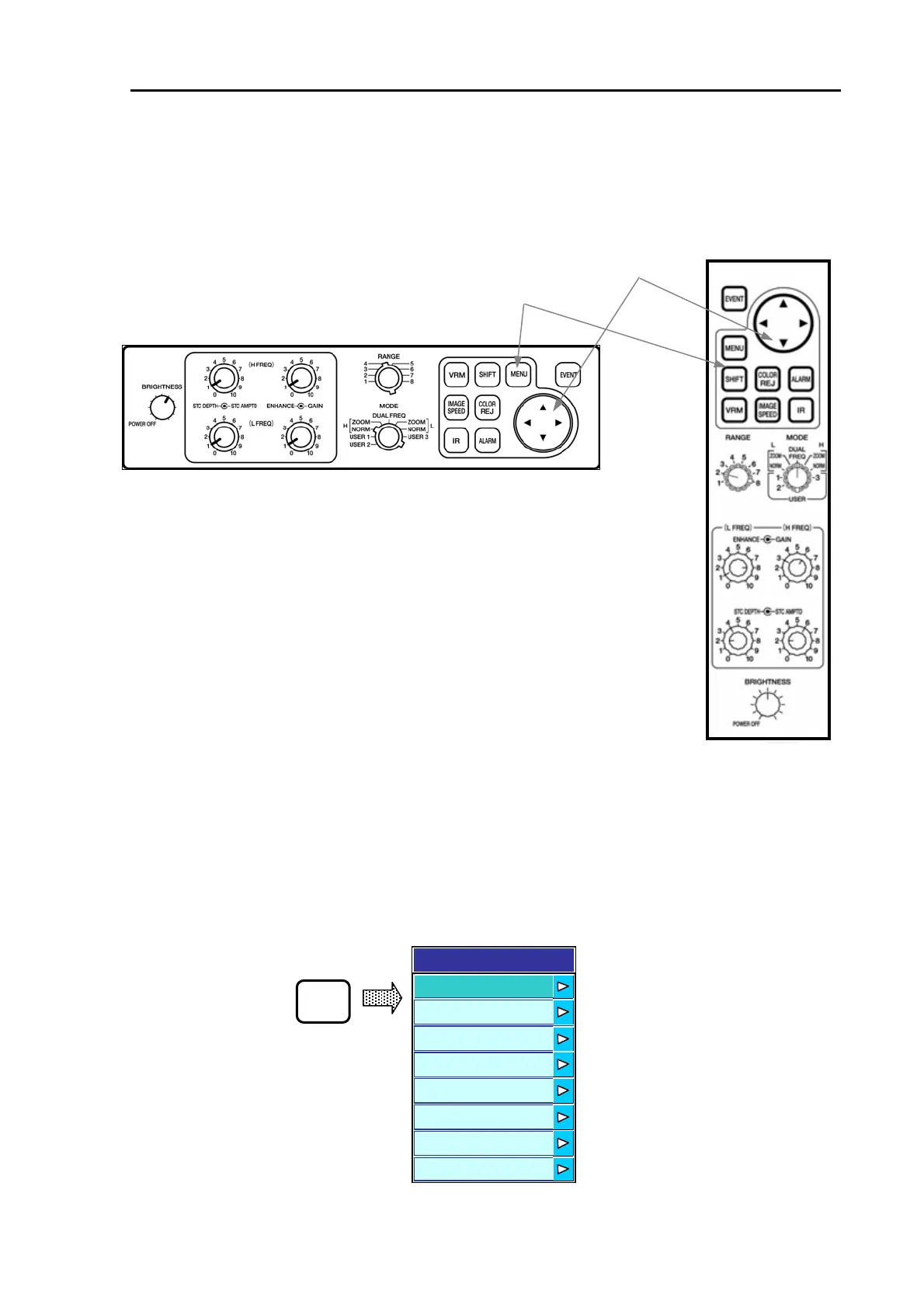
6.1 The key switches used
This chapter describes the operating procedures of menu driven functions, which is activated by
pressing the MENU key switch. The following key switches are used for the menu, with their locations
shown in Figure 6.1.
Menu key
4-way arrow key
CVS-842/852 CVS-843
6.2 Operating procedure of the menu driven functions
1. Press the MENU key to show the Main Menu.
4-way arrow keys
Menu key
Figure 6.1 Locations of the key switches
2. Press the up or down arrow key to select a menu item and press the right arrow key to show its
sub menu list.
3. Press the up or down arrow key to select a sub menu or to select a numerical value.
4. Press the MENU key or the left arrow key repeatedly until the normal screen display is shown.
The above procedures are illustrated as follows with actual menu windows shown.
[Displaying the Main Menu]
Main Menu shown
Simulator
Initialize
Customize
System
uto
Display
Image
Transmission
Menu
MENU
Figure 6.2 Main Menu display
0093132692-05 6-1



 To Next Page