CVS-842/852/843 Chapter 7
Operation Manual Functional Registration
93132692-00 7-5
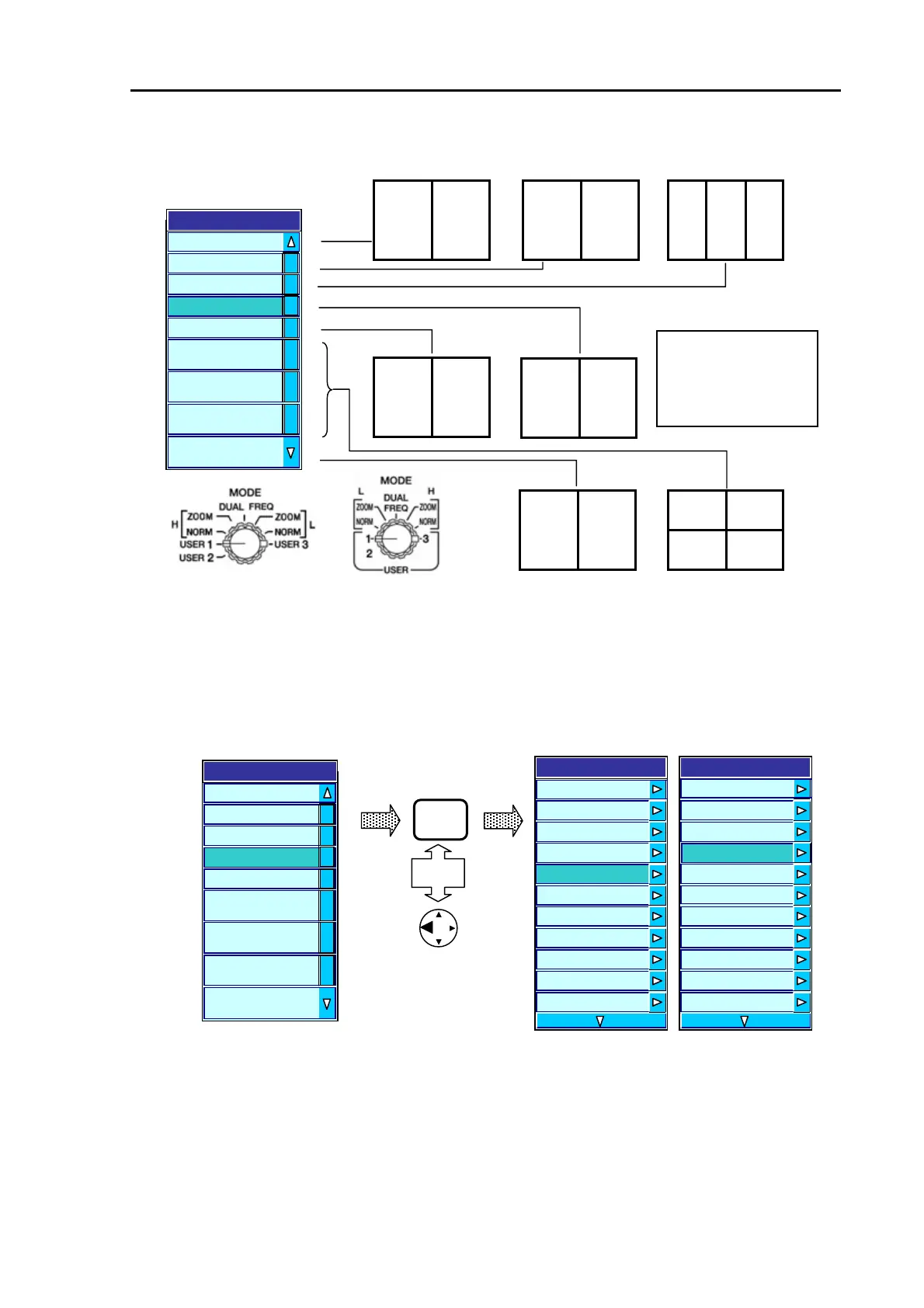
The items and their image arrangements available in the USER 1 menu are as follows:
CVS-842/852 CVS-843
Figure 7.6 Available image modes in the USER 1 menu
(3) Press the MENU key or the left arrow key to fix the H/Enhance (See NOTE) selection. The display
will return to an upper level menu, showing USER 1 H/Enhance under the DISPLAY menu.
NOTE: The H/Enhance function is defaulted to 25 dB. To change the setting, refer to Para 7.5 “Setting
the Enhance effect”.
CVS-842/852 CVS-843
(5) To continue the settings for USER 2, repeat the procedure from step (3).
(6) To exit this menu, press the MENU key or the left arrow key twice.
MENU
Or
User 1
L/MIX
H/MIX
H/L/MIX
H/EN
L/EN
H/BTM/L/BTM
H/B.D./L/B.D.
H/ZOOML/ZOOM
H/B.X/L/B.Z
Figure 7.7 Fixing the entry to the USER 1 menu
MIX NORM (H)
Enhance NORM(H)
MIX NORM
Enhance NORM(L)
L H MIX
NORM (H)
LK
H
NORM (H)
LK
L
BZ(L)
Scope
User 1
L/MIX
H/MIX
H/L/MIX
H/EN
L/EN
H/BTM/L/BTM
H/B.D./L/B.D.
H/ZOOML/ZOOM
H/B.X/L/B.Z
Acronym:
NORM: Normal Display
BZ: Bottom Zoom Display
LK: Bottom Lock Display
MIX: Video Mixed Display
Display
Menu
Information Window
OFF
Zoom T
e ZOOM
Zoom Range
5.0
User 1 H/EN
User 2 B.D
User 3 H(1)/H(2)/L
Depth Value Large
Depth Value Position Bottom
Scale Single
Scale Position Side
Display
A Scope
OFF
Scale Value Small
Zoom Type ZOOM
Zoom Range
5.0
User 1 H/EN
User 2 B.D
User 3 H(1)/H(2)/L
Depth Value Large
Depth Value Position Bottom
Scale Single
Scale Position Side



 To Next Page