10-12
Song Mode and the Song Editor
Song Mode: The FX Pages
Song Mode: The FX Pages
ThethreeSongmodeFXpages—FX,AUXFX1,andAUXFX2—workthesamewayastheeffects
pagesinSetupMode.SeetheSetupmodechaptereffectssection:TheFXPages:FX,AUXFX1,
AUXFX2 on page 7‐59forinformationonusing thesepages.
Song Mode: The MIXER Page
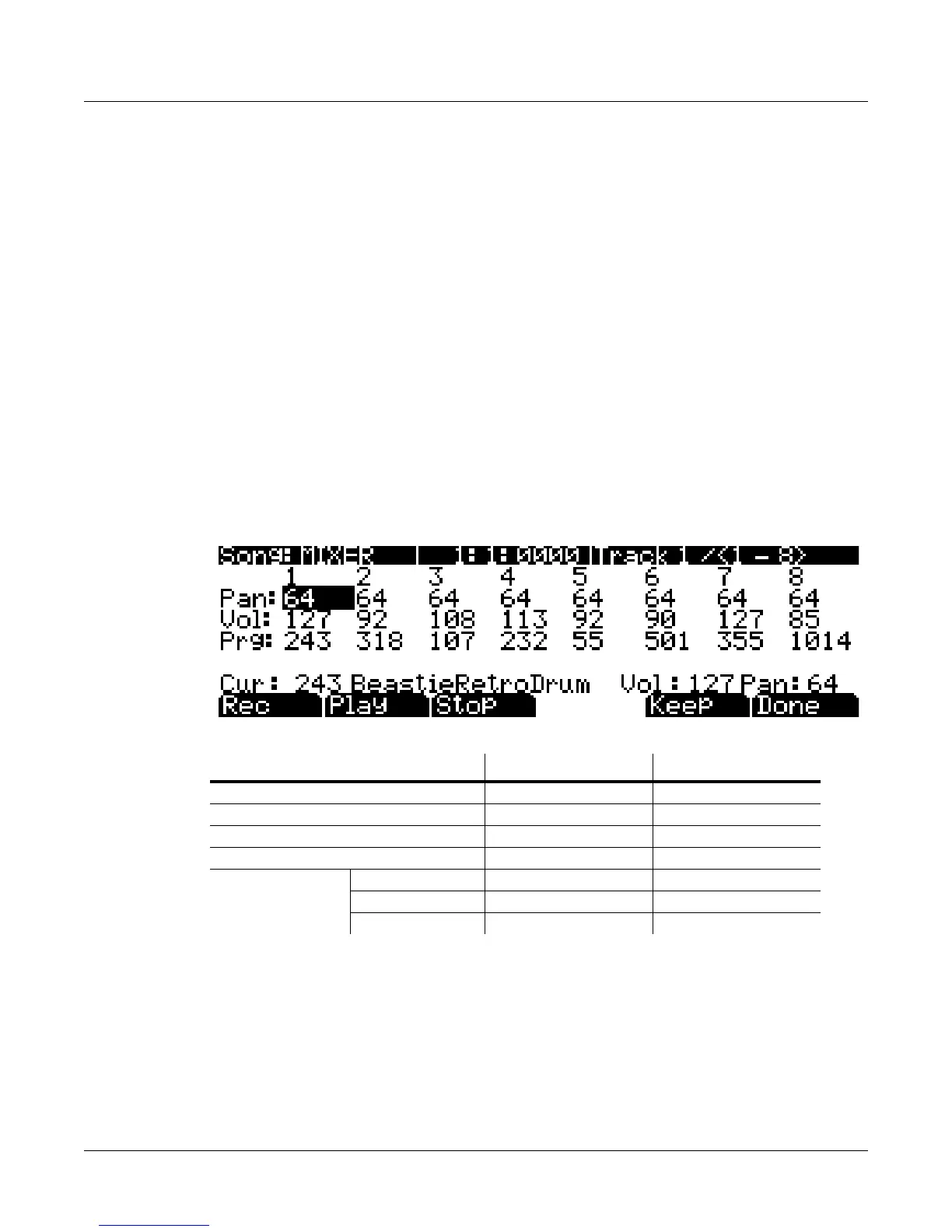
TheMIXERpageshowsthecurrentsettingsforthe programnumber,panning,andvolumeof
eachtrack(ingroupsof8).Theselectedtracknumber,aswellastherangeoftracksdisplayed
onthepage,aredisplayedintheupperright‐handcornerofthescreen.UsetheChan/Zone
buttons
orthecursorbuttonstochangethecurrentlyselectedtrack.Togettootherpagesof
tracks,continuescrollingpastthefirstorlasttrackonthepage.Thebottompartofthescreen
displayscurrentsettingsfortheselectedtrackincludingprogramnumberandname,panning,
andvolume.
Changing
thesettingsforatrack’sprogram,volume,orpanningwhilethesequenceris
recordingwillrecordthesechanges,viewableinthecorrespondingtrack’sEVENTpage.Upon
playback,theseautomatedmixerparameterswilldisplaytheirchangingvaluesinreal‐timeon
theMIXERpage.BelowisanexampleMIXERpage:
**Uneditable,these
valuesareanexpandedviewofthemixervaluesforthecurrentlyselectedtrack,which
canbeeditedinthefirstthreerowsoftheMIXERpage.
The Rec, Play, and Stop Soft Buttons
ThesesoftbuttonsfunctionasdescribedinTheRec,Play,andStopSoftButtons on page 10‐7.
Parameter Range of Values Default
Current Pan 0 to 127 None
Current Volume 0 to 127 None
Current Program Program List None
Selected Track (Trk) 1 to 16 1
For Selected Track
Current Program** Program List (Current Program)
Current Volume** 0 to 127 127
Current Pan** 0 to 127 64









 To Next Page