Program Mode
The Program Editor
6-9
The Program Editor
YoucanusetheProgramEditortofurthermodifythePC3LE’sfactorypresetROMsounds.To
entertheProgramEditor,startinProgrammodebypressingthe Programmodebutton onthe
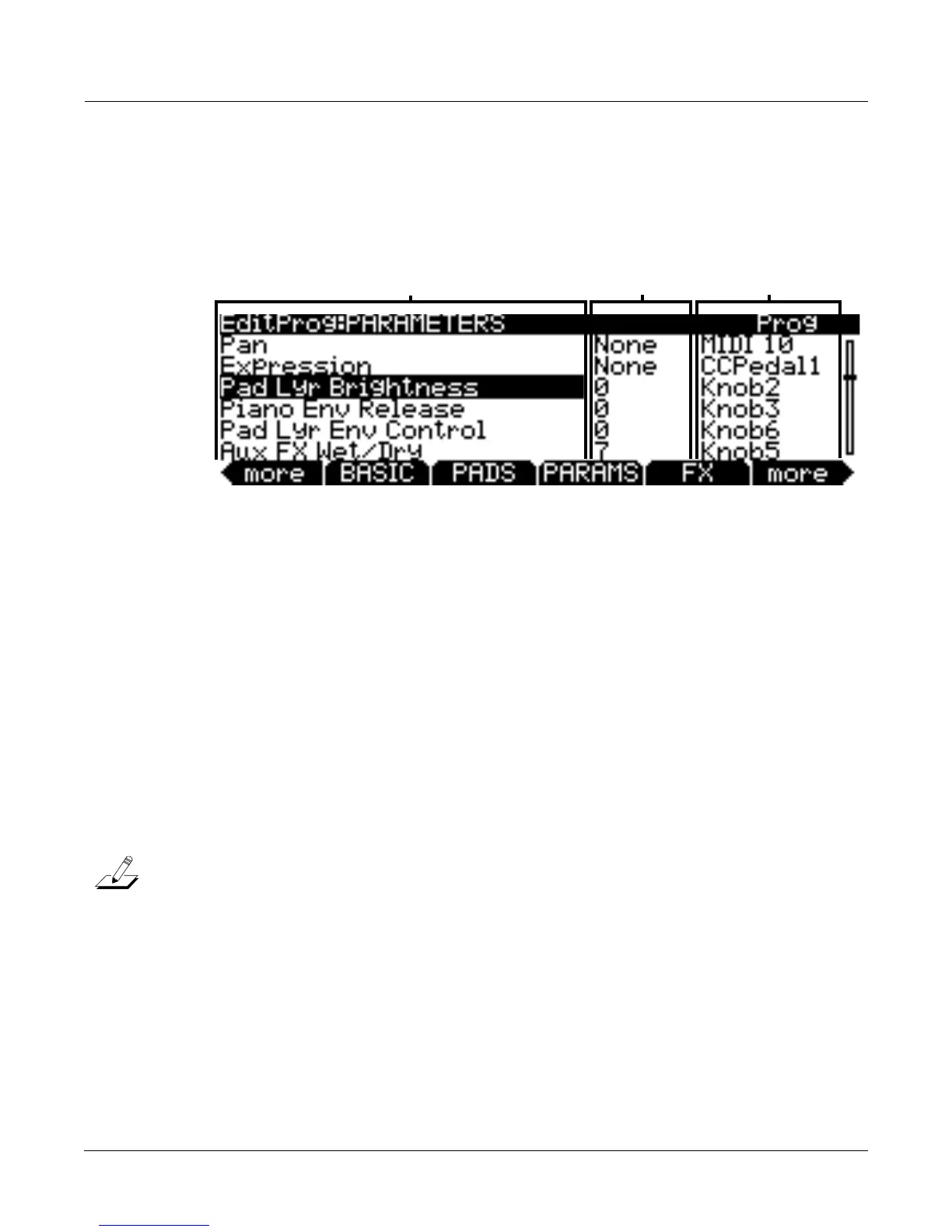
frontpanel,thenpresstheEditbuttononthefrontpanel.TheEditProg:PARAMETERSpage
willappear(seebelow,)along
withsoftbuttonsforotherbasicProgramEditorpages.Formore
advancededitingparameters,seeTheV.A .S . T. SoftButton on page 6‐16.
The PARAMETERS Page
PressthePARAMSsoftbuttontodisplaythePARAMETERSpage(seeabove.)The
PARAMETERSpageallowsyoutoaccessallofthecontrolableparametersforthecurrent
program.Allprogramshaveatleastthesefivebasicparameters:Pan,Expression(program
volume,)AuxFX1Wet/Dry ,Sustain,andSostenuto.Theparameterspagewill
alsodisplayany
availableV.A.S.T.synthesisparametersforthecurrentprogramandparametersforthecurrent
program’sinsertandauxeffects(ifeffectsareinuse.)Allavailableparametersarelisted
(additionalV.A . S . T. parameterscanbeaddedbymakingparametercontrolassignmentsintheV.A . S . T
ProgramEditor,seepage 6‐16
fordetails.)ForeachparameteryoucansetaMIDIvalueaswellasa
controlsource.
Theleftcolumnliststheavailableparameters,thecentercolumnshowstheMIDIvalueforeach
parameter,andtherightcolumnshowsthecontrolsource(eitheraphysicalcontrollerorMIDI
CCnumber)which
thatparameteriscontrolledby.Foreachparameterselected,therighttop
lineofthepagedisplayswhattypeofparameteritis.ThethreeparametertypesareProg(either
oneofthe5basicparameters,oraparameterspecifictotheprogram,)FXAux1(aparameterfor
theprogram’scurrent
AuxFXchain,)orFXInsert1(aparameterfortheprogram’scurrentInsert
FXchain.Drumprogramsmayhavemorethan1inserteffectschain.)
IfyoustophearingsoundfromprogramsononeMIDIchannel,orifprogramsonlyplay
fromtheleftorrightspeakerforaMIDIchannel,it
maybebecauseofchangesyou’vemade
ontheParameterspage,evenifyouhaven’tsavedaprogram.Seethenotesbelowfor
explanationsandsolutions.
Parameters
Usethecursorbuttonstoselectaparameterintheleftcolumn,andusetheAlphaWheel,‐/+
buttons,orcursorup/downbuttonstoscroll
throughparametersinthatcolumn.Allprograms
haveatleastthesefivebasicparameters:Pan,Expression(programvolume,)AuxFX1Wet/Dry,
Sustain,andSostenuto.TheparameterscolumnwillalsodisplayanyavailableVASTsynthesis
parametersforthecurrentprogramandparametersforthecurrentprogram’sinsertandaux
effects(if
effectsareinuse.).Allavailableparametersarelisted(additionalV.A . S .T. parameterscan
beaddedbymakingparametercontrolassignmentsintheV. A . S .T ProgramEditor,seeTheV.A . S . T. Soft
Button on page 6‐16fordetails.)SeeANoteAboutProcessorPowerAllocation on page 6‐13for
detailsonparameterslabeledNotAvailable.
Parameter MIDI Value Control Source














 To Next Page