Keymap and Sample Editing
Editing Samples
12-9
Editing Samples
ToentertheSampleEditor,firstselecttheprogramyouwishtoeditinProgrammode.Withthe
programselected,presstheEditbuttontoentertheProgramEditor,thenpresstheV.A. S. T.soft
buttontoentertheV.A .S .T.ProgramEditor.IntheV.A.S.T.ProgramEditortheKEYMA Ppage
willbe
selected(ifnotpresstheKEYMAPsoftbutton.)WiththeKeyMapparameterselectedon
theKEYMAPpage,presstheEditbuttonagaintoentertheKeymapEditor.OntheEditKeymap
page,selecttheKeyRangeparameterandusetheAlphaWheelor‐/+buttonstochooseoneof
theava ilablekey
ranges(ifthereismorethanonekeyrange.)Youcanedittheexistingsampleof
akeyrange,orchooseanewsampleforthekeyrange andeditthat.WhentheKeymap
parameterisselectedyoucanholdtheEnterbuttonandtriggernotestoselectdifferentkey
ranges.
Ifyouwant
toselectadifferentsample,usethecursorbuttonstoselecttheSampleparameter.
UsetheAlphaWheeltoselectasample.PresstheEditbuttononcemore,andyou’llenterthe
SampleEditor.Thesamplewillplaythroughtheeffectsofthecurrentprogram.Thenameof
stereosamplesend
withanS.Touseastereosample,theStereoparametermustbesettoOnin
theV.A . S.T. ProgramEditor,andtwokeymapsmustbeselected,seeTheKEYMAP
Page on page 6‐19fordetails.
Therearetwosampleeditingpages—MISC(Miscellaneous)andTRIM.Thesoftbuttonsfor
thesepagesare
visiblewhenyouentertheSampleEditor.Youcantriggernotesatanytime
whileyou’reediting,tohearyourchangesasyoumakethem.
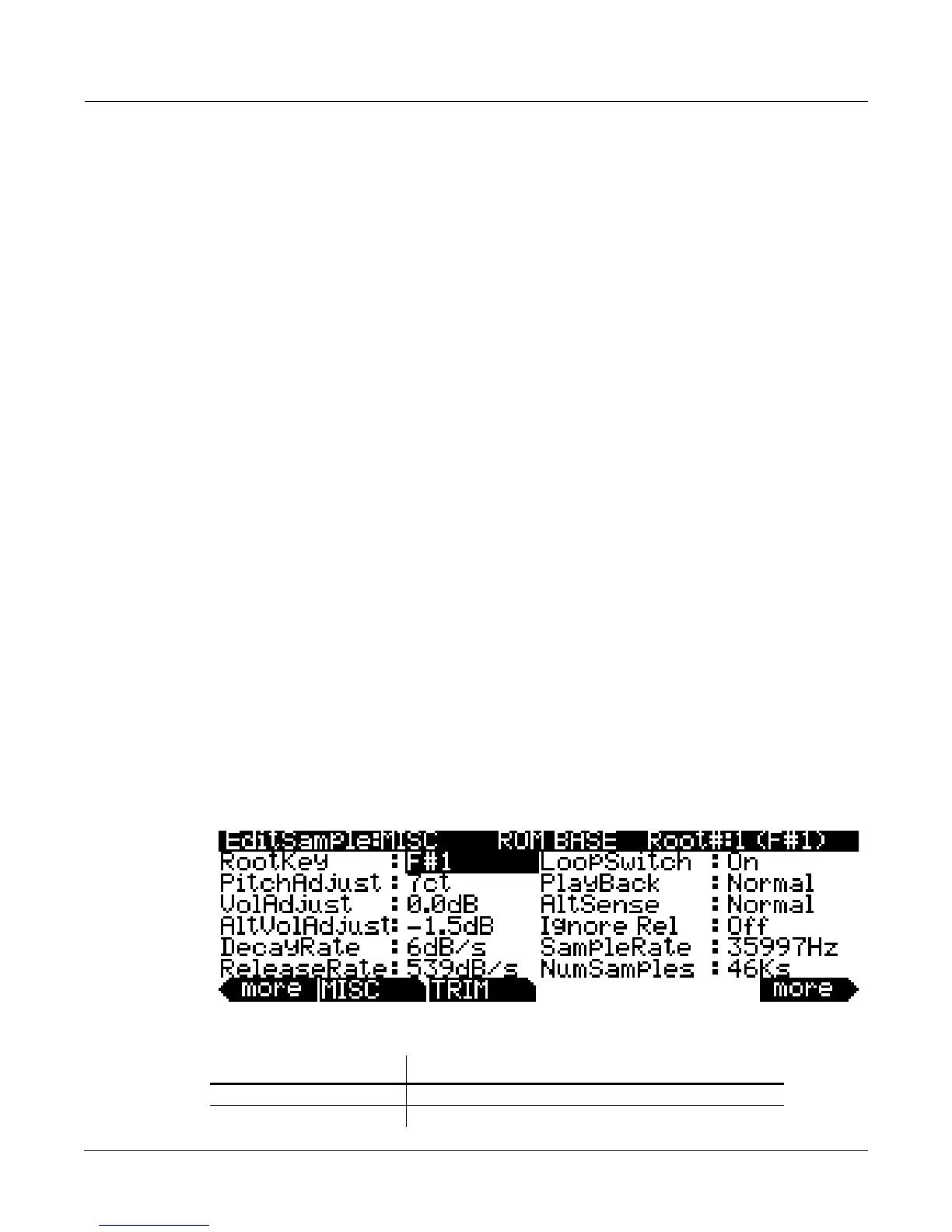
The Miscellaneous (MISC) Page
OntheMISCpage,you’llsetseveralparametersthataffectthebehaviorofthecurrentsample.
Theseparametersaffecttheentiresample.Therightsideofthetoplinedisplaystheroot
numberandRootKeyofthesample.Forstereosamples,LorRisdisplayedaftertheRoot#
parameterto
indicatethatyouareviewingparametersfortheleftorrightchannelofthesample.
UsetheChan/Layerbuttonstomovebetweenchannelsofstereosamples.Althoughyoucan
editparametersfortheleftand rightchannels ofasample,bothchannelscanonlybeheardif
theStereoparameter
issettoOnintheV.A.S.T.ProgramEditor,andthesamekeymapisselected
fortheKeymap1andKeymap2parametersintheV.A.S.T.ProgramEditor.IftheStereo
parameterissettoOffintheV.A .S .T.ProgramEditor,onlytheleftchannelofstereosamples
willbeheardinmono.
Ifthesampleispartofagroupofsampleroots,youcanalsousethe
Chan/Layerbuttonstoscrollthrougheachsampleinthegroup.ArepresentativeMISCpageis
shownbelow:
Parameter Range of Values
Root Key Number C -1 to G 9
Pitch Adjust Variable (depends on sample rate)














 To Next Page