2FP/2FY/2FR-2
1-5-21
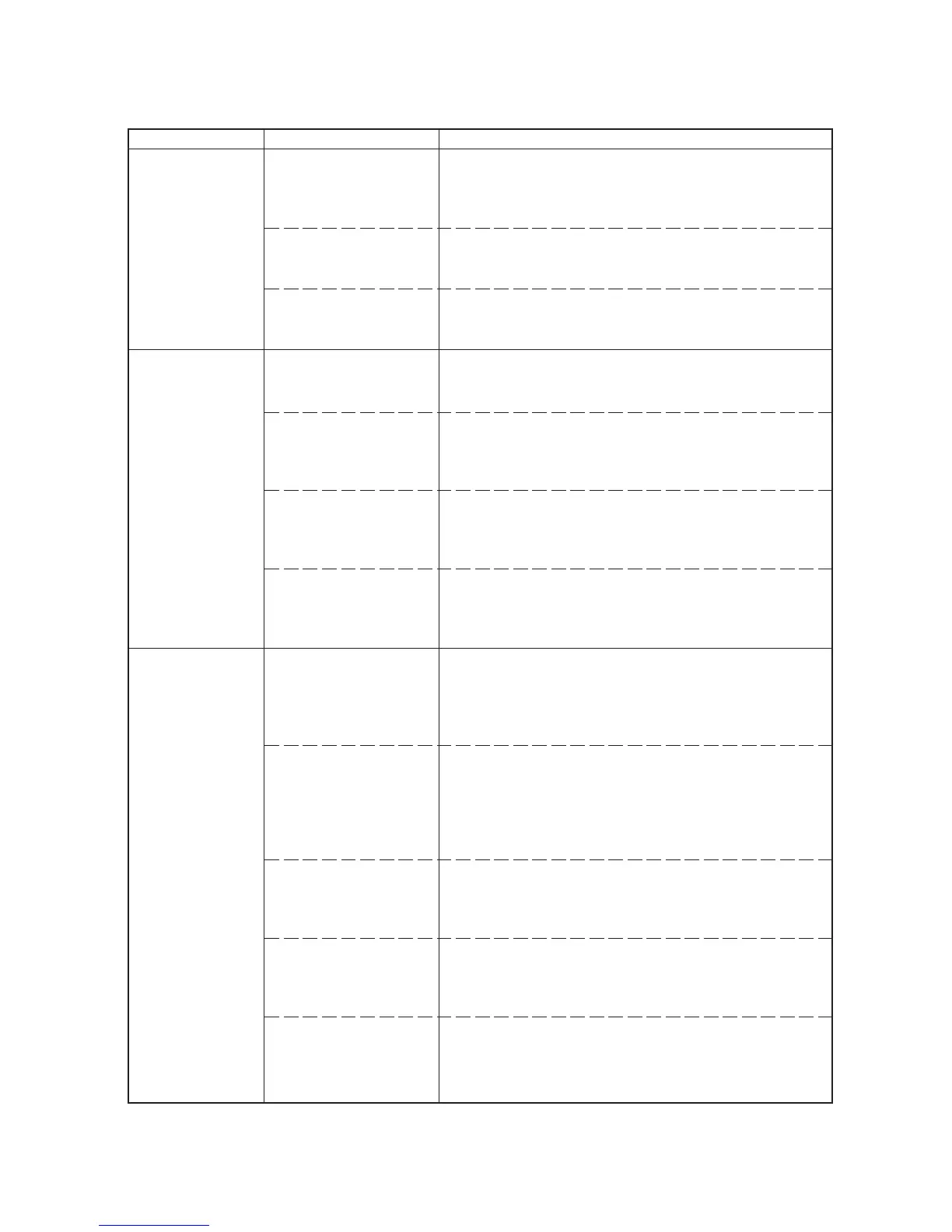
(1) Defective waste
toner box detecting.
• Although new
waste toner box is
installed, Check
waste toner box is
displayed. Al-
though waste
toner bottle is not
installed, Ready is
displayed.
(2) Defective paper
jam detecting.
• Paper jam fre-
quently occurs.
• False paper jam
message display.
(3) Defective paper
gauge sensing.
• False paper gauge
indication.
Defective waste toner full
sensor [board] (KP-1065)
or waste toner sensor (re-
ceiver).
Deformed pins of connec-
tor (YC702) on the sensor
board (KP-1077).
Defective engine board
(KP-1081).
Surface of the registration
sensor (PH701) is dirty
with paper particles.
Actuators of registration
sensor (PH701) or exit
sensor does not operate
smoothly.
Defective sensor board
(KP-1077), fuser board
(KP-1069) or engine board
(KP-1081).
A piece of paper torn from
a sheet is caught around
actuator of registration
sensor or exit sensor.
Surface of the paper
gauge sensor 1 (PH702)
and 2 (PH703) on the sen-
sor board (KP-754) are
dirty with paper particles.
A piece of paper torn from
a sheet is caught around
paper gauge sensor 1
(PH702) and 2 (PH703) on
the paper sensor board
(KP-754).
Reflecting mirror has come
off the actuator of paper
gauge sensor 1 (PH702)
and 2 (PH703).
Defective paper gauge
sensor 1 (PH702) and 2
(PH703) on the sensor
board (KP-754).
Defective engine board
(KP-1081).
Replace drum unit. See page 1-6-10.
Check and straighten pins of connector (YC702) on the sensor
board (KP-1077).
Replace engine board (KP-1081).
Clean with cloth.
Repair or replace.
Replace sensor board (KP-754), fuser board (KP-1069), or en-
gine board (KP-1081). See page 5-26 and 1-6-20.
Check visually and remove it, if any.
Clean with cloth.
Check visually and remove it, if any.
Check visually and remove it, if any.
Replace sensor board (KP-1077). See page 1-6-24.
Replace engine board (KP-1081). See page 1-6-20.
1-5-4 Electrical problems
Problem Causes Check procedures/corrective measures


 To Next Page